|
VOOZH | about |
|
VOOZH | about |
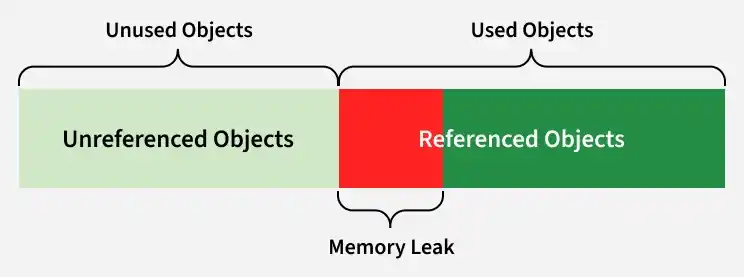
Memory leaks in Java occur when objects that are no longer needed remain referenced, preventing garbage collection. Over time, this increases memory usage, degrades performance, and can eventually crash the application.
Example: Memory Leak Due to Unused Objects
Finished adding items!
Explanation:The static list keeps all added items in memory, so even unused objects cannot be garbage collected, causing a memory leak.
Note: If an object is no longer needed, it is important to remove references to it so the garbage collector can free its memory.
Even though Java has automatic garbage collection, memory leaks can occur when the program keeps references to objects that are no longer needed, preventing their removal and wasting memory.
Output:
Explanation:The program creates 1 MB arrays and stores them in a list. Because the list retains references, the garbage collector cannot free the memory, eventually filling the heap and causing an OutOfMemoryError.
There are multiple tools that help us to detect memory leaks by showing which object is using the most memory, and the list of such tools are listed below:
If our program keep on leaking memory it means the program will use up all the memory as much as it can use. After some time, the program will stop working and will show an error like this:
java.lang.OutOfMemoryError: Java heap space
This means Java ran out of memory to create new things it needs.
We can avoid memory leaks by keeping few things in our mind which is listed below:
| Feature | C | Java |
|---|---|---|
| Memory Management | Manual | Automatic |
| Allocation & Deallocation | Programmer must allocate and free memory | Handled by Garbage Collector |
| Memory Leak Risk | High if free() is forgotten | Possible if references to unused objects are retained |
| Garbage Collector | Not available | Automatically finds and frees unused objects |