VOOZH about

URL: https://www.geeksforgeeks.org/java/command-line-arguments-in-java/

⇱ Command Line Arguments in Java - GeeksforGeeks


  • Courses
  • Tutorials
  • Interview Prep

Command Line Arguments in Java

Last Updated : 28 May, 2026

Command-line arguments in Java are values passed to a program during execution through the command prompt. These arguments are stored as String values in the main() method parameter.

  • Used to provide input without hardcoding values in the program.
  • Helps make programs flexible and reusable for different inputs.
  • Commonly used for file names, configuration values, and user data at runtime.

Command-line arguments are passed after the class name while running the Java program.

Syntax:

java Geeks Hello World

  • The JVM collects these values and passes them to the main(String[] args) method.
  • Hello -> stored in args[0]
  • World -> stored in args[1]

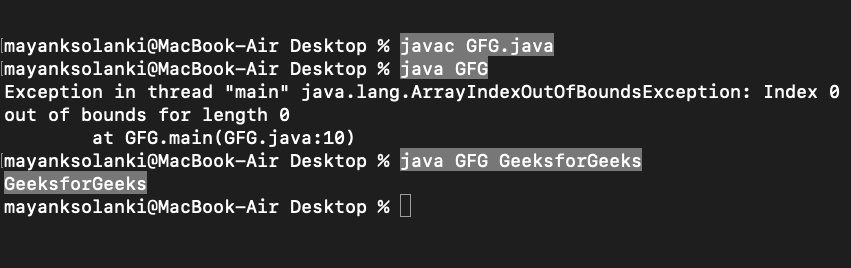
Example: In this example, we are going to print a simple argument in the command line.

Output:

👁 Output 1
Output of first argument

Explanation:

  • Running java GFG GeeksForGeeks prints GeeksForGeeks because the argument is passed to main(String[] args).
  • If no arguments are given (e.g., java GFG), it throws ArrayIndexOutOfBoundsException since args is empty.

Working of Command-Line Arguments

  • Command-line arguments in Java are space-separated values passed to the main(String[] args) method.
  • JVM wraps them into the args[] array, where each value is stored as a string (e.g., args[0], args[1], etc.).
  • The number of arguments can be checked using args.length.

Example: Display Command-Line Arguments Passed to a Java Program

To compile and run a Java program in the command prompt, follow the steps written below.

  • Save the program as Hello.java
  • Open the command prompt window and compile the program- javac Hello.java
  • After a successful compilation of the program, run the following command by writing the arguments- java Hello
  • For example - java Hello Geeks at GeeksforGeeks
  • Press Enter and you will get the desired output.
Comment
Article Tags:
Article Tags: