VOOZH about

URL: https://www.geeksforgeeks.org/java/convert-a-hashset-to-json-in-java/

⇱ How to Convert a HashSet to JSON in Java? - GeeksforGeeks


  • Courses
  • Tutorials
  • Interview Prep

How to Convert a HashSet to JSON in Java?

Last Updated : 23 Jul, 2025

In Java, a HashSet is an implementation of the Set interface that uses a hash table to store elements. It allows fast lookups and does not allow duplicate elements. Elements in a HashSet are unordered and can be of any object type. In this article, we will see how to convert a HashSet to JSON in Java.

Steps to convert a HashSet to JSON in Java

Below are the steps and implementation of converting a HashSet to JSON in Java with Jackson.

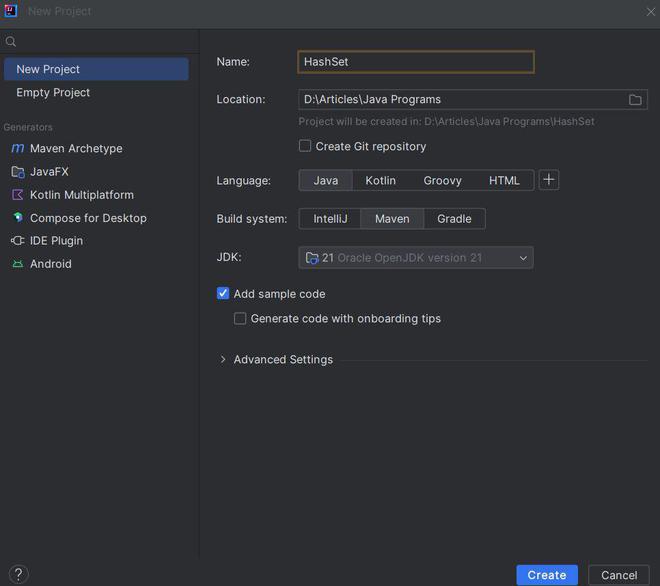
Step 1: Create a Maven Project

Open any preferred IDE and Create a new Maven project. Here, we are using IntelliJ IDEA. So, we can do this by selecting File -> New -> Project.. -> Maven and following the wizard.

👁 Project Creation

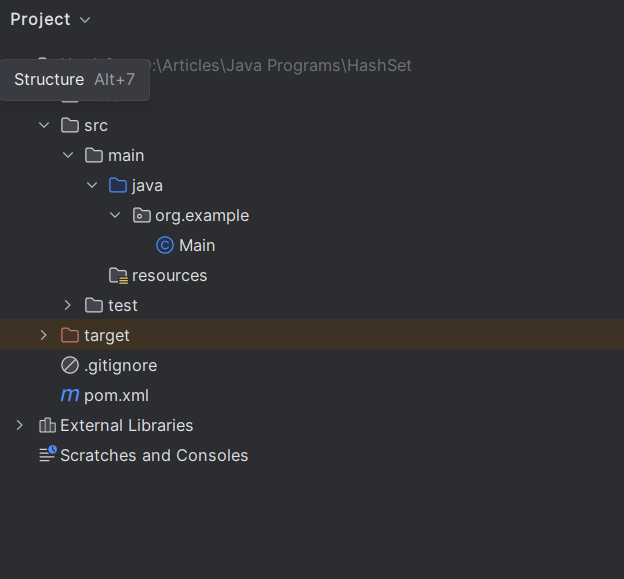
Project Structure:

Below is the project structure that we have created.

👁 Project Structure

Step 2: Add Jackson Dependency to the pom.xml

Now, we will add Jackson dependency to pom.xml file.

Step 3: Add logic of Conversion of a HashSet to JSON String

Below is the implementation to convert a HashSet to JSON with Jackson.

Explanation of the above code:

  • It creates a HashSet of courses - Java, Python, C++
  • Jackson ObjectMapper is used to convert Java objects to JSON.
  • ObjectWriter is used to format the JSON with proper indentation.
  • HashSet is converted to a JSON string using ObjectWriter.
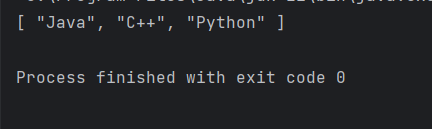
  • The JSON string is printed to the output.

Output:

👁 JSON String output
Comment