|
VOOZH | about |
|
VOOZH | about |
Deadlock is a situation in multithreading where two or more threads are permanently blocked because each one is waiting for the other to release a required lock. In simple terms, threads get stuck forever, and the program never continues.
Example: Below is a simple example demonstrating a deadlock condition in Java.
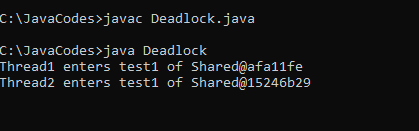
Output:
Note: It is not recommended to run the program in an online IDE. We can run the above source code locally, but it gets stuck in a deadlock, preventing execution.
Explanation:
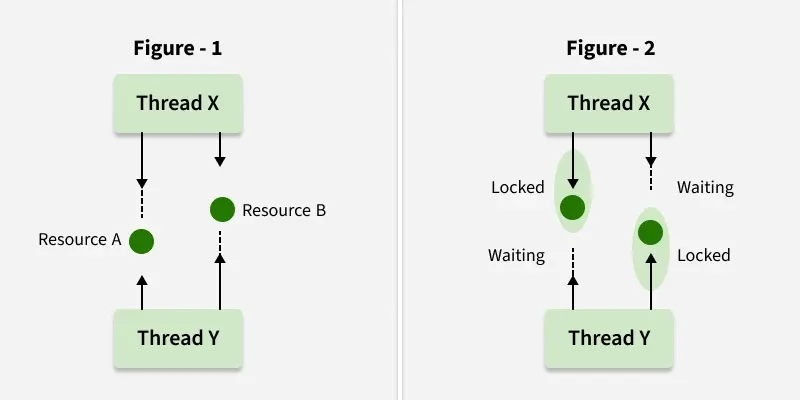
In Java, locks are mechanisms used to control access to shared resources in a multithreaded environment. Below is the diagrammatic representation of how Locks work and prevent Deadlock conditions.
We can detect deadlocks in a running Java program using the following steps:
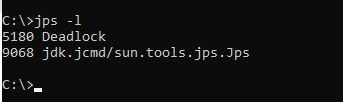
1. List the active Java processes:
jps -l
Response:
This will list the running Java processes and also mention that there is a deadlock if we want to generate a thread dump.
2. Identify the process ID (PID) of the target program and run:
jcmd <PID> Thread.print // replace PID with the process ID
Replace <PID> with the process ID from the list provided by jps -l. This command outputs the state of the threads, which you can then analyze for deadlocks.
After running the above two commands, we can see deadlock occurs:
As we can see it is mentioned that found 1 deadlock.
We can avoid deadlock conditions by knowing its possibilities. It's a very complex process and not easy to catch. Still, if we try, we can avoid this. There are some methods by which we can avoid this condition. We can't completely remove its possibility but we can reduce it.