|
VOOZH | about |
|
VOOZH | about |
AsciiDoc is a lightweight markup language used to create documentation such as web pages, help guides, and technical content. It can be converted into formats like HTML, PDF, and EPUB using tools like Asciidoctor.
Dependencies:
To use the plugin in the build, we need to add as follows
And also we need to specify the path where the converted files are placed into:
Let us see about AsciidoctorJ API. AsciiDoctor Java interface has the below methods
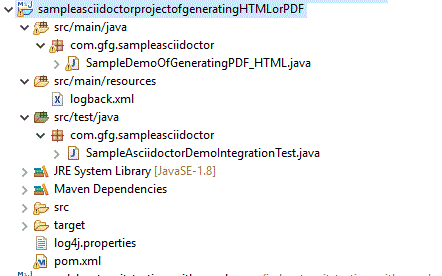
Let us start exploring by starting with the project structure:
Project Structure:
As this is a maven project, for doing the project, let us see the dependencies via
pom.xml
Let us see the important java files and concepts
SampleDemoOfGeneratingPDF_HTML.java
For creating an Asciidoctor instance, we need to use as
Asciidoctor sampleAsciiDoctor= create();
Converting AsciiDocument easily as follows
String result = sampleAsciiDoctor.convert("Hello _Geeks_!", new HashMap<String, Object>());
From the file system means
String resultantFile = sampleAsciiDoctor.convertFile(new File("sample.adoc"), options); // Here we need to specify the options, i.e. in which format it has to get converted Map<String, Object> options = options().inPlace(true) .backend("pdf") .asMap();
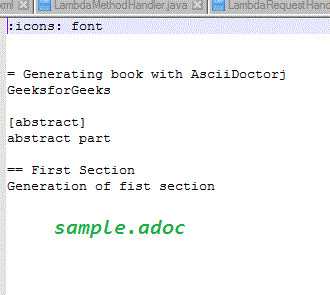
Now to see this as a demo, let us assume we have a "sample.adoc" file under src/docs/asciidoc directory
On execution of the java file, we can able to get a pdf document to get generated under target/docs/asciidoc directory
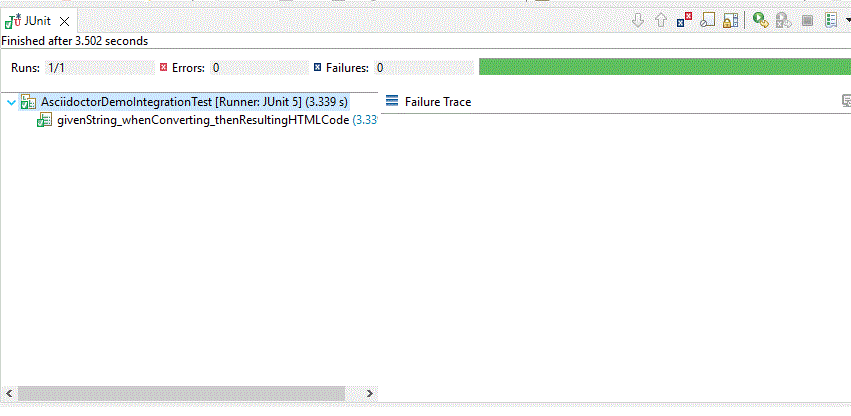
Let us test the same via the JUNIT part as well
SampleAsciidoctorDemoIntegrationTest.java
Output of JUnit:
Explanation: The code shows how to use Asciidoctor in a Maven project to convert AsciiDoc content into PDF and HTML formats. It creates an Asciidoctor instance, performs conversion using methods like convert() and convertFile(), and uses Maven plugins to automate the process, while JUnit tests verify the output.