|
VOOZH | about |
|
VOOZH | about |
Java Swing is a GUI (Graphical User Interface) toolkit that is part of the Java Foundation Classes (JFC). It provides a rich set of lightweight components for building desktop applications with a more flexible and feature-rich interface than AWT.
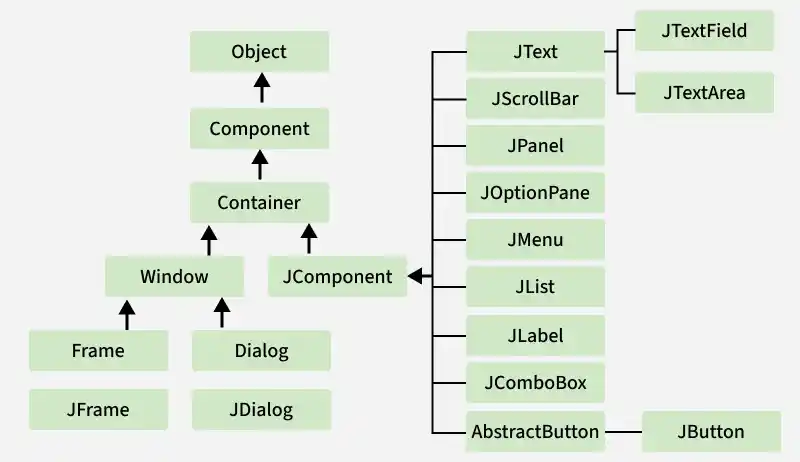
This diagram illustrates the inheritance hierarchy of Swing classes, showing how core GUI components such as JFrame, JButton, JLabel, JCheckBox, JList, and JProgressBar are derived from base classes like Container and JComponent within the Java Swing framework.
AWT is Java's original GUI library used for creating window-based applications. It provides basic components such as buttons, labels, text fields, and menus, and relies on the native operating system's GUI components.
JFC stands for Java Foundation Classes. JFC is the set of GUI components that simplify desktop Applications. Many programmers think that JFC and Swing are one and the same thing, but that is not so. JFC contains Swing [A UI component package] and quite a number of other items:
Swing components provide more flexibility and advanced features compared to AWT components.
Example 1: Develop a program using label (swing) to display the message “GFG WEB Site Click”
Example 2: Write a program to create three buttons with caption OK, SUBMIT, CANCEL.
Example 3: Program to Add Checkbox in the Frame
| Class | Description |
|---|---|
| Component | A Component is the Abstract base class for about the non-menu user-interface controls of Java SWING. Components are representing an object with a graphical representation. |
| Container | A Container is a component that can container Java SWING Components |
| JComponent | A JComponent is a base class for all swing UI Components In order to use a swing component that inherits from JComponent, the component must be in a containment hierarchy whose root is a top-level Java Swing container. |
| JLabel | A JLabel is an object component for placing text in a container. |
| JButton | This class creates a labeled button. |
| JColorChooser | A JColorChooser provides a pane of controls designed to allow the user to manipulate and select a color. |
| JCheckBox | A JCheckBox is a graphical (GUI) component that can be in either an on-(true) or off-(false) state. |
| JRadioButton | The JRadioButton class is a graphical (GUI) component that can be in either an on-(true) or off-(false) state. in the group |
| JList | A JList component represents the user with the scrolling list of text items. |
| JComboBox | A JComboBox component is Presents the User with a show up Menu of choices. |
| JTextField | A JTextField object is a text component that will allow for the editing of a single line of text. |
| JPasswordField | A JPasswordField object it is a text component specialized for password entry. |
| JTextArea | A JTextArea object is a text component that allows for the editing of multiple lines of text. |
| Imagelcon | A ImageIcon control is an implementation of the Icon interface that paints Icons from Images |
| JScrollbar | A JScrollbar control represents a scroll bar component in order to enable users to Select from range values. |
| JOptionPane | JOptionPane provides set of standard dialog boxes that prompt users for a value or Something. |
| JFileChooser | A JFileChooser it Controls represents a dialog window from which the user can select a file. |
| JProgressBar | As the task progresses towards completion, the progress bar displays the tasks percentage on its completion. |
| JSlider | A JSlider this class is letting the user graphically (GUI) select by using a value by sliding a knob within a bounded interval. |
| JSpinner | A JSpinner this class is a single line input where the field that lets the user select by using a number or an object value from an ordered sequence. |