|
VOOZH | about |
|
VOOZH | about |
Abstract Window Toolkit (AWT) was Java's first GUI framework, and it has been part of Java since version 1.0. It contains numerous classes and methods that allow you to create windows and simple controls. Controls are components that allow a user to interact with your application in various ways.
The AWT supports the following types of controls:
The easiest control to use is a label. A Label is an object of type Label (class in java.awt.Component), and it contains a string, which it displays within a container. Labels are passive controls that do not support any interaction with the user. To create a label, we need to create the object of the Label class.
Label in Java AWT is a component for placing text or images in a container. The text displayed in the Container (Display) by Java AWT Label can't be edited directly by the user but needs the programmer to change it from his side.
Note: Java AWT Label is also called passive control as no event is created when it is accessed.
public class Label extends Component implements Accessible
There are three types of Java AWT Label Class
1. Label():
Creates Empty Label.2. Label(String str):
Constructs a Label with str as its name.3. Label(String str, int x):
Constructs a label with the specified string and x as the specified alignment
Java AWT Labels have 3 fields there can also be determined as the java.awt.Component class fields. All of them are mentioned below:
Java AWT Label Fields | Description |
|---|---|
static int LEFT | It specifies that the label is aligned left. |
static int RIGHT | It specifies that the label is aligned right. |
static int CENTER | It specifies that the label is aligned center. |
There are a few predefined Methods associated with Java AWT Label as mentioned below:
Sr. No. | Method | Description |
|---|---|---|
|
1. | void setText(String text) | Sets the text of the label. |
|
2. | String getText() | Gets the text of the label. |
|
3. | void setAlignment(int alignment) | Sets the alignment of the text in the label. Possible values: Label.LEFT, Label.RIGHT, Label.CENTER. |
|
4. | int getAlignment() | Gets the alignment of the text in the label. |
|
5. | void addNotify() | Creates the peer for the label. |
|
6. | AccessibleContext getAccessibleContext() | Gets the AccessibleContext associated with the label. |
|
7. | void addNotify() | Creates the peer (native window) for the label. |
The Methods provided with AWT Label is inherited by classes mentioned below:
There are certain cases associated with Java AWT Label so let us explore them as examples below:
javac Main.java
java Main
In this example we will check how to change the alignment of the Label we are putting into the frame.
Below is the implementation of the Example:
javac Example2.java
java Example2
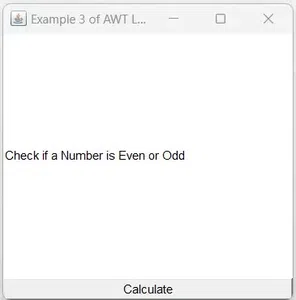
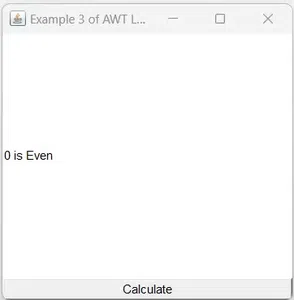
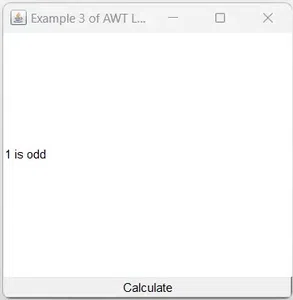
In this example , we are creating objects of Label and Button classes which are added to the Frame. Using actionPerformed() method an event is generated over the button. When we click the button we will get the result if a number is odd or even.
Below is the implementation of the above method:
javac Example3.java
java Example3
👁 Output of Example3 AWT Label
👁 Example3 AWT Label2 number is even
👁 Example3 AWT Label3 number is odd
We hope you learned something new from this article on the Java AWT Label class. As a Java developer, you'll find this Label class to be a very useful component. It is simple to use, but it can be customized to meet the needs of any application. Experiment with the Label class and see how you can use it to make your user interfaces more informative and engaging.

-300.webp)
-(1)-300.webp)