|
VOOZH | about |
|
VOOZH | about |
Java is one of the most popular programming languages, known for its simplicity and versatility. Mastering its core concepts is essential for any aspiring developer.
The following questions cover fundamental topics frequently asked in interviews to help you prepare effectively
A variable is a container that stores data, which can be used and manipulated by a program.
Instance Variable | Local Variable |
|---|---|
Declared outside the method, directly invoked by the method. | Declared within the method. |
Has a default value. | No default value |
It can be used throughout the class. | The scope is limited to the method. |
Instance variables (non-local) are automatically initialized with default values if not explicitly set:
Data Type | Default Value |
|---|---|
byte, short, int, long | 0 |
float | 0.0f |
double | 0.0d |
boolean | false |
char | '\u0000' |
Object/String | null |
Example:
byte value0
short value0
int value0
long value0
boolean valuefalse
char value
float value0.0
double value0.0
string valuenull
object valuenull
Array valuenull
In Java, a class variable (also known as a static variable) is a variable that is declared within a class but outside of any method, constructor, or block. Class variables are declared with the static keyword, and they are shared by all instances (objects) of the class as well as by the class itself. No matter how many objects are derived from a class, each class variable would only exist once.
There is no default value stored with local variables. Also, primitive variables and objects don't have any default values.
Instance Variable: A class variable without the static modifier is called an instance variable. It is unique to each object (instance) of the class and is not shared between instances.
Name John
Class Variable: Class Variable variable can be declared anywhere at the class level using the keyword static. These variables can only have one value when applied to various objects. These variables can be shared by all class members since they are not connected to any specific object of the class.
Area of circle: 78.53975
A static variable is a variable that belongs to the class rather than to any particular object of the class. It is declared using the static keyword inside a class but outside any method, constructor, or block.
| Feature | System.out | System.err | System.in |
|---|---|---|---|
| Purpose | Used to display standard output (normal program output) | Used to display error messages | Used to take input from the user (keyboard) |
| Type | PrintStream | PrintStream | InputStream |
| Output Stream | Writes to console (stdout) | Writes to console (stderr) | Reads from console (stdin) |
| Typical Use Case | System.out.println("Hello") | System.err.println("Error occurred") | Scanner sc = new Scanner(System.in) |
| Redirection | Can be redirected to a file or another output stream | Can be redirected separately from standard output | Can be redirected from a file or input stream |
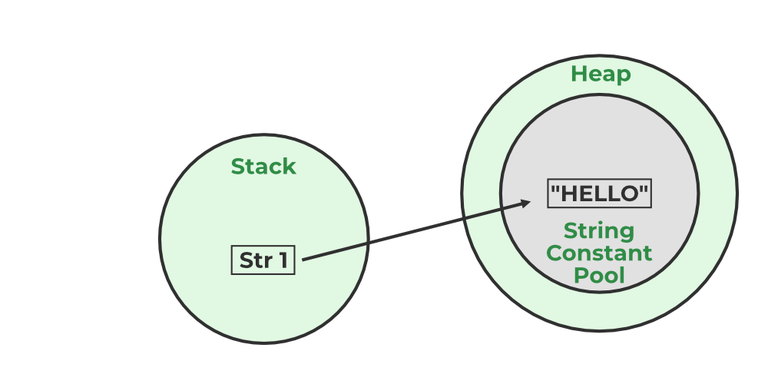
A Java String Pool is a place in heap memory where all the strings defined in the program are stored. A separate place in a stack is there where the variable storing the string is stored. Whenever we create a new string object, JVM checks for the presence of the object in the String pool, If String is available in the pool, the same object reference is shared with the variable, else a new object is created.
Java brings various Streams with its I/O package that helps the user to perform all the input-output operations. These streams support all types of objects, data types, characters, files, etc to fully execute the I/O operations.
| Feature | Reader/Writer Hierarchy | InputStream/OutputStream Hierarchy |
|---|---|---|
| Type of Data | Character-oriented (text data) | Byte-oriented (binary data) |
| Base Classes | Reader (abstract) and Writer (abstract) | InputStream (abstract) and OutputStream (abstract) |
| Data Unit | Works with 16-bit Unicode characters | Works with 8-bit bytes |
| Use Case | Reading/writing text files, strings, characters | Reading/writing binary files, images, audio, etc. |
| Encoding Handling | Supports character encoding (Unicode, UTF-8, etc.) | No encoding/decoding, raw bytes only |
Example:
-32 79 -48 32 -22
In Java’s I/O system, the topmost (super) classes for all streams are:
To read and write data, Java offers I/O Streams. A Stream represents an input source or an output destination, which could be a file, an i/o device, another program, etc. FileInputStream in Java is used to read data from a file as a stream of bytes. It is mostly used for reading binary data such as images, audio files, or serialized objects.
Example:
File file = new File("path_of_the_file");
FileInputStream inputStream = new FileInputStream(file);
In Java, the FileOutputStream function is used to write data byte by byte into a given file or file descriptor. Usually, raw byte data, such as pictures, is written into a file using FileOutputStream.
Example:
File file = new File("path_of_the_file");
FileOutputStream outputStream = new FileOutputStream(file);
When we are working with the files or stream then to increase the Input/Output performance of the program we need to use the BufferedInputStream and BufferedOutputStream classes. These both classes provide the capability of buffering which means that the data will be stored in a buffer before writing to a file or reading it from a stream. It also reduces the number of times our OS needs to interact with the network or the disk. Buffering allows programs to write a big amount of data instead of writing it in small chunks. This also reduces the overhead of accessing the network or the disk.
BufferedInputStream(InputStream inp);
// used to create the bufferinput stream and save the arguments.
BufferedOutputStream(OutputStream output);
// used to create a new buffer with the default size.
Stream filter or Filter Streams returns a stream consisting of the elements of this stream that match the given predicate. While working filter() it doesn't actually perform filtering but instead creates a new stream that, when traversed, contains the elements of initial streams that match the given predicate.
Example:
FileInputStream fis =new FileInoutStream("file_path");
FilterInputStream = new BufferedInputStream(fis);
An I/O filter also defined as an Input Output filter is an object that reads from one stream and writes data to input and output sources. It used java.io package to use this filter.
There are two methods to take input from the console in Java mentioned below:
The program demonstrating the use of each method is given below.
Example 1:
| Method | Description | Line Break | Use Case |
|---|---|---|---|
| print() | Prints the text/data as it is. | No newline (cursor stays on the same line). | When you want to continue output on the same line. |
| println() | Prints the text/data and then moves cursor to the next line. | Yes, adds newline. | When you want each output on a new line. |
| printf() | Prints formatted text (like C’s printf). Supports format specifiers (%d, %s, %.2f, etc.). | No automatic newline unless specified (%n). | When you need formatted output (numbers, strings, decimals). |
Example:
Operators are the special types of symbols used for performing some operations over variables and values.
All types of operators in Java are mentioned below:
Postfix operators are considered as the highest precedence according to Java operator precedence.
Operators like >> and >>> seem to be the same but act a bit differently. >> operator shifts the sign bits and the >>> operator is used in shifting out the zero-filled bits.
-8
2147483639
There is only one operator which is right associative which is = operator.
The Dot operator in Java is used to access the instance variables and methods of class objects. It is also used to access classes and sub-packages from the package.
Data types in Java define what kind of data a variable can hold. They tell the compiler how much memory to allocate and what operations can be performed on the variable.
There are 2 types of data types in Java as mentioned below:
1. Primitive Data Type: Primitive data are single values with no special capabilities. There are 8 primitive data types:
2. Non-Primitive Data Type: Reference Data types will contain a memory address of the variable's values because it is not able to directly store the values in the memory. Types of Non-Primitive are mentioned below:
A byte is an 8-bit signed two-complement integer. The minimum value supported by bytes is -128 and 127 is the maximum value. It is used in conditions where we need to save memory and the limit of numbers needed is between -128 to 127.
The default value of the byte datatype in Java is 0.
The default value of the float is 0.0f and of double is 0.0d in Java.
A Wrapper Class in Java is a class that wraps (encapsulates) a primitive data type into an object. Since Java is object-oriented, wrapper classes allow primitives to be used where objects are required, like in Collections (ArrayList, HashMap, etc.).
| Primitive | Wrapper Class |
|---|---|
| byte | Byte |
| short | Short |
| int | Integer |
| long | Long |
| float | Float |
| double | Double |
| char | Character |
| boolean | Boolean |
The wrapper class is an object class that encapsulates the primitive data types, and we need them for the following reasons:
Autoboxing: Autoboxing is the automatic conversion of a primitive type to its corresponding wrapper class object.
Example: converting int to Integer, double to Double, etc.
int num = 10;
Integer boxedNum = num; // Autoboxing happens here
Before Java 5, you would need to manually do this:
Integer boxedNum = Integer.valueOf(num);
Unboxing: Autoboxing and unboxing reduce boilerplate code. Can happen implicitly in expressions, assignments, and method calls.
Example with a collection:
List<Integer> numbers = new ArrayList<>();
numbers.add(5); // Autoboxing: int → Integer
int n = numbers.get(0); // Unboxing: Integer → int
In method overriding, a subclass method can return a type that is a subclass of the parent method’s return type.
The transient keyword is used at the time of serialization if we don’t want to save the value of a particular variable in a file. When JVM comes across a transient keyword, it ignores the original value of the variable and saves the default value of that variable data type
A String is a class in Java that represents a sequence of characters. When a string is created, it becomes an object (instance) of the String class.
String s = "Hello";
Once a String object is created, it cannot be modified. Any operation that seems to modify a String creates a new String object.
String s1 = "Hello";
String s2 = s1.concat(" World"); // s1 remains "Hello"
String | StringBuffer |
|---|---|
| Store of a sequence of characters. | Provides functionality to work with the strings. |
| It is immutable. | It is mutable (can be modified and other string operations could be performed on them.) |
| No thread operations in a string. | It is thread-safe (two threads can't call the methods of StringBuffer simultaneously) |
StringBuffer | StringBuilder |
|---|---|
| StringBuffer provides functionality to work with the strings. | StringBuilder is a class used to build a mutable string. |
| It is thread-safe (two threads can't call the methods of StringBuffer simultaneously) | It is not thread-safe (two threads can call the methods concurrently) |
| Comparatively slow as it is synchronized. | Being non-synchronized, implementation is faster |
StringBuffer class in Java is used to represent a changeable string of characters. It offers an alternative to the immutable String class by enabling you to change a string's contents without constantly creating new objects. Mutable (modifiable) strings are created with the help of the StringBuffer class. The StringBuffer class in Java is identical to the String class except that it is changeable.
GeeksforGeeks
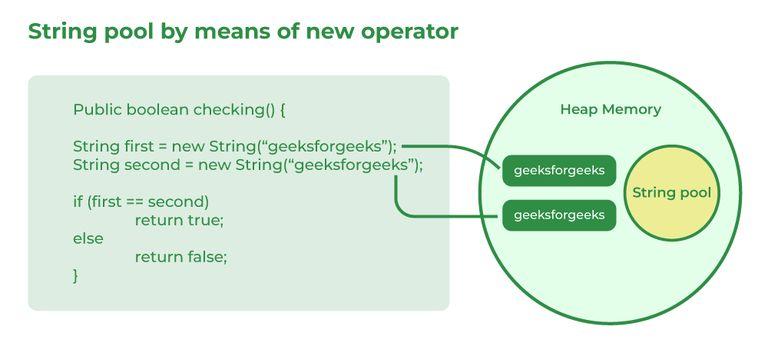
When a String is created using a string literal, the JVM first checks the String Pool (which is part of Heap memory).If the same value already exists, the reference to the existing object is returned. If not, a new String object is created in the String Pool.When a String is created using the new keyword, a new String object is always created in the Heap memory, even if the same value already exists in the String Pool.
Syntax:
String x = new String("ABC");
String s1 = "Hello";
String s2 = "Hello";
System.out.println(s1 == s2); // true (same String pool object)
System.out.println(s1.equals(s2)); // true (same content)
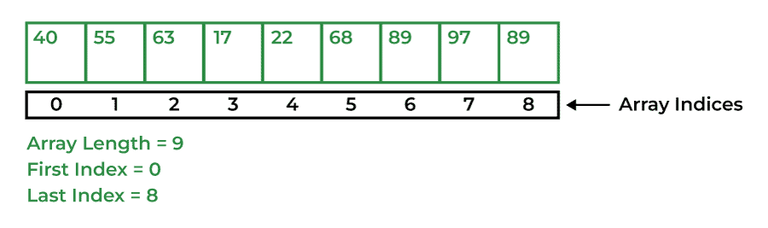
An Array in Java is a data structure that is used to store a fixed-size sequence of elements of the same type. Elements of an array can be accessed by their index, which starts from 0 and goes up to a length of minus 1.
In Java, arrays are always created in the Heap memory, regardless of whether:
There are two types of arrays i.e., Primitive arrays and References Arrays.
1. Single-Dimensional Arrays: Arrays that have only one dimension i.e., an array of integers or an array of strings are known as single-dimensional arrays.
Syntax:
data_type[] Array_Name = new data_type[ArraySize];
2. Multi-Dimensional Arrays: Arrays that have two or more dimensions such as two-dimensional or three-dimensional arrays.
data_type[][] Array_Name = new data_type[][];
The index of an array signifies the distance from the start of the array. So, the first element has 0 distance therefore the starting index is 0.
Syntax:
[Base Address + (index * no_of_bytes)]
Both int array[] and int[] array are used to declare an array of integers in java. The only difference between them is on their syntax no functionality difference is present between them.
int arr[] is a C-Style syntax to declare an Array.
int[] arr is a Java-Style syntax to declare an Array.
However, it is generally recommended to use Java-style syntax to declare an Array. As it is easy to read and understand also it is more consistent with other Java language constructs.
In Java, there are multiple ways to copy an array based on the requirements:
1. clone() Method (Shallow Copy)
int[] arr = {1, 2, 3, 5, 0};
int[] tempArr = arr.clone(); // Creates a new array with copied values
2. System.arraycopy() Method (Deep Copy)
int[] arr = {1, 2, 7, 9, 8};
int[] tempArr = new int[arr.length];
System.arraycopy(arr, 0, tempArr, 0, arr.length);
3. Arrays.copyOf() Method (Creates New Array)
int[] arr = {1, 2, 4, 8};
int[] tempArr = Arrays.copyOf(arr, arr.length);
4. Arrays.copyOfRange() Method (Copying a Subset)
int[] arr = {1, 2, 4, 8};
int[] tempArr = Arrays.copyOfRange(arr, 0, arr.length);
In Java, a jagged array (also called a ragged array) is an array of arrays where each inner array can have a different length.
int[][] Arr = new int[][] {
{1, 2, 8},
{7, 5},
{6, 7, 2, 6}
};