VOOZH about

URL: https://www.geeksforgeeks.org/java/java-if-statement-with-examples/

⇱ Java if statement - GeeksforGeeks


  • Courses
  • Tutorials
  • Interview Prep

Java if statement

Last Updated : 14 Oct, 2025

In Java, an if statement is the simplest decision-making statement. It is used to execute a block of code only if a specific condition is true. If the condition is false, the code inside the if block is skipped.

  • The condition must evaluate to a Boolean value (true or false).
  • If curly braces {} are omitted, only the immediately next statement is considered part of the if block.

Syntax:

if (condition) {
// Statements executed if the condition is true
}

Example: with Curly Braces


Output
10 is less than 15
Outside if-block

Explanation:

  • The condition i < 15 evaluates to true, so the message inside the if block is printed.
  • The second System.out.println() executes regardless of the condition.

Example: without Curly Braces


Output
i is positive
This statement runs regardless of if condition

Explanation:

  • Only the first statement after if is executed when the condition is true.
  • The second System.out.println() is not part of the if block, so it executes in all cases.

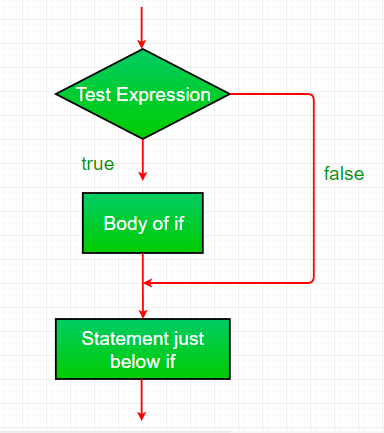
Working of if statement

  • Control reaches the if statement.
  • The condition is evaluated.
  • If the condition is true, the body inside the if block executes.
  • If the condition is false, the program skips the if block.
  • Flow continues with the statements after the if block.

Flowchart if statement:

👁 Image


Comment
Article Tags:
Article Tags: