|
VOOZH | about |
|
VOOZH | about |
java.io.FilterInputStream Class in Java
👁 FilterInputStream and FilterOutputStream Class
Java.io.FilterOutputStream class is the superclass of all those classes which filters output streams. The write() method of FilterOutputStream Class filters the data and write it to the underlying stream, filtering which is done depending on the Streams.
Declaration :
public class FilterOutputStream
 extends OutputStream
Constructors :
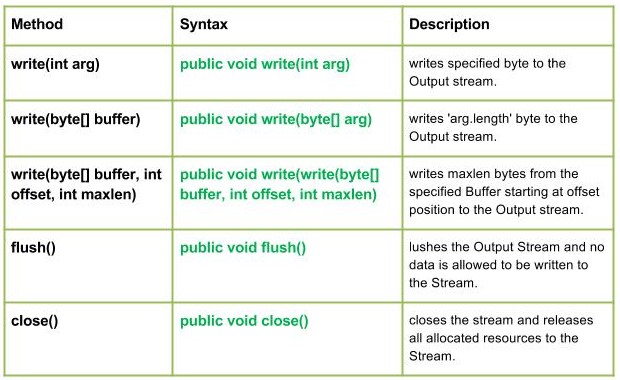
Methods:
public void write(int arg)
Parameters :
arg : Source Bytes
Return :
void
Exception :
In case any I/O error occurs.
Character written by FilterOutputStream : M
public void write(byte[] arg)
Parameters :
buffer : Source Buffer to be written to the Output Stream
Return :
void
Exception :
In case any I/O error occurs.
Output :
MOHIT
Syntax :
public void write(write(byte[] buffer, int offset, int maxlen)
Parameters :
buffer : Source Buffer to be written to the Output Stream
Return :
buffer : Source Buffer to be written
offset : Starting offset
maxlen : max no. of bytes to be written to the Output Stream
Exception :
In case any I/O error occurs.
public void flush()
Parameters :
------
Return :
void
Exception :
In case any I/O error occurs.
public void close()
Parameters :
------
Return :
void
Exception :
In case any I/O error occurs.
Java program illustrating : write(byte[] buffer, int offset, int maxlen), flush(), close() methods
Note :
In the program I have use GEEKS.txt file, the program will create a new file of the name given in the code and write in it.
Output :
MOHIT