|
VOOZH | about |
|
VOOZH | about |
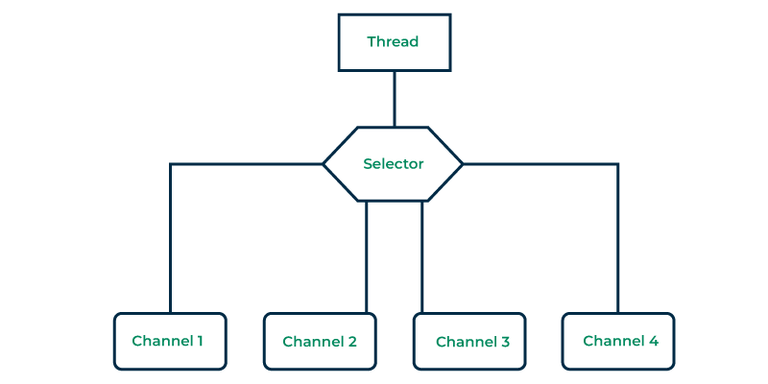
A selector is a tool that helps you keep an eye on one or more NIO channels and figure out when they're ready to transfer data. In Java NIO, the Selector is a key player that looks at multiple Java NIO Channel instances and figures out which ones are good to go for actions like reading or writing.
This allows a single thread to handle many channels, making it easy to manage multiple network connections.
👁 A Thread uses a Selector to handle 4 Channel's
Using a selector helps us do more with fewer threads, just one instead of many. Frequent thread switching can burden the operating system and use up memory.
Selectors can do more than just read data, they can also keep an eye on incoming network connections and make sending data through slower channels easier.
You can create a selector by simply using the open method of the Selector class. This method makes use of the system's default selector provider to generate a fresh selector
Selector selector = Selector.open();
For a selector to monitor any channels, we must register these channels with the selector.
This is done by calling the register method of the SelectableChannel. However, the channel must be in non-blocking mode before registering it with the selector:
channel.configureBlocking(false);
SelectionKey selectionKey = channel.register(selector, SelectionKey.OP_READ);
The second parameter defines an interest set, meaning what events we are interested in listening for in the monitored channel, via the selector.
There are four different events you can listen for:
As you saw in the above section, when we register a Channel with a Selector the register() method returns a SelectionKey object. This SelectionKey object contains a few interesting properties:
An interest set specifies the events that the selector should monitor on a channel. This interest set is represented as an integer value, and we can retrieve this information as below.
int set = selectionKey.interestOps();
boolean isAccept = set & SelectionKey.OP_ACCEPT;
boolean isConnect = set & SelectionKey.OP_CONNECT;
boolean isRead = set & SelectionKey.OP_READ;
boolean isWrite = set & SelectionKey.OP_WRITE;
Initially, we obtain the interest set using the interestOps method of SelectionKey.
When we use a bitwise AND operation on these two values, it yields a boolean value that indicates whether the event is being monitored or not.
The ready set is the set of operations the channel is ready for. We can access the ready set like below.
int readySet = selectionKey.readyOps();
We can also use below four methods below instead, which all return a boolean.
We can access the channel from selectionKey as below:
Channel channel = selectionKey.channel();
We can obtain the selector object from selectionKey object as below:
Selector selector = selectionKey.selector();
We can attach an object to a SelectionKey. Here is how we can attach and get objects from a SelectionKey:
selectionKey.attach(object);
Object attachedObject = selectionKey.attachment();
Once we have registered one or more channels with a Selector, we can use one of the select() methods. These methods provide us with the channels that are "ready" for the events we care about (such as connect, accept, read, or write).
int channels = selector.select();
int channels = selector.select(long timeout);
int channels = selector.selectNow();
Once we have called the select() methods and its return value has indicated that one or more channels are ready, you can access the ready channels via the selected key set, by calling the selectedKeys() method as below:
Set<SelectionKey> selectedKeys = selector.selectedKeys();
We have some more selector methods available mentioned with proper description and usage.
Method | Syntax | Description | Usage |
|---|---|---|---|
wakeup() | selector.wakeup(); | The wakeup() method is used to interrupt the blocking select() call. It's typically called from another thread to wake up the select() method. | When you need to modify the Selector or stop it from blocking, you can use wakeup() to wake up the select() call and make it return. |
close() | selector.close(); | The close() method is used to close the Selector. Once a Selector is closed, it can no longer be used to monitor channels. | It's important to close the Selector when you are done with it to release system resources. |
Let's explore a couple of practical examples to see the Selector class in action.
In this example, we are going to use Java NIO Selector to monitor a single non-blocking SocketChannel for read operations. The steps are as follows:
// Create a Selector
Selector selector = Selector.open();
// Configure and register a non-blocking SocketChannel for read operationsSocketChannel
socketChannel = SocketChannel.open(new InetSocketAddress("example.com", 80));
socketChannel.configureBlocking(false);
socketChannel.register(selector, SelectionKey.OP_READ);
// Wait for a ready channelint
readyChannels = selector.select();
In this example, we have extended the usage of the Java NIO Selector to manage multiple channels, each with different I/O operations. The steps are as follows:
// Create a Selector
Selector selector = Selector.open();
// Create and configure multiple channels
SocketChannel channel1 = /* Create and configure your channel */;
SocketChannel channel2 = /* Create and configure another channel */;
// Register channels for specific operations
channel1.register(selector, SelectionKey.OP_READ);
channel2.register(selector, SelectionKey.OP_WRITE);
// Wait for ready channelsint ready
Channels = selector.select();
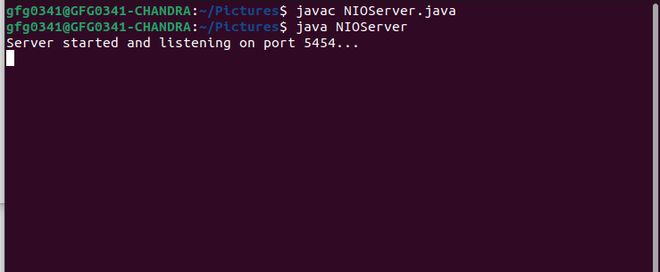
To practice the knowledge we have learned in the previous sections, let's see a complete client-server example
When the server encounters a specific message, such as the end, it interprets it as the end of the communication and closes the connection with the client
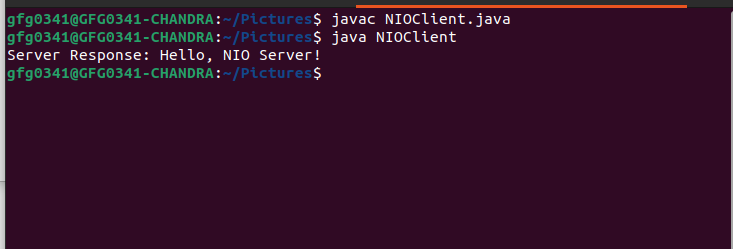
In this example we will create a NIOClient, using SocketChannel.
SocketChannel and connects to a server at localhost on port 5454.The java.nio.channels.Selector class is an important component for mastering non-blocking I/O in Java. By understanding how to create a Selector, work with SelectionKey objects, and leverage the select() method, we can significantly enhance the efficiency and responsiveness of our Java applications.