|
VOOZH | about |
|
VOOZH | about |
Before a MapReduce job can start processing data, it goes through a crucial initialization phase. This phase prepares the system by setting up resources, validating input/output paths and coordinating with key Hadoop components like the ResourceManager and ApplicationMaster.
This setup ensures that job runs smoothly across the distributed cluster. Let’s explore what happens step-by-step when a MapReduce job is launched.
When a client submits a MapReduce job, it calls the submitApplication() method.
The Application Master (AM) used in MapReduce is called MRAppMaster. This master controls the whole job, it keeps track of progress and assigns tasks to different nodes.
During startup, the AM:
Next, the job needs to know how to divide the data:
Example:
If your file is 256MB and the HDFS block size is 128MB --> 2 input splits --> 2 Map tasks
The number of Reducer tasks is set using property:
mapreduce.job.reduces
You can configure it in code with:
job.setNumReduceTasks(n)
Choosing Right Reducer Count:
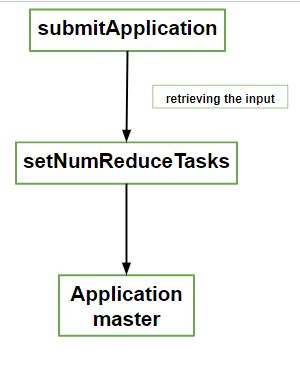
This diagram shows the key steps - submitting the job, setting reducer count and launching Application Master.
After all Map and Reduce tasks are created, each is assigned a unique Task ID. The Application Master (AM) decides where to run each task:
Note: To improve performance, AM schedules Map tasks on the same nodes as the data. This is called data locality and reduces network use.
An Uberised job is one where all tasks run in the same JVM as the AM saving overhead for small jobs.
Conditions for Uberization:
Uber task behavior can be controlled using following configuration properties:
Before tasks begin execution, the Application Master sets up the output path. It calls setupJob() on the OutputCommitter.
This sets up:
Note: Temporary directories prevent partial or corrupted output in case of task failure. Once a task finishes successfully, temp output is safely committed to the final directory.
By default, Hadoop uses FileOutputCommitter, which manages the creation and cleanup of these files.