|
VOOZH | about |
|
VOOZH | about |
Managing a library is a very difficult task as we need to keep track of lots of things, we need to keep track of all books, how many copies there are and we also need to keep track whether they are available for students to borrow or not.
In this article, we will build a basic library management system in Java using switch statement. In this project, we will add various functionality such as adding new books, searching for books, and registering students.
Why Build this Library Management System?
While learning Java, exploring how to design and manage small applications makes our concepts more strong, with the help of this project we will understand the working of lots of things which are listed below:
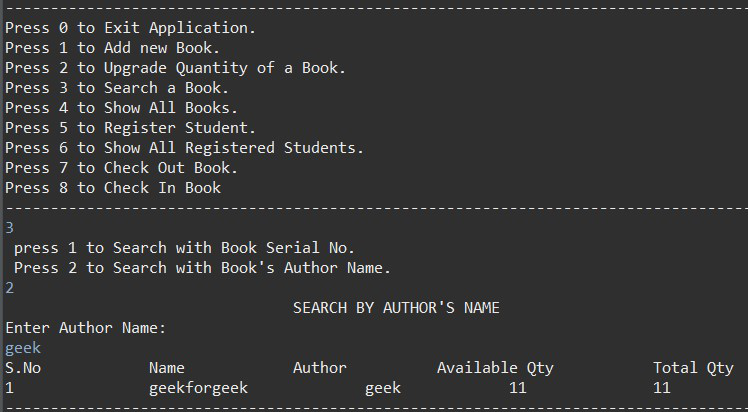
The library management system will support the following operations which are listed below:
Let's now understand the project structure of this project.
Our mini-project will be split into five Java files and each will handle a specific part of the system. The table below demonstrates the file name with their responsibilty.
File names | Responsibilty |
|---|---|
Library.java | This is the main application with the menu and execution flow. |
book.java | This file represent individual book detail. |
books.java | This file manages the collection of books and related operations. |
student.java | This file represents individual student details. |
students.java | This file manages student records and book borrowing |
Note: As per naming conventions in Java, it is good practice to have class initial with uppercase letter still here we are adhering with lowercase for better understanding of the code.
Before we get into more details, let's first try to understand how the system is put together. As we already know each class is our project has its own work and all these files will work together to make the library management system work more smoothly. We are using different files because we do not want to make the code more complex, by keeping all the files seprate we are increasing the readability of the code.
Now, let's look at each file and see how it help the whole system work.
1. book.java:
This file will hold the detail about each book including their serial number, Book name, Author name, total quantity and available quantity and the constructor will asks the user to enter these details whenever a new book is added.
2. books.java:
This class keeps track of all the books in the library with the help of an array. This class has multiple methods like method to add new book without allowing duplicates based on the serial number or name, we can also search for a particular book by the serial number or by the author name and can also see a list of all the books available in the system. We can also check how many copies of a book are available and can also handle the process of books in and out. Also, this class shows the menu options for managing books in the program.
3. Student.java:
This class represents a student in the library system. Each student has a name, registration number and each student can borrow upto 3 books at a time which are stored in an array and whenver a new student is added into the system, the program will asks for detials with the help of a constructor.
4.students.java:
This class will keep track of all the student registered in the library. It adds new students only when the registration number is unique. We can see a list of registered students as well, before a student borrow or returned a book this class will always check that this particular student is registered in the system or not. It also handles the process of student borrowing and returning book.
5. Library.java:
This is the main class of our project where everything comes together. This class shows a welcome message and a menu of options to the user. Using a do-while loop and a switch statement, it lets the user choose what they want to do and then runs the right actions based on their choice. This class calls methods from the books and students classes to handle tasks like adding books, registering students, or checking out books. It even has a nested switch to let users search for books by either serial number or author name.