|
VOOZH | about |
|
VOOZH | about |
LinkedHashMap in Java implements the Map interface of the Collections Framework. It stores key-value pairs while maintaining the insertion order of the entries. It maintains the order in which elements are added.
public class LinkedHashMap<K,V> extends HashMap<K,V> implements Map<K,V>
Here, K is the key Object type and V is the value Object type
LinkedHashMap: {Apple=50, Banana=30, Mango=70, Orange=40}
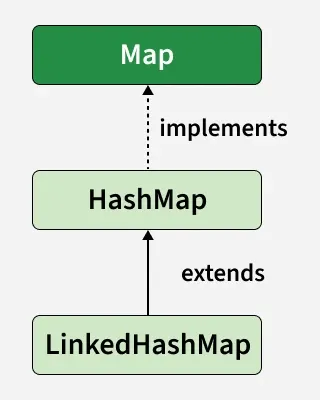
LinkedHashMap extends HashMap and implements the Map interface:
public class LinkedHashMap extends HashMap implements Map
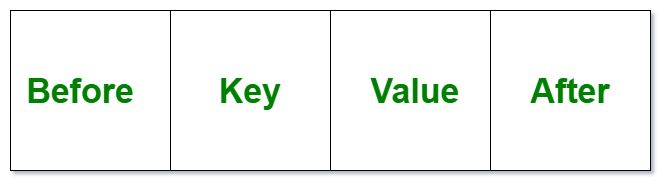
It stores data as nodes similar to a doubly-linked list, maintaining insertion order. Each node contains:
👁 LinkedHashMap Node Representation in Java
It extends HashMap and maintains a doubly-linked list to preserve the insertion order of elements.
LinkedHashMap class provides various constructors for different use cases:
Creates an empty LinkedHashMap with default initial capacity (16) and load factor (0.75)
LinkedHashMap<K, V> lhm = new LinkedHashMap<>();
Creates a LinkedHashMap with specified capacity and load factor.
LinkedHashMap<K, V> lhm = new LinkedHashMap<>(20, 0.75f);
Creates a LinkedHashMap containing all elements from the specified map, maintaining their insertion order.
LinkedHashMap<K, V> lhm = new LinkedHashMap<>(existingMap);
Let’s see how to perform a few frequently used operations on the LinkedHashMap class instance.
We can add elements to a LinkedHashMap using the put() method, which retains the insertion order unlike HashMap.
{3=Geeks, 2=For, 1=Geeks}
To update an element in a LinkedHashMap, use the put() method again with the same key and a new value , it replaces the old value while keeping the insertion order.
{3=Geeks, 2=Geeks, 1=Geeks}
Updated Map: {3=Geeks, 2=For, 1=Geeks}
We can remove elements from a LinkedHashMap using the remove() method by specifying the key of the element to be deleted.
{3=Geeks, 2=Geeks, 1=Geeks, 4=For}
{3=Geeks, 2=Geeks, 1=Geeks}
We can iterate through a LinkedHashMap using a for-each loop over map.entrySet(), accessing each key and value with getKey() and getValue() methods.
3 : Geeks
2 : For
1 : Geeks
Below are some commonly used methods of the LinkedHashMap class:
| Method | Description |
|---|---|
| put(K key, V value) | Adds or updates a key-value pair in the map. |
| get(Object key) | Returns the value associated with the specified key. |
| remove(Object key) | Removes the mapping for the specified key. |
| containsKey(Object key) | Checks if the map contains the specified key. |
| containsValue(Object value) | Checks if the map contains the specified value. |
| clear() | Removes all key-value pairs from the map. |
| size() | Returns the number of key-value pairs in the map. |
| isEmpty() | Checks if the map is empty. |
| keySet() | Returns a Set view of all keys in the map. |
| values() | Returns a Collection view of all values in the map. |
| entrySet() | Returns a Set view of all key-value mappings in the map. |
| getOrDefault(Object key, V defaultValue) | Returns the value for a key, or a default value if the key is not found. |