|
VOOZH | about |
|
VOOZH | about |
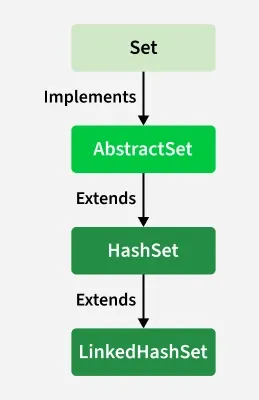
LinkedHashSet is a class in Java that implements the Set interface and maintains insertion order while storing unique elements. It combines the features of a HashSet and a LinkedList.
[Apple, Banana, Cherry]
Note: If an element is removed and then added again, it is inserted at the end of the LinkedHashSet, because insertion order is maintained based on latest insertion.
It implements the Set interface, which is a sub-interface of the Collection interface.
This constructor is used to create an empty LinkedHashSet with the default capacity i.e. 16 and load factor 0.75.
LinkedHashSet<E> hs = new LinkedHashSet<E>();
Used in initializing the LinkedHashSet with the elements of the collection C.
LinkedHashSet<E> hs = new LinkedHashSet<E>(Collection<? extends E> c);
Used to initialize the size of the LinkedHashSet with the integer mentioned in the parameter.
LinkedHashSet<E> hs = new LinkedHashSet<E>(int initialCapacity);
Creates an empty LinkedHashSet with specified capacity and load factor.
LinkedHashSet<E> hs = new LinkedHashSet<E>(capacity, loadFactor);
Let’s see how to perform a few frequently used operations on the LinkedHashSet.
In order to add an element to the LinkedHashSet, we can use the add() method. This is different from HashSet because in HashSet, the insertion order is not retained but is retained in the LinkedHashSet.
LinkedHashSet : [Geek, For, Geeks]
The values can be removed from the LinkedHashSet using the remove() method.
[Geek, For, Geeks, A, B, Z]
After removing element [Geek, For, Geeks, A, Z]
false
Iterate through the elements of LinkedHashSet usingthe iterator() method. The most famous one is to use the enhanced for loop.
Geek, For, Geeks, A, B, Z,
Geek, For, Geeks, A, B, Z,
| Method | Description |
|---|---|
| add(E e) | Adds an element if it’s not already present. |
| addAll(Collection c) | Adds all elements from the specified collection. |
| clear() | Removes all elements from the set. |
contains(Object o) | Checks if the set contains the specified element. |
containsAll(Collection c) | Checks if the set contains all elements from the given collection. |
remove(Object o) | Removes the specified element from the set. |
removeAll(Collection c) | Removes all matching elements from the set. |
retainAll(Collection c) | Keeps only elements present in the given collection. |
isEmpty() | Checks if the set is empty. |
| size() | Returns the number of elements in the set. |
iterator() | Returns an iterator over the elements. |
| toArray() | Returns an array containing all elements. |
| toArray(T[] a) | Returns an array of the specified type containing all elements. |
| hashCode() | Returns hash code of the set. |
equals(Object o) | Compares this set with another set. |
| clone() | Creates a shallow copy of the set. |
| toString() | Returns a string representation of the set. |
| spliterator() | Returns a Spliterator for this set. |