|
VOOZH | about |
|
VOOZH | about |
Loops in programming are used to execute a block of code repeatedly until a specified condition is met. They help reduce code duplication and make programs more efficient and readable. In Java, loops are essential for handling repetitive tasks.
2
4
6
8
10
Java provides different types of loops that allow a block of code to be executed repeatedly based on a specified condition.
The for loop is used when we know the number of iterations (we know how many times we want to repeat a task). The for statement includes the initialization, condition, and increment/decrement in one line.
Example: Program demonstrates a for loop that prints numbers from 0 to 10 in a single line.
0 1 2 3 4 5 6 7 8 9 10
for (initialization; condition; increment/decrement) {
// code to be executed
}
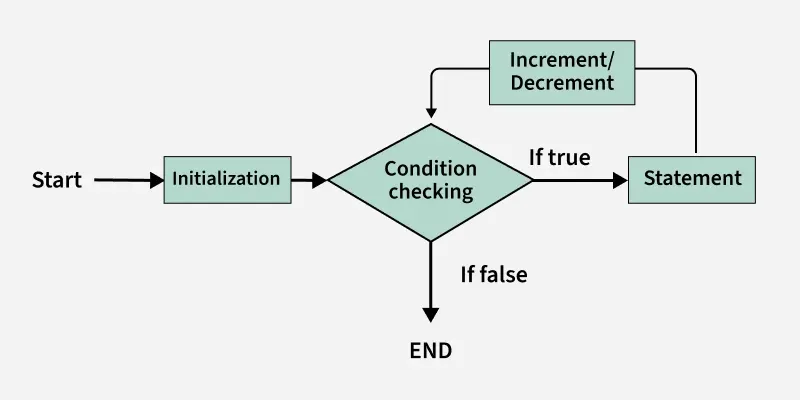
The image below demonstrates the flow chart of a for loop:
Note: There is another form of the for loop known as Enhanced for loop or (for each loop).
This loop is used to iterate over arrays or collections.
Example: The below Java program demonstrates an Enhanced for loop (for each loop) to iterate through an array and print names.
Name: Sweta
Name: Gudly
Name: Amiya
for (dataType variable : arrayOrCollection) {
// code to be executed
}
A while loop is used when we want to check the condition before executing the loop body.
Example: Program demonstrates a while loop that prints numbers from 0 to 10 in a single line.
0 1 2 3 4 5 6 7 8 9 10
while (condition) {
// code to be executed
}
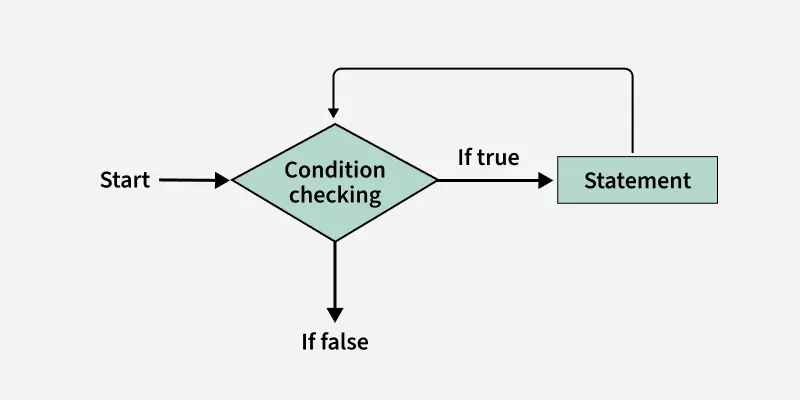
The below image demonstrates the flow chart of a while loop:
The do-while loop ensures that the code block executes at least once before checking the condition.
Example: Program demonstrates a do-while loop that prints numbers from 0 to 10 in a single line.
0 1 2 3 4 5 6 7 8 9 10
do {
// code to be executed
} while (condition);
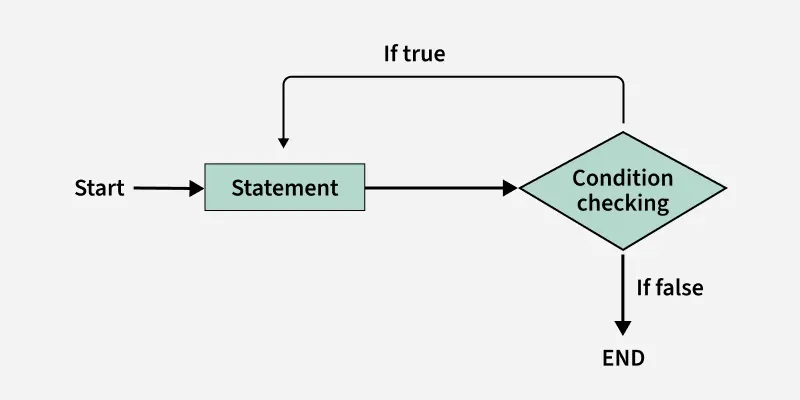
The below image demonstrates the flow chart of a do-while loop:
If loops are not used correctly, they can introduce pitfalls and bugs that affect code performance, readability, and functionality. Below are some common pitfalls of loops:
This is one of the most common mistakes while implementing any sort of looping is that it may not ever exit, that is the loop runs for infinite time. This happens when the condition fails for some reason.
Types of Infinite Loops:
Example: Here, both the examples demonstrates the infinite loops.
Output: When you run both the above codes you will get TLE (Time Limit Exceeded) error.
Off-by-One Errors are caused when the loop runs one more or one fewer time than you wanted. It basically happens when the loop condition is not set correctly.
Example: The below Java program demonstrates an Off-by-One Error, where the loop runs 6 times and we expected it to run 5 times.
When we change the loop condition (like i) inside the loop, it can cause the loop to skip certain iterations or behave in ways that we did not expected. This might leads to errors or unexpected behavior.
Example: The below Java program demonstrates modifying the loop variable inside the loop, which cause the loop to skip certain iterations and behave unexpected.
An empty loop body occurs when a loop is written to iterate but does not perform any operations inside the loop. Running a loop without any useful operations inside it can be confusing.
Example: The below Java program demonstrate Empty loop body.
No output will be generated for this, because the body of the loop is empty.
Loop Type | When to Use | Condition Checking | Executes At Least Once? |
|---|---|---|---|
for loop | When you want exact iterations | Before loop body, It is called Entry-controlled. | no |
while loop | When you need condition check first. | Before loop body, It is called Entry-controlled. | no |
do-while loop | When you need to run at least once | After loop body, It is called Exit-controlled. | yes |
for-each loop | When you process all collection items | Internally handled | no |