|
VOOZH | about |
|
VOOZH | about |
An array is a type of data structure that can store a collection of elements. These elements are stored in contiguous memory locations and provide efficient access to each element based on the index of each array element.
In this article, we will learn about a one-dimensional array in Java.
Arrays are commonly used for storing and manipulating data in programming languages because they offer fast access to the elements based on their indices and provide efficient memory usage.
dataType [] arrayName = new dataType [arraySize] ;
One of the most commonly used types of arrays is the one-dimensional array. It represents a simple list of elements where each item can be accessed using a single index.
Note: To know how to declare and initialize an array, refer to this article: Declare and Initialize an Array in Java
Below is an example demonstrating a one-dimensional array in Java:
Original Array:
10 20 30 40 50

Element at index 2: 30

Modified Array:
10 20 30 45 50

Sum of elements in the array: 155
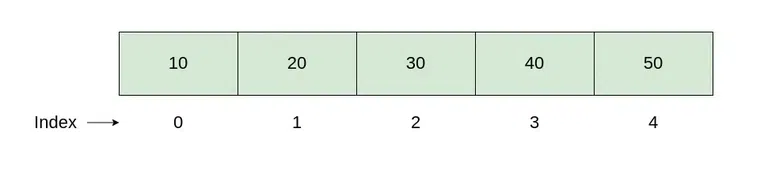
In memory, a one-dimensional array in Java is a contiguous block of the memory locations allocated to the hold elements of the same data type. Each element occupies a fixed amount of memory determined by the data type of array. The elements in the array are stored sequentially in the memory by the one by one.
Example:
int [ ] numbers = new int [5] ;
The memory organization as shown below:
👁 One_D_Array
Basic operations on a one-dimensional array is include the accessing elements, inserting elements, deleting elements, searching for elements and sorting elements. Below are the basic operations performed on a one-dimensional array with the time complexity and space complexity:
Operations | Description | Complexity |
|---|---|---|
Accessing Elements | Accessing elements in an array involved the retrieving values and stored at a specific index. | Time Complexity: O(1) |
Inserting Elements | Inserting an element into array is involved the adding a new value at the specific index or at end of the array. If the array is filled, it will may be required resizing. | Time Complexity:
Space Complexity:
|
Deleting Elements | Deleting element from an array is involve the removing a value from the specific index and shifting subsequent elements to fill gap in an array. | Time Complexity: O(n) |
Searching for Elements | Searching for specific element in an array is involve traversing the array for find the element in an array. | Time Complexity:
Space Complexity:
|
Sorting Elements | Sorting elements in an array is involve arranging the elements in the specific order such as ascending order or descending order. | Time Complexity:
Space Complexity:
|
This Java program demonstrates the implementation of the one-dimensional array and it performs the basic operations like initialization, accessing elements, inserting elements, deleting elements, searching for elements and sorting elements:
Element at index 0: 10
Element at index 3: 50
Array after deleting element at index 2: [10, 30, 50, 40, 0]
Element 30 found at index 1
Sorted array: [0, 10, 30, 40, 50]
One-Dimensional arrays are widely used in various domains because of its simplicity, efficiency and versatility. Here are the some common applications:
Important Notes:
In Java, arrays have a fixed length and this is accessible via the length property.
For example:
int[] numbers = new int[5];
System.out.println(numbers.length); // Outputs 5
When iterating through an array, always use the length property to avoid ArrayIndexOutOfBoundsException:
for (int i = 0; i < numbers.length; i++) {
System.out.println(numbers[i]);
}
Arrays are fixed in size, if you need a dynamically resizable collection, consider using classes like ArrayList from the Java Collections Framework.