|
VOOZH | about |
|
VOOZH | about |
FilterConfig is an object created by the web container for each filter to access initialization parameters defined in the web.xml file. It helps separate configuration details from filter implementation, making web applications easier to manage and maintain.
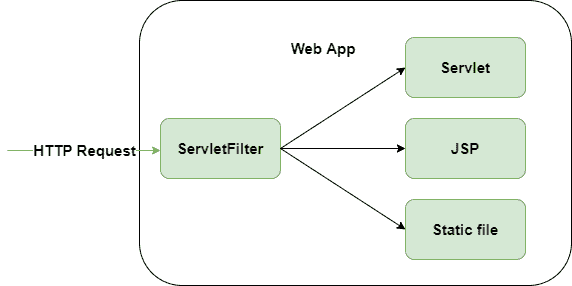
Servlet Filter intercepts incoming HTTP requests and uses FilterConfig during initialization to process configuration details before forwarding the request to the appropriate resource such as a Servlet, JSP, or static file.
There are two approaches to configure FilterConfig in a servlet application using the web.xml deployment descriptor and using annotations with @WebFilter.
In this approach, filter configuration and initialization parameters are defined inside the deployment descriptor using <filter> and <init-param> tags. The container creates the FilterConfig object automatically and passes it to the init() method.
Syntax:
<filter>
<filter-name>filterName</filter-name>
<filter-class>package.FilterClass</filter-class>
<init-param>
<param-name>paramName</param-name>
<param-value>value</param-value>
</init-param>
</filter>
<filter-mapping>
<filter-name>filterName</filter-name>
<url-pattern>/*</url-pattern>
</filter-mapping>
Servlet API also allows filter configuration using the @WebFilter annotation. Initialization parameters can be provided using the @WebInitParam annotation.
Syntax:
@WebFilter(
urlPatterns = "/*",
initParams = {@WebInitParam(name = "paramName", value = "value")
}
)
public class FilterClass implements Filter {
}
The FilterConfig interface provides different methods that help a filter access its configuration details and servlet context information.
This method returns the name of the filter defined in the web.xml file. It is mainly used to identify the current filter during execution.
Syntax:
public String getFilterName()
This method is used to get the value of a specific initialization parameter by passing its name. If the parameter is not available, it returns null.
Syntax:
public String getInitParameter(String name)
This method returns all initialization parameter names of the filter as an Enumeration object. It is useful when multiple parameters are configured.
Syntax:
public Enumeration getInitParameterNames()
This method returns the ServletContext object associated with the web application. It allows the filter to access application-wide resources and information.
Syntax:
public ServletContext getServletContext()
Follow these steps to create Servlet Filter using FilterConfig, where we validate user credentials through initialization parameters defined in web.xml and control request flow using FilterChain.
This is the front-end page where the user enters login credentials. The form sends data to the servlet via POST request.
This servlet processes the request after filter validation and displays a welcome message.
This filter intercepts the request before it reaches the servlet and validates username and password using FilterConfig parameters.
This file defines servlet mapping, filter mapping, and init parameters required for FilterConfig.
http://localhost:8080/FilterConfigDemo/index.html
Your Login page will appear on the browser
When incorrect credentials are provided, the filter handles the response by reloading the login page and displaying an error message.
👁 ImageWhen user provides correct credential then the servlet executes and generates response output
👁 ImageExplanation: When the user submits the login form, the request first passes through the Filter, where credentials are validated using FilterConfig parameters from web.xml. If valid, the request is forwarded to the servlet using chain.doFilter(); otherwise, the login page is reloaded with an error message.