|
VOOZH | about |
|
VOOZH | about |
ServletResponse is used to send responses from the servlet back to the client browser. It provides methods to set content type, character encoding, buffering, and send text or binary data using PrintWriter or ServletOutputStream.
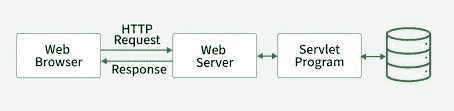
The below diagram illustrates how a client request is processed through the web server and servlet program, and how the response is generated and sent back to the browser after interacting with the database.
Used to send binary data such as images, PDFs, and files.
Used to send text or HTML content to the client.
| Method | Description |
|---|---|
getCharacterEncoding() | Returns response character encoding |
getContentType() | Returns response content type |
getOutputStream() | Returns output stream for binary data |
getWriter() | Returns writer for text response |
setContentLength(int len) | Sets response content length |
setContentType(String type) | Sets response content type |
setBufferSize(int size) | Sets buffer size |
getBufferSize() | Returns buffer size |
flushBuffer() | Sends buffered data to the client |
isCommitted() | Checks whether response is committed |
setLocale(Locale loc) | Sets response locale |
reset() | Clears response buffer and headers |
In this example, the servlet receives a username from the HTML form and displays it in the browser using setContentType() and getWriter() methods.
The index.html file contains a form that accepts the username from the user.
The servlet receives the username from the request and sends the response back to the browser.
The web.xml file maps the servlet with the URL pattern.
<web-app>
<servlet>
<servlet-name>GFG</servlet-name>
<servlet-class>GFG</servlet-class>
</servlet><servlet-mapping>
<servlet-name>GFG</servlet-name>
<url-pattern>/GFG</url-pattern>
</servlet-mapping>
</web-app>
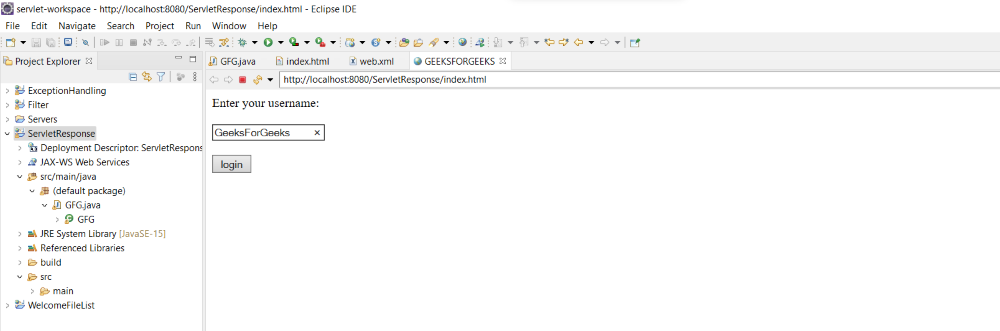
Deploy the project on the server and open the index.html page in the browser by using the url.
http://localhost:8080/ProjectName/index.html
Enter the username and click the login button.
👁 ImageOutput:
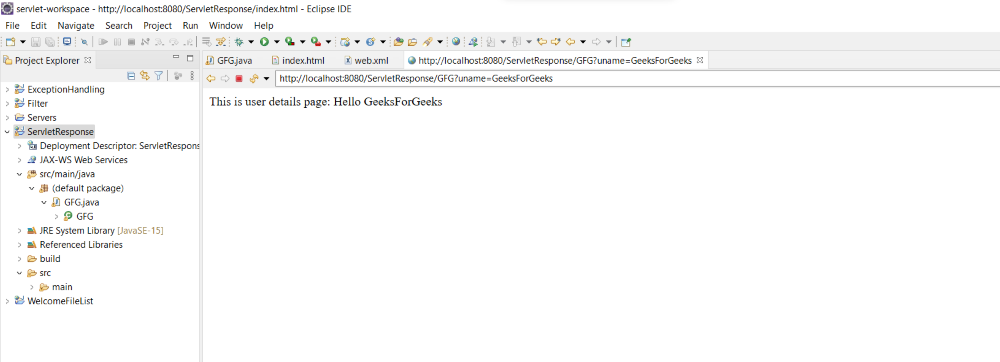
The servlet processes the request and displays the response on the browser.
👁 ImageExplanation: The browser displays the entered username dynamically using the ServletResponse object.