|
VOOZH | about |
|
VOOZH | about |
ApplicationContext is an advanced interface in the Spring Framework that acts as a powerful IoC container for managing beans and their lifecycle. It extends BeanFactory and provides additional enterprise-level features like event handling, internationalization, and annotation-based configuration. It is widely used in modern Spring applications for efficient and scalable development.
Note: Due to its advanced features, developers generally prefer using ApplicationContext over BeanFactory. BeanFactory provides only basic functionalities and is suitable for lightweight applications or memory-constrained environments.
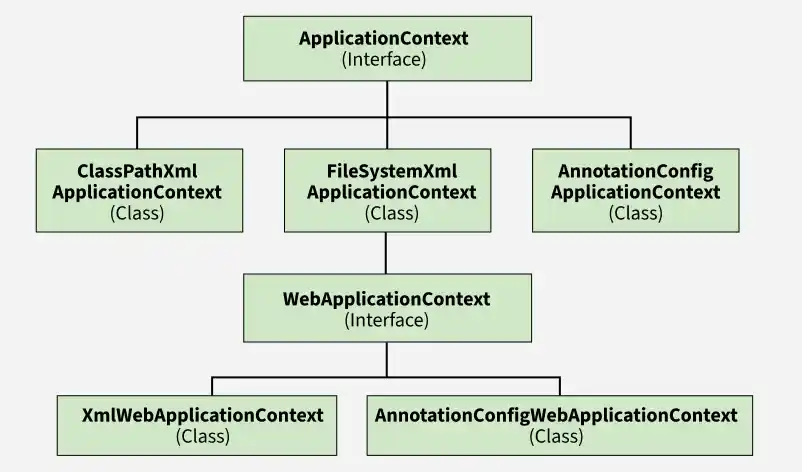
Hierarchy of Spring ApplicationContext implementations, showing different configuration approaches for standalone and web-based applications.
Spring container that manages beans using Java-based configuration with classes annotated like @Configuration and @Component, eliminating the need for XML. Supports multiple configuration classes and is commonly used in standalone and Spring Boot applications.
Syntax:
ApplicationContext context = new AnnotationConfigApplicationContext(AppConfig.class, AppConfig1.class);
Spring container for web applications that manages beans using annotation-based configuration and integrates with servlet components like DispatcherServlet. it initializes the web application context using classes annotated with @Configuration and @Component.
Syntax:
AnnotationConfigWebApplicationContext context = new AnnotationConfigWebApplicationContext();
context.register(AppConfig.class); // Register config class
context.setServletContext(container); // Set servlet context
Example
Explanation: This class replaces web.xml and initializes the Spring web application at startup. It loads bean configuration from the XML file and links it with the servlet container.
Spring container for web applications that manages beans using XML configuration files and integrates with servlet components like DispatcherServlet. It initializes the web context using XML files such as applicationContext.xml.
Syntax:
XmlWebApplicationContext context = new XmlWebApplicationContext();
context.setConfigLocation("/WEB-INF/spring/applicationContext.xml");
context.setServletContext(container);
context.refresh();
Example:
Explanation: Creates and configures the XML-based Spring context for a web application during startup.
Spring container that loads bean configuration from XML files using a file system path or URL instead of the classpath. It is mainly used in standalone applications and testing environments.
Syntax:
String path = "path/to/applicationContext.xml";
ApplicationContext context = new FileSystemXmlApplicationContext(path);
Example:
String path = "Documents/demoProject/src/main/resources/applicationcontext/student-bean-config.xml";
ApplicationContext context = new FileSystemXmlApplicationContext(path);
StudentService studentService = context.getBean("studentService", StudentService.class);
Explanation: Initializes the container from the file system and retrieves the StudentService bean.
Spring container that loads bean configuration from XML files located in the classpath (e.g., src/main/resources). It is commonly used in standalone and testing environments for easy configuration.
Syntax:
ApplicationContext context = new ClassPathXmlApplicationContext("applicationcontext/student-bean-config.xml");
Example:
ApplicationContext context = new ClassPathXmlApplicationContext("applicationcontext/student-bean-config.xml");
StudentService studentService = context.getBean("studentService", StudentService.class);
Follow the below steps to implement and use the ApplicationContext container in a Spring application by using AnnotationConfigApplicationContext class.
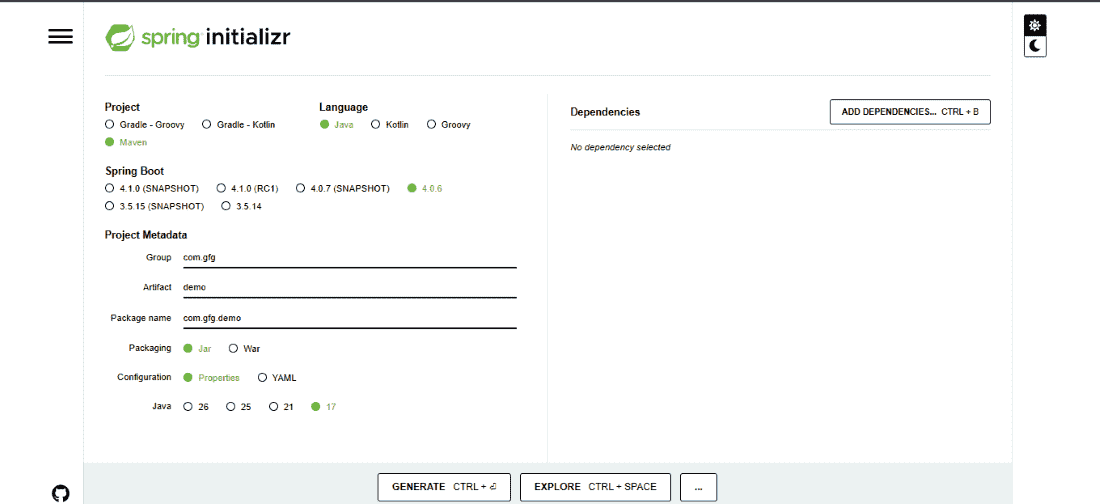
Creating a Spring Project using Spring Initializer as pictorially depicted below.
This class represents a simple bean (POJO) that will be managed by the Spring container
This class is used to define beans using Java-based configuration.
This step shows how container is created manually.
Note: This example uses manual container creation (AnnotationConfigApplicationContext) to understand how Spring works internally. In real applications, Spring Boot creates it automatically using SpringApplication.run().