|
VOOZH | about |
|
VOOZH | about |
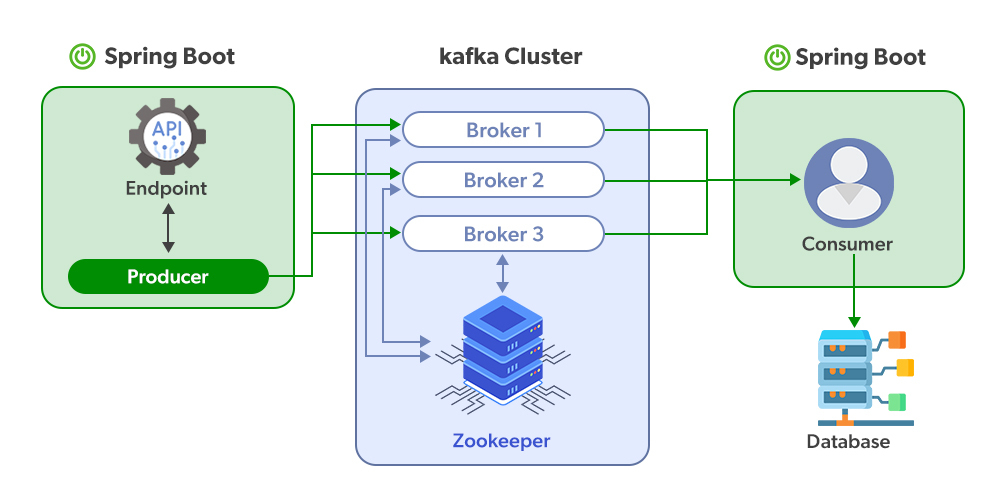
Spring Boot provides seamless integration with Apache Kafka to build scalable event-driven applications. Using Spring for Apache Kafka, developers can easily produce and publish messages to Kafka topics with minimal configuration.
Prerequisite: Apache Kafka
Follow the steps below to create and run a Kafka Producer using Spring Boot.
Go to Spring Initializr and create a new Spring Boot project.
Project Configuration:
Add Dependencies:
Select the following dependencies:
Download the project, extract it, and open it in your IDE.
👁 ImageOpen the application.properties file located in src/main/resources and add the following configuration.
server.port=8081
spring.kafka.bootstrap-servers=localhost:9092
spring.kafka.consumer.group-id=test-group
spring.kafka.consumer.auto-offset-reset=earliest
These properties configure the Kafka server connection and application port.
Create a controller class DemoController.java to send messages to a Kafka topic.
DemoController.java
Explanation:
Before running the Spring Boot application, ensure that Kafka and Zookeeper servers are running.
Start Zookeeper Server
Run the following command:
C:\kafka>.\bin\windows\zookeeper-server-start.bat .\config\zookeeper.properties
Zookeeper manages Kafka broker coordination.
Start Kafka Server
Run the following command:
C:\kafka>.\bin\windows\kafka-server-start.bat .\config\server.properties
This command starts the Kafka broker which handles message publishing and consumption.
To monitor the messages published to the topic, run the following command:
C:\kafka>.\bin\windows\kafka-console-consumer.bat --bootstrap-server localhost:9092 --topic NewTopic --from-beginning
This command listens to messages from the NewTopic topic.
Run the main Spring Boot class:
SpringBootKafkaProducerApplication.java
You can start the application by:
👁 Imagehttp://localhost:8081
Open a browser or API client and send a request:
http://localhost:8081/publish/GeeksforGeeks
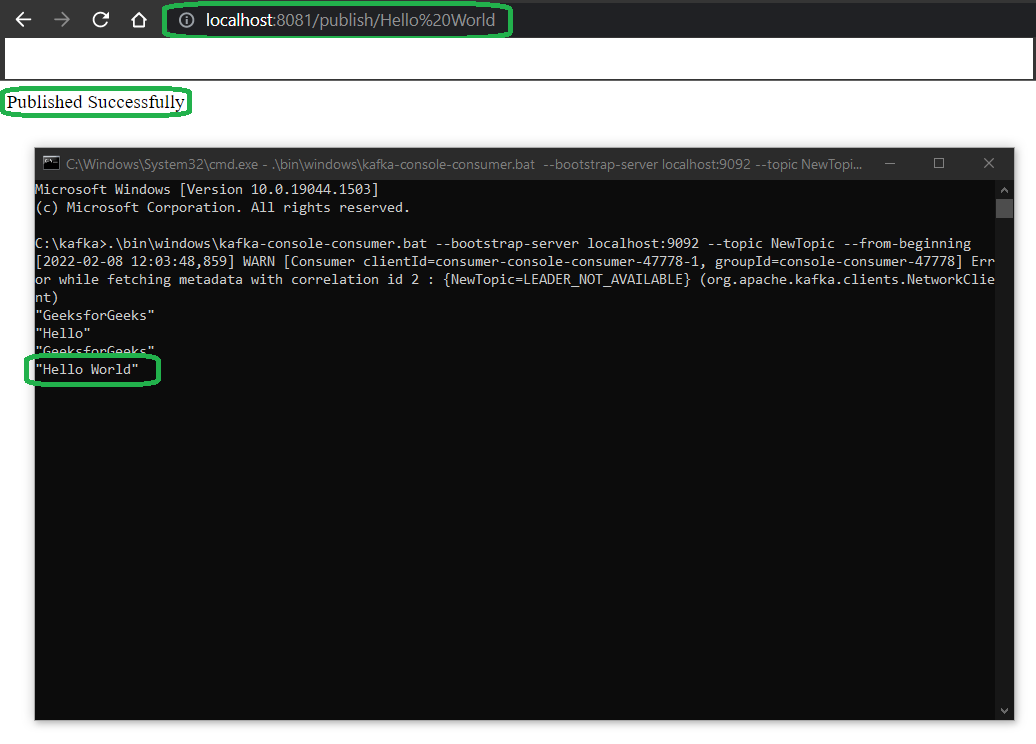
As we have passed "GeeksforGeeks" here you can see we got "Published Successfully" in return. And in real-time you can see the message has been published on the server also. The streaming of the message is in real-time.
👁 OutputSimilarly, if we have passed "Hello World" here you can see we got "Published Successfully" in return. And in real-time you can see the message has been published on the server also.
👁 Output