|
VOOZH | about |
|
VOOZH | about |
Spring MVC is a web framework based on the Model–View–Controller (MVC) architectural pattern. It helps in building dynamic web applications by separating application logic, presentation and data access layers.
In this project, we’ll develop a Spring MVC application that interacts with MySQL to find doctor details online. It uses Spring JDBC for database interaction and follows a layered structure for maintainability.
Create and populate the database before running the project.
DROP DATABASE IF EXISTS geeksforgeeks;
CREATE DATABASE geeksforgeeks;
USE geeksforgeeks;
CREATE TABLE DoctorsDetails (
id INT(6) UNSIGNED NOT NULL AUTO_INCREMENT,
doctorName VARCHAR(50) NOT NULL,
doctorRegistrationNumber VARCHAR(10) NOT NULL,
qualification VARCHAR(30) NOT NULL,
gender VARCHAR(10),
PRIMARY KEY (id)
);
INSERT INTO DoctorsDetails (doctorName, doctorRegistrationNumber, qualification, gender) VALUES
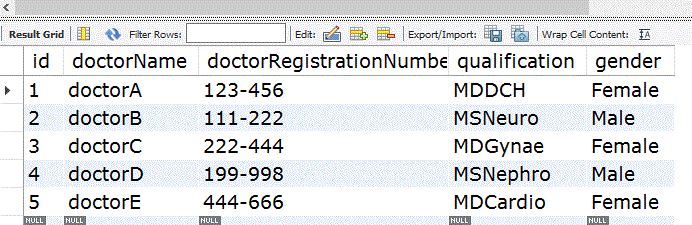
('doctorA', '123-456', 'MDDCH', 'Female'),
('doctorB', '111-222', 'MSNeuro', 'Male'),
('doctorC', '222-444', 'MDGynae', 'Female'),
('doctorD', '199-998', 'MSNephro', 'Male'),
('doctorE', '444-666', 'MDCardio', 'Female');
SELECT * FROM DoctorsDetails;
This is a Maven Web Application.
Update database credentials (username, password) in spring-servlet.xml.
We would be getting a page like below
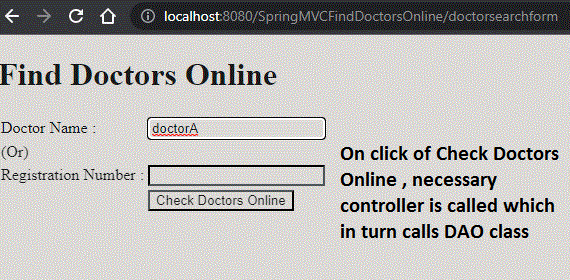
On click of the "Find Doctors Online" link, we can get the below page
Ensure Tomcat is configured and running before deployment.
Open the application home page, click Find Doctors Online.
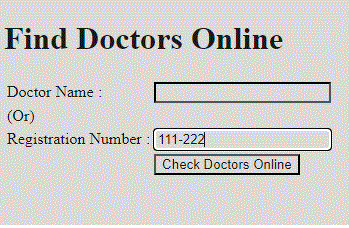
Enter a Doctor Name or Registration Number.
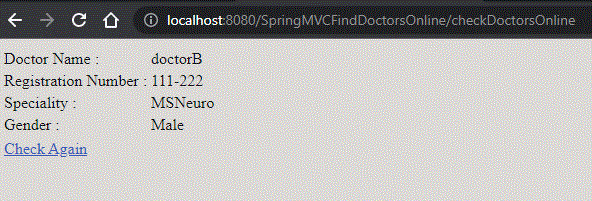
On submission, details will be fetched from MySQL and displayed on welcome.jsp.