|
VOOZH | about |
|
VOOZH | about |
Spring Security is a powerful and highly customizable authentication and access-control framework. It is the de-facto standard for securing Spring-based applications. Spring Security is a framework that focuses on providing both authentication and authorization to Java applications. Like all Spring projects, the real power of Spring Security is found in how easily it can be extended to meet custom requirements. Some of the key features of Spring Security are:
Let's first discuss the basic simple authentication of Spring Security. In Simple authentication, Spring Security provides a default user name and the password that we have to use for valid authentication.
Login page of simple authentication of Spring Security:
👁 ImagePassword:
👁 ImageIt is very difficult to remember this password because this is a random password and Spring Security generates a random password every time when we execute the Spring Application. If we want to add a custom user name and password in the Spring application for authentication we can add it easily(using application.properties ) but if we want to make our Spring application for multiple users it is difficult to configure their credentials. So to overcome this situation when we handle multiple authentications along with their respective roles. We will use in-memory authentication in the Spring Application.
in-memory authentication is the way for handling authentication in Spring Security. In the in-memory authentication we hardcore all the user details such as roles, passwords, and the user name. We can perform validation until the Spring server is running. If the server is stopped the memory is cleared out and we cannot perform validation. This is the main drawback of in-memory authentication.
inMemoryAuthentication() is the method of AuthenticationManagerBuilder class is used to perform in-memory authentication in the Spring Security. This method is used for creating the user with respective roles and passwords. Let's discuss how to implement inmemoryAuthentication in Spring Security.
Step 1: Create a Spring Boot Project
Project: Maven
Language: Java
Spring Boot: 2.2.8
Packaging: JAR
Java: 8
Dependencies: Spring Web,Spring Security
👁 Image
Step 2: Click on Generate which will download the starter project.
Project Structure:
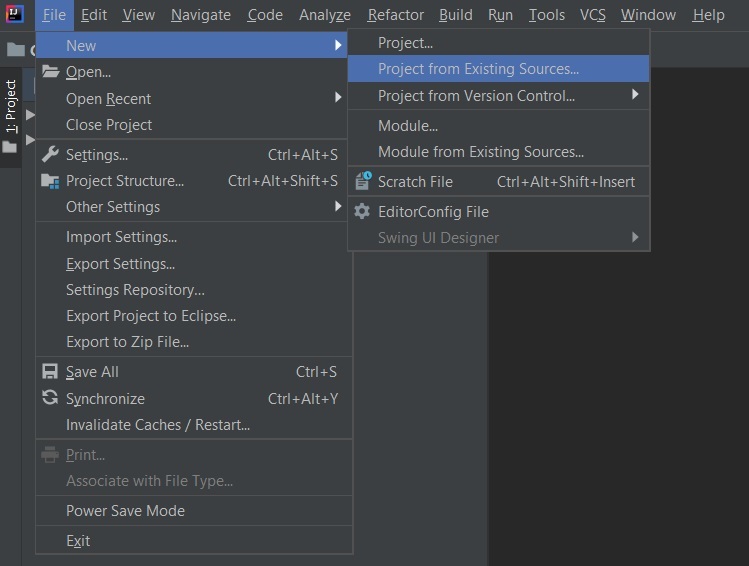
👁 ImageStep 3: Extract the zip file. Now open a suitable IDE and then go to File > New > Project from existing sources > Spring-boot-app and select pom.xml. Click on import changes on prompt and wait for the project to sync as pictorially depicted below as follows:
👁 ImageNote: In the Import Project for Maven window, make sure you choose the same version of JDK which you selected while creating the project.
Step 4: Now go to the src > main > java > com.gfg.Spring.boot.app and create two java files one is controller.java and the other is config.java
controller.java
The above java file is used to set the controller for handling the incoming request from the client side. Now we have to configure the request for that we will use the config.java file.
config.java
This config file is extending the WebSecurityConfigureAdapter class and we override two methods configure(AuthenticationManagerBuilder auth) and configure(HttpSecurity Http) both methods are used for handling the multiple authentications on the Spring application.
Note: There is no default password is generated because we have already used external configuration for handling the user credentials.
Go to the postman and type localhost:8080/delete
Using the admin roles:
👁 ImageUsing the student role: Try to access the details API using the student role's user name and password.
👁 Image