|
VOOZH | about |
|
VOOZH | about |
A TreeMap in Java is a part of the java.util package that implements the Map interface. It stores key-value pairs in a sorted order using either a natural or custom comparator.
TreeMap elements: {}
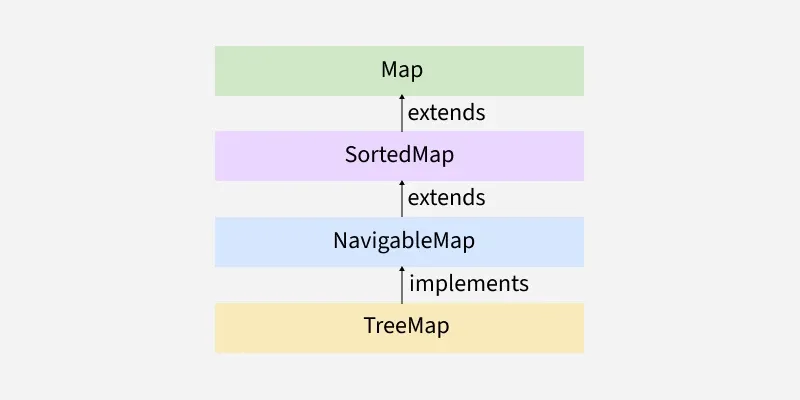
TreeMap extends AbstractMap and implements the NavigableMap, SortedMap, Map, Cloneable, and Serializable interfaces.
In order to create a TreeMap, we need to create an object of the TreeMap class. The TreeMap class consists of various constructors that allow the possible creation of the TreeMap. The following are the constructors available in this class:
This constructor is used to build an empty TreeMap that will be sorted by using the natural order of its keys.
Syntax:
TreeMap<K, V> map = new TreeMap<>();
TreeMap using TreeMap() constructor
TreeMap: {10=Geeks, 15=For, 20=Geeks}
This constructor is used to build an empty TreeMap object in which the elements will need an external specification of the sorting order.
Syntax:
TreeMap<K, V> map = new TreeMap<>(Comparator<? super K> comparator);
TreeMap sorted by roll number: {111 Geek1 New York=1, 121 Geek3 Paris=3, 131 Geek2 London=2}
This constructor is used to initialize a TreeMap with the entries from the given map M which will be sorted by using the natural order of the keys.
Syntax:
TreeMap<K, V> map = new TreeMap<>(Map<? extends K, ? extends V> m);
TreeMap using TreeMap(Map) Constructor
TreeMap: {10=Geeks, 20=For, 30=Geeks}
We can use the put() method to insert elements to a TreeMap. However, the insertion order is not retained in the TreeMap. Internally, for every element, the keys are compared and sorted in ascending order.
TreeMap with raw type: {1=Geeks, 2=For, 3=Geeks}
TreeMap with generics: {1=Java, 2=Programming, 3=Language}
To change the element in a TreeMap, simply use the put() method again with the same key and the new value.
{1=Geeks, 2=Geeks, 3=Geeks}
{1=Geeks, 2=For, 3=Geeks}
We can use the remove() method to remove element from the TreeMap.
{1=Python, 2=C++, 3=Java, 4=JS}
{1=Python, 2=C++, 3=Java}
There are multiple ways to iterate through the Map. The most famous way is to use a for-each loop and get the keys. The value of the key is found by using the getValue() method.
1 : Geeks
2 : For
3 : Geeks
| Method | Action Performed |
|---|---|
| clear() | The method removes all mappings from this TreeMap and clears the map. |
| clone() | The method returns a shallow copy of this TreeMap. |
| containsKey(Object key) | Returns true if this map contains a mapping for the specified key. |
| containsValue(Object value) | Returns true if this map maps one or more keys to the specified value. |
| entrySet() | Returns a set view of the mappings contained in this map. |
| firstKey() | Returns the first (lowest) key currently in this sorted map. |
| get(Object key) | Returns the value to which this map maps the specified key. |
| headMap(Object key_value) | The method returns a view of the portion of the map strictly less than the parameter key_value. |
| keySet() | The method returns a Set view of the keys contained in the treemap. |
| lastKey() | Returns the last (highest) key currently in this sorted map. |
| put(Object key, Object value) | The method is used to insert a mapping into a map. |
| putAll(Map map) | Copies all of the mappings from the specified map to this map. |
| remove(Object key) | Removes the mapping for this key from this TreeMap if present. |
| size() | Returns the number of key-value mappings in this map. |
| subMap(K startKey, K endKey) | The method returns the portion of this map whose keys range from startKey, inclusive, to endKey, exclusive. |
| values() | Returns a collection view of the values contained in this map. |