|
VOOZH | about |
|
VOOZH | about |
Broadcasting in NumPy allows us to perform arithmetic operations on arrays of different shapes without reshaping them. It automatically adjusts the smaller array to match the larger array's shape by replicating its values along the necessary dimensions. This makes element-wise operations more efficient by reducing memory usage and eliminating the need for loops.
Lets see an example:
[[11 12 13]
 [14 15 16]]
Explanation:
Broadcasting applies specific rules to find whether two arrays can be aligned for operations or not that are:
If these conditions aren’t met NumPy will raise a ValueError. Lets see various examples for broadcasting below:
It creates a NumPy array arr with values [1, 2, 3] and adds a scalar value 1 to each element of the array using broadcasting.
[2 3 4]
This example shows how a 1D array a1 is added to a 2D array a2. NumPy automatically expands the 1D array along the rows of the 2D array to perform element-wise addition.
[[ 3 7 11]
 [ 9 13 17]]
Explanation:
This example checks each age in the array and assigns "Adult" or "Minor" using np.where().
['Minor' 'Adult' 'Adult' 'Adult' 'Adult' 'Adult']
Explanation:
In this example, each element of a 2D matrix is multiplied by the corresponding element in a broadcasted vector.
[[10 40]
 [30 80]]
Explanation:
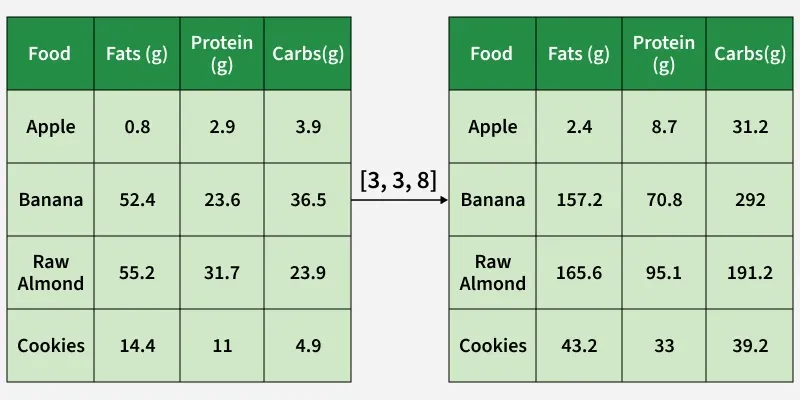
Consider a real-world scenario where we need to calculate the total calories in foods based on the amount of fats, proteins and carbohydrates. Each nutrient has a specific caloric value per gram.
Left table shows the original data with food items and their respective grams of fats, proteins and carbs. The array [9, 4, 4] represents the caloric values per gram for fats, proteins and carbs respectively. This array is being broadcast to match the dimensions of the original data and arrow indicates the broadcasting operation.
[[ 7.2 11.6 15.6]
 [471.6 94.4 146. ]
 [496.8 126.8 95.6]
 [129.6 44. 19.6]]
Explanation:
Suppose you have a 2D array representing daily temperature readings across multiple cities and you want to apply a correction factor to each city’s temperature data.
[[31.5 33.5 35.5 34.5 32.5]
 [24.5 26.5 28.5 27.5 25.5]
 [22. 24. 26. 25. 23. ]]
Explanation:
Normalization is important in many real-world scenarios like image processing and machine learning because it:
Let's see how broadcasting simplifies normalization:
[[ 1.22474487 1.22474487 0. ]
 [ 0. 0. 1.22474487]
 [-1.22474487 -1.22474487 -1.22474487]]
Explanation:
Centering data is an important step in many machine learning workflows. Broadcasting helps center the data efficiently by subtracting the mean from each feature. This example centers each feature by subtracting its mean using NumPy broadcasting.
[[-5. -5.]
 [ 0. 0.]
 [ 5. 5.]]
Explanation: