|
VOOZH | about |
|
VOOZH | about |
NumPy is a Python library used for numerical computing that makes array operations fast and efficient. It provides built-in functions for sorting arrays, searching for specific elements and counting occurrences of values. These functions help simplify data manipulation and analysis allowing you to perform complex operations on large datasets with ease.
Sorting in NumPy refers to arranging array elements in a specific order, such as numerical or alphabetical order. It helps improve data organisation and makes searching and analysis more efficient, especially when working with large datasets or multi-dimensional arrays.
numpy.sort() method returns a sorted copy of the input array without modifying the original array. It is useful when you want sorted data while keeping the original data unchanged.
Output:
[1 2 5 7 9]
numpy.argsort() function returns the indices that would sort the array instead of the sorted values themselves. It is commonly used when you need to rearrange another array based on the sorted order.
Output:
['Priya' 'Vikram' 'Anish' 'Rahul']
This function performs an indirect stable sort using multiple sorting keys. The last key is used as the primary sort key making it useful for sorting structured or tabular data.
Output:
[2 0 3 1]
This method sorts the array in-place meaning the original array is modified. It is memory-efficient since no new array is created.
Output:
['Bangalore' 'Chennai' 'Delhi' 'Mumbai']
numpy.sort_complex() function sorts a complex array by real part first, and if equal, by the imaginary part. It is specifically designed for handling complex numbers.
Output:
[1.+5.j 3.+1.j 3.+2.j]
numpy.partition() method partially sorts the array such that the element at the given position is in its correct place. Elements smaller appear before it and larger ones after it but the order is not fully sorted.
Output:
[ 300 500 800 1200 1500]
numpy.argpartition() function returns the indices that would partition the array around a given position. It is useful for finding top-k or bottom-k elements efficiently.
Output:
[65 70 78 88 92]
Searching in NumPy is used to locate the position of elements that satisfy a specific condition or comparison. It supports different data structures such as 1D and 2D arrays, strings, booleans and arrays with missing values. These operations help efficiently identify maximum, minimum or matching elements within large datasets.
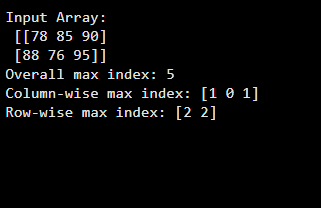
numpy.argmax() function returns the index of the maximum value in an array. We can search across the entire array or along a specific axis in multi-dimensional data.
Output:
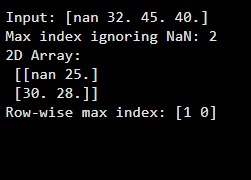
numpy.nanargmax() function works like argmax() but ignores NaN values while searching. It is useful when dealing with incomplete or missing data.
Output:
numpy.argmin() function returns the index of the minimum value in an array. It helps identify the smallest element position efficiently.
Output:
Prices: [1200 850 999 650]
Index of lowest price: 3
numpy.nanargmin() function returns the index of the minimum value while ignoring NaN values. It ensures reliable results when the dataset contains missing entries.
Output:
Scores: [nan 78. 65. 80.]
Min index ignoring NaN: 2
numpy.argwhere() function returns the indices of elements that satisfy a condition. The result is grouped by element, making it useful for filtering data.
Output:
[[0]
[4]]
numpy.nonzero() function returns the indices of non-zero elements in the array. It is often used for quick condition-based searches.
Output:
Non-zero indices: (array([0, 2, 4]),)
numpy.flatnonzero() function returns indices of non-zero elements in the flattened array. It is useful when working with multi-dimensional arrays.
Output:
Flat non-zero indices: [1 2]
numpy.where() function returns elements based on a condition. It can also be used to choose values from two arrays.
Output:
Result: ['Fail' 'Pass' 'Pass' 'Pass']
numpy.searchsorted() function finds the index where a value should be inserted to maintain sorted order. It is commonly used in binary search applications.
Output:
Insert position for 65: 2
numpy.extract() function returns elements that satisfy a given condition. It is helpful for extracting filtered data directly.
Output:
Adults: [18 25 30]
Counting in NumPy involves determining how many elements meet a specific condition such as non-zero values, Boolean matches or frequency of occurrences. These operations help summarize data efficiently and extract meaningful statistical insights from arrays. NumPy optimized counting mechanisms work well with both one-dimensional and multi-dimensional data.
numpy.count_nonzero() function returns the number of non-zero elements in an array. It works with numeric, boolean and conditional expressions.
Output:
Array: [ 0 10 0 25 30 0]
Non-zero count: 3
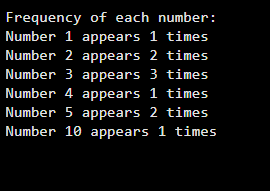
numpy.bincount() function counts occurrences of non-negative integers in an array. Each index represents the integer value and its count.
Output:
numpy.unique() function is used to find the unique elements in an array. It can also return additional information such as the frequency of each unique value, the indices of their first occurrence and inverse indices making it useful for counting and data analysis.
Output:
Unique elements: ['apple' 'banana' 'orange']
Counts: [3 2 1]
You can download full code from here.