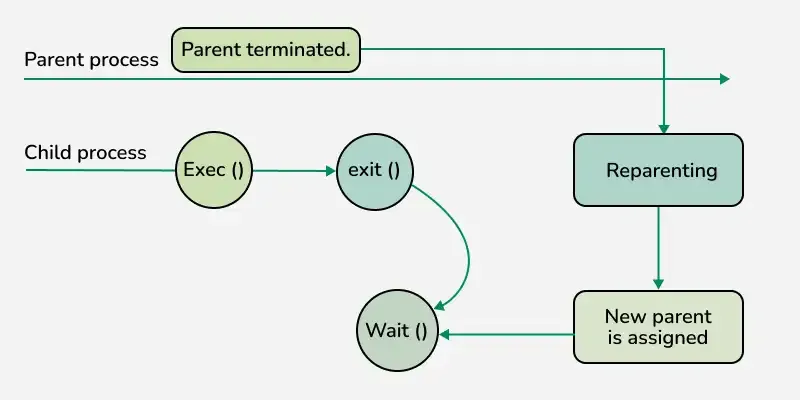
An orphan process is a process in an operating system whose parent process has terminated or exited while the child process is still running. In simple terms, the parent process is no longer available to manage the child process, leaving it "orphaned." To ensure the orphan process continues to function properly, the operating system reassigns it to a system process like the init process (in Linux/Unix systems).
Orphan processes are a common occurrence and do not typically cause major issues, as they are managed automatically by the operating system.
The parent process terminates or crashes unexpectedly and leaves its child processes still running.
A parent process completes execution before its child processes finish their tasks.
An application design flaw causes the parent to exit before handling its child processes properly.
This program demonstrates an orphan process by creating a child process using fork(). The parent process exits immediately, leaving the child process orphaned, which is then adopted by the init process (shown by the updated parent process ID).
Note that the above code may not work with online compiler as fork() is disabled.
Orphan Process vs Zombie Process: Key Differences
Aspect
Orphan Process
Zombie Process
State
Running process without a parent.
Terminated process with an unremoved entry in the process table.
Impact
Managed by the OS without major issues.
Occupies process table space until the parent removes it.
Handled By
Automatically adopted by the init process.
Requires the parent process to acknowledge its termination.
Example
A server crash leaving running worker processes.
A terminated process that the parent has not cleaned up.
Web Servers: A web server creates child processes to handle client requests. If the server crashes, these child processes become orphaned but continue running until they finish their tasks.
Background Jobs: In job scheduling systems, if the scheduler (parent) crashes, its child jobs may become orphan processes.
Batch Processing Systems: During large-scale data processing, if a parent program managing tasks crashes, its ongoing tasks can become orphans.
Why Do Orphan Processes Matter in System Performance
Minimal Performance Impact: Orphan processes are typically handled well by the operating system as they are reassigned to the init process for management.
Resource Holding: If orphan processes are poorly coded, they might consume unnecessary CPU or memory resources and potentially leading to system slowdowns.
Scalability Issues: If systems has a high volume of orphan processes, resource management can become challenging.
How Does the Operating System Handle Orphan Processes
Reassignment to Init Process: In Linux/Unix, the init process automatically adopts orphan processes, ensuring they are monitored and cleaned up after termination.
Proper Cleanup: The init process ensures that the orphan process’s resources (e.g., memory and file descriptors) are released when it finishes execution.
Impact of Orphan Processes
CPU Usage: Orphan processes generally do not consume excessive CPU unless they are misbehaving or poorly coded.
Memory Usage: Orphan processes may hold memory resources, but the OS ensures these are freed when the process ends.
Impact on Multi-User Environments : In multi-user systems, orphan processes created by one user can indirectly affect other users by consuming shared resources, such as memory or processing power.
Orphan Process in Linux: How It Works
1. Parent-Child Process Relationship:
A parent process creates one or more child processes to perform tasks.
The child processes inherit the parent’s resources, such as open files, environment variables, and memory.
2. Parent Process Terminates:
If a parent process exits unexpectedly or completes execution before its child processes finish, the child processes are left without a parent.
At this point, the child processes become orphan processes.
3. Reassignment to Init Process:
The Linux kernel identifies orphan processes and automatically reassigns them to the init process (process with PID 1).
The init process is the root of all processes in Linux and is always running to ensure system stability. It acts as a caretaker for orphan processes.
4. Management by Init Process:
Once an orphan process is reassigned to the init process, the init process becomes responsible for monitoring it.
The init process ensures the orphan process completes its execution and properly releases its resources, such as memory and file descriptors, after termination.
5. Completion of Orphan Process:
When an orphan process finishes its task, the init process cleans up its resources and removes its entry from the process table, preventing resource leaks.
Steps to Prevent Orphan Processes in Operating Systems
Parent Process Management: Design parent processes to wait for their child processes to complete using functions like wait() or waitpid().
Error Handling: Implement robust error-handling mechanisms to prevent parent processes from crashing unexpectedly.
Use Supervisors: Employ process supervisors that can restart parent processes if they fail.