Memory is an essential component of a computer system, responsible for storing data and instructions needed for processing. It enables the CPU to execute programs efficiently and ensures smooth system operation.
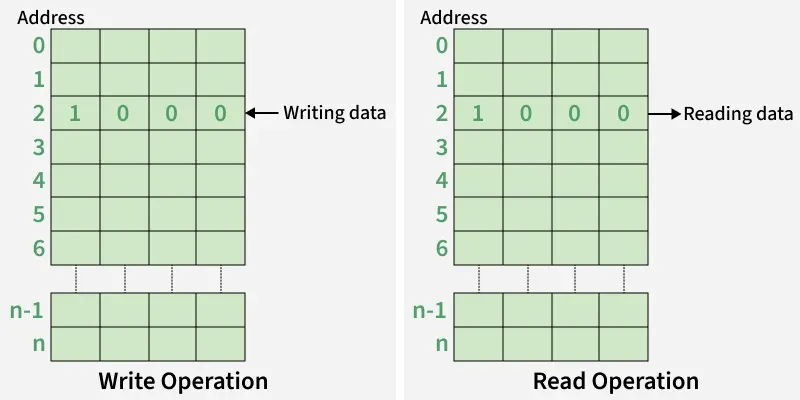
Memory Cell: Smallest storage unit that holds 1 bit of data. Each address in memory typically refers to a byte.
Word & Byte: A word is a group of bits; 1 byte = 8 bits.
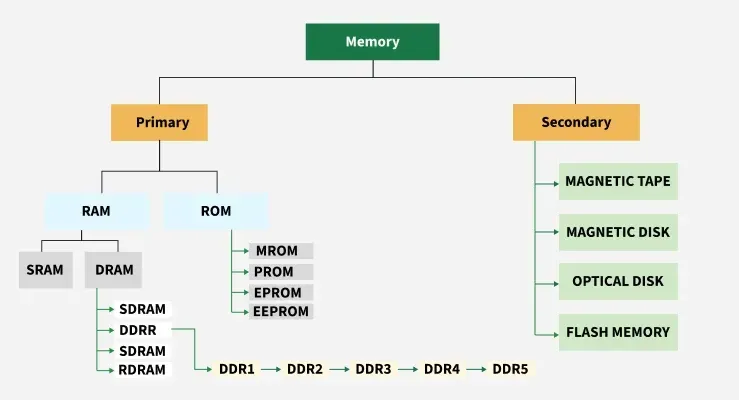
RAM is the computer’s main memory used for temporary storage of active programs and data. Data is lost when power is off. It provides fast CPU access, improving multitasking and performance.
Secondary memory provides long-term data storage and is not directly accessed by the CPU.
Examples: HDD, SSD, optical discs (CD/DVD/Blu-ray), USB drives, flash cards, magnetic tapes, cloud storage.
Characteristics: Non-volatile, slower, high capacity, used for storing operating systems, software, and user files.
Memory Unit
A memory unit is a standard unit used to measure the amount of data that can be stored, processed, or transferred in a computer system. It represents the storage capacity of memory and storage devices.
The smallest memory unit is a Bit (0 or 1) and larger units are KB, MB, GB, TB, PB, EB, ZB, and YB.
A Byte is the basic unit of storage and equals 8 bits.
Memory units are used to measure file sizes, RAM capacity, and storage device capacity.
Computers use the binary number system, so memory units are typically based on powers of 2 (1024).
Example: A computer with 8 GB RAM can store approximately 8 gigabytes of data in its main memory.