The Command Line Interface (CLI) is a text-based tool for interacting with a computer’s operating system using typed commands. Unlike graphical interfaces (GUIs), CLI offers fast, precise control for managing systems and programs.
Core Function: Executes text commands to configure, navigate, or run programs.
Accessibility: Built into Windows, Linux, and macOS for quick system interaction.
Goal: Provides efficient, scriptable control for users and administrators.
You will see CLI on Windows (Command Prompt, PowerShell), Linux (Bash), and macOS (Terminal), it enables tasks like file management, system configuration, and automation without a graphical interface.
How Does a CLI Work?
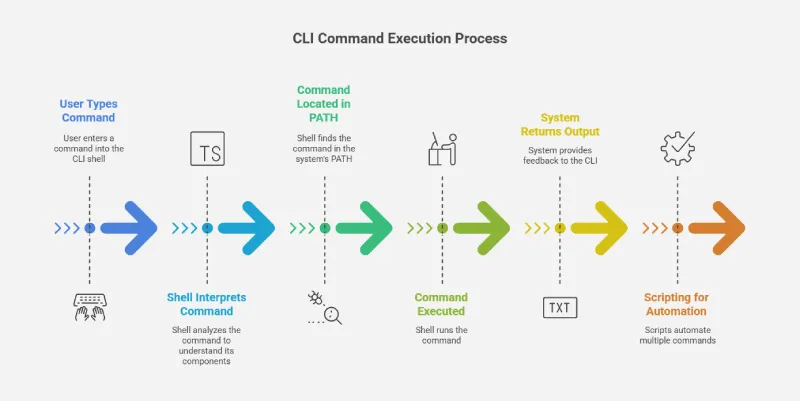
Users type commands into a CLI shell (e.g., Bash, PowerShell), which interprets and executes them:
Shell Role: Acts as an intermediary between the user and the operating system.
Command Process:
The shell parses the command, identifying the action, options, and arguments.
It locates the command in the system’s PATH and executes it.
The system returns output (e.g., data, error messages) to the CLI.
Scripting: Batch files or shell scripts run multiple commands for automation.
In the world of computeing a shell is program that provide access to the OS(Operating System) components. It enables interaction with the system by executing commands or managing settings. It acts as the boundary separating the system's internal operations from external interactions.
There are two main types of operating system shells:
CLI-based shells: These provide a streamlined and efficient way to interact with the OS through text commands, eliminating the need for a graphical interface.
GUI-based shells: These are more beginner-friendly due to their visual interface but often include a CLI-based shell for advanced users or system administrators who prefer command-line interactions.
Bash is the most widely used command-line shell for Unix-based operating systems, including Linux.
Features of CLI
Command History: Recalls previous commands using arrow keys or shortcuts.
Scripting Capability: Creates scripts to automate repetitive tasks.
Piping: Connects one command’s output to another’s input.
Variables: Sets or displays system variables for customization.
How do Command-Line Interfaces (CLIs) Function?
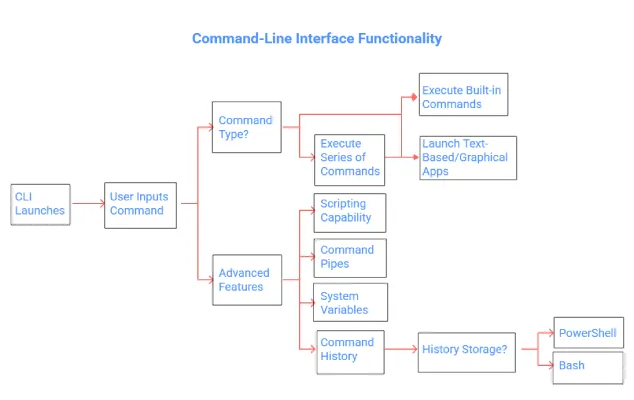
When a computer system is running, the CLI launches on a blank screen displaying a command prompt where users can input commands.
CLI commands fall into three categories:
System commands: Built-in commands integrated into the operating system's interface.
Executable programs: Commands that, when executed, launch text-based or graphical applications.
Batch programs (also called batch files or shell scripts): Text files containing a series of commands, which may include system commands and executable programs, executed sequentially when invoked.
Beyond a basic command-and-response structure, CLIs offer advanced features that distinguish one from another, including:
Scripting capability: Allows users to create and run programs directly from the command line.
Command pipes: Enable the output of one program to serve as the input for another, facilitating data flow between programs.
System variables: Can be set or viewed from the command line to configure the system environment.
Command history: Allows users to recall previously entered commands. Some CLIs, like PowerShell, store history for the current session, while others, like Bash, can be configured to retain history across sessions.