|
VOOZH | about |
|
VOOZH | about |
Vite is rapidly gaining popularity as a new and more efficient solution for managing frontend assets, and Laravel, one of the most popular PHP frameworks, has been using it in the latest versions as the default bundler instead of Mix. Vite is a new generation frontend tool build, featuring a development server speed that is faster than that of the original Vite, as well as a fast HMR. It’s a perfect choice to work, if you want to have a great experience while working with modern Javascript frameworks such as Vue or React integrated into Laravel.
We will lead you through the steps of connecting to Laravel along with understanding how to take advantage of the Vite tool to ensure effective asset compilation.
Before diving into the setup, ensure that you have the following prerequisites installed:
You should have a basic understanding of Laravel, JavaScript, and using terminal commands.
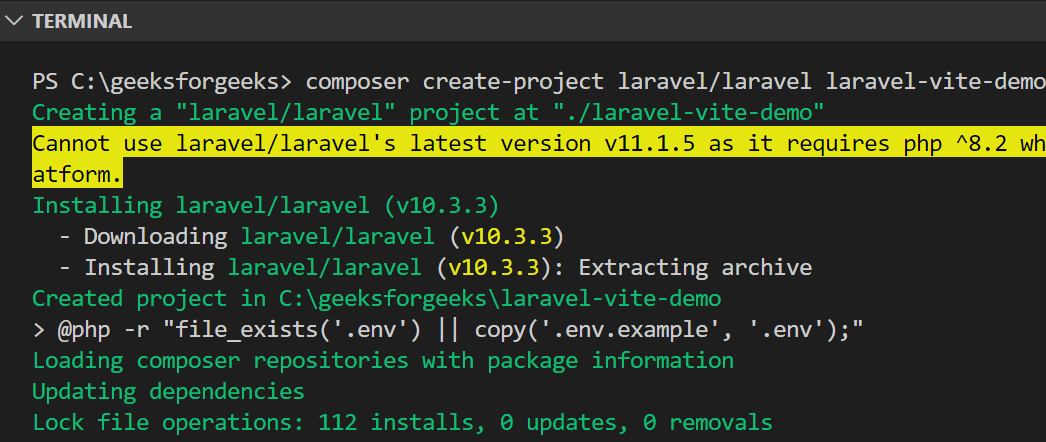
Begin with setting up a new Laravel project or just open your existing one. If you haven’t set up a Laravel project yet, you can create a new one by running:
composer create-project laravel/laravel laravel-vite-demoOnce the Laravel project is created, navigate into the project directory:
cd laravel-vite-demoSince the latest Laravel versions, Vite is integrated by default; You know what you can do, check your package. This is well substantiated in the sample json file that I have used to support this. Here’s what the default dev dependencies should look like:
"devDependencies": {
 "axios": "^1.6.4",
 "laravel-vite-plugin": "^1.0.0",
 "lodash": "^4.17.21",
 "vite": "^5.0.0"
 }
If you’re working with an older Laravel version or don’t have these dependencies, you can install them manually:
npm install vite laravel-vite-plugin --save-dev
Laravel provides a vite.config.js file in which Vite is going to be configured. You can find this file in the root directory of your project where you would be working on. It may look like this:
Here, the laravel-vite-plugin on GitHub solves some issues related to handling assets in Laravel. It indicates to Vite which files should be monitored as well as bundled.
When it is necessary, other stylesheets, JavaScript files or even Vue/React components can be added to the input property.
Within Blade templates, you no longer use Laravel Mix helper mix() like it’s done previously; instead, you need to use Vite’s @vite() helper. So in the resources/views/welcome.blade.php file, replace:
@vite(['resources/css/app.css', 'resources/js/app.js'])
This will ensure that Vite correctly handles your asset bundling and hot reloading during development.
To start the Vite development server, you need to run the following command:
npm run devWhenever you update your CSS, JS, Vue or React components, Vite offers the ability to hot swap the browser without a full page refresh.
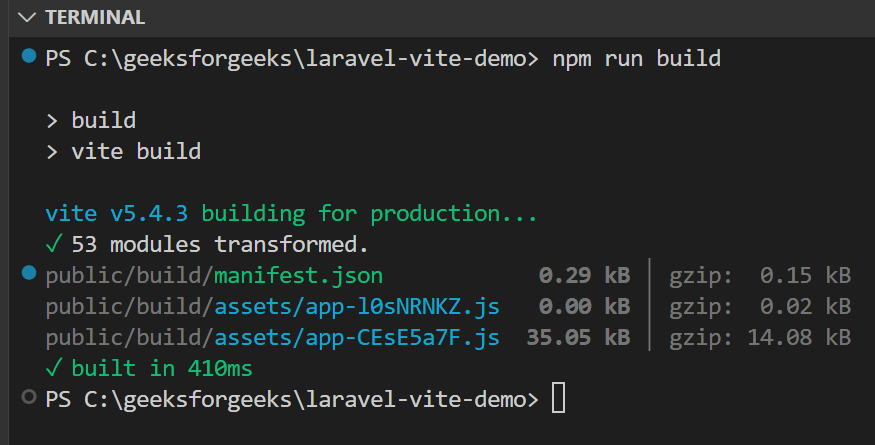
Once you’re ready to deploy your Laravel application to production, you need to bundle your assets using Vite's production build command:
npm run buildThis will further optimize as well as minify your assets so that they will be fit for use in production. Vite will produce the required files in the public/build folder or in any other specified directory.
When it comes to the frontend framework, If your Laravel based application use Vue or React, then it can easily works with Vite.
For Vue, install the necessary packages:
npm install vue @vitejs/plugin-vueUpdate vite.config.js to include Vue:
Similarly, for React, install the React plugin:
npm install @vitejs/plugin-reactAnd update your configuration:
With these configurations, you can now develop your Vue or React components using Vite within your Laravel project.
By introducing the interaction of Vite and Laravel, a contemporary and effective approach for managing the assets of the frontend crafting is provided. Developer experience is enhanced by Vite with the help of fast development server, HMR, and optimized builds. No matter if you write the basic JavaScript, use Vue or React to develop applications, Vite nicely integrates with Laravel and makes the transition from the development to production phase.