|
VOOZH | about |
|
VOOZH | about |
NPM (Node Package Manager) is the default package manager for Node.js. It helps manage project dependencies, scripts, and third-party libraries, and is automatically installed when you install Node.js.
A package in NodeJS is a reusable module of code that adds functionality to your application. It can be anything from a small utility function to a full-featured library.
To start using NPM in your project, follow these simple steps
First, you need to install NodeJS. NPM is bundled with the NodeJS installation.
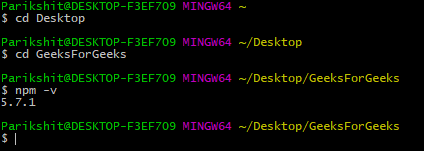
After installation, verify NodeJS and NPM are installed by running the following commands in your terminal:
node -v
npm -v
These commands will show the installed versions of NodeJS and NPM.
In the terminal, navigate to your project directory and run:
npm init -yThis will create a package.json file, which stores metadata about your project, including dependencies and scripts.
To install a package, use the following command
npm install <package-name>For example, to install the Express.js framework
npm install expressThis will add express to the node_modules folder and automatically update the package.json file with the installed package information.
To install packages that you want to use across multiple projects, use the -g flag:
npm install -g <package-name>You can also define custom scripts in the package.json file under the "scripts" section. For example:
{
 "scripts": {
 "start": "node app.js"
 }
}
Then, run the script with
npm startCreate a file named app.js in the project directory to use the package
Now run the application with
node app.jsVisit http://localhost:3000 in your browser, and you should see the message: Hello, World!
In a NodeJS project, dependencies are stored in a package.json file. To install all dependencies listed in the file, run:
npm installThis will download all required packages and place them in the node_modules folder.
To install a specific package, use:
npm install <package-name>You can also install a package as a development dependency using:
npm install <package-name> --save-devDevelopment dependencies are packages needed only during development, such as testing libraries.
To install a package and simultaneously save it in package.json file (in case using NodeJS), add --save flag. The --save flag is default in npm install command so it is equal to npm install package_name command.
Example:
npm install express --saveNote: If there is a package.json file with all the packages mentioned as dependencies already, just type npm install in terminal
You can easily update packages in your project using the following command
npm updateThis will update all packages to their latest compatible versions based on the version constraints in the package.json file.
To update a specific package, run
npm update <package-name>To uninstall packages using npm, follow the below syntax:
npm uninstall <package-name>For uninstall Global Packages
npm uninstall package_name -gNPM has a massive library of packages. Here are a few popular packages that can enhance your NodeJS applications
Packages | Description |
|---|---|
A fast, minimal web framework for building APIs and web applications. | |
A MongoDB object modeling tool for NodeJS. | |
A utility library delivering consistency, customization, and performance. | |
A promise-based HTTP client for making HTTP requests. | |
A popular front-end library used to build user interfaces. | |
Loads environment variables from a .env file into process.env. | |
Automatically restarts the server during development when file changes are detected. | |
A JavaScript testing framework designed to ensure correctness of any NodeJS code. | |
Enables real-time, bidirectional communication between web clients and servers. |
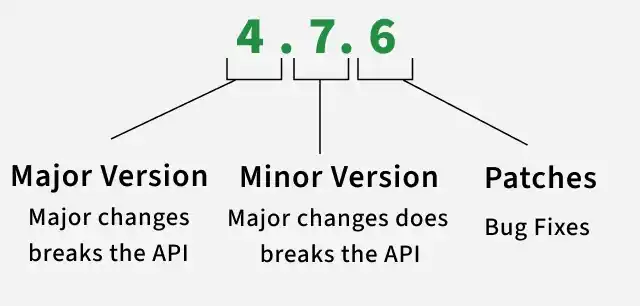
NPM allows you to manage package versions. This is important when you want to ensure that a specific version of a library is used across all environments.
Install a Specific Version
To install a specific version of a package, use:
npm install <package-name>@<version>For example:
npm install express@4.17.1This will install version 4.17.1 of Express, regardless of the latest version.
Dependencies | DevDependencies |
|---|---|
Required to run the application in production. | Required only during development. |
Essential for the app to function properly. | Used for development tools, testing, linting, and bundling. |
Examples: express, mongoose, lodash, react, axios | Examples: nodemon, eslint, jest, mocha, webpack, babel |
Installed using npm install <package> | Installed using npm install <package> --save-dev (or -D) |
Included when running npm install --production | Ignored when running npm install --production |