|
VOOZH | about |
|
VOOZH | about |
Dotenv is a popular npm (Node Package Manager) package used in NodeJS applications to manage environment variables. Environment variables are values that are set outside of an application's code and are accessible to the application during runtime. These variables often contain sensitive information like API keys, database connection strings, or configuration settings.
1. Loading Environment Variables: Dotenv simplifies the process of loading environment variables from a '.env' file into Node.js applications. The '.env' file typically resides in the root directory of the project. It stores key-value pairs of environment variables in a simple format: KEY=VALUE.
_PORT = 3000
API_KEY = localhost
API_PASS= mypassword
2. Parsing and Setting Environment Variables: When you launch your Node.js application, dotenv steps into '.env' file. It reads its contents, and creates individual settings (environment variables) within your program. Through these settings, environment variable are easily accessible throughout your code using process.env.VARIABLE_NAME.
const PORT = process.env.PORT
const API_KEY = process.env.API_KEY
Now make a Project to show use of dotenv for better understanding.
Step 1: Create a application using the following command:
npm init -y
cd foldername
Step 2: Use npm to install dotenv and express package.
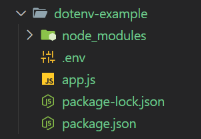
npm i dotenv express Step 3: Create a '.env' file in the root directory and set your sensitive or Important variables.
_PORT = 8000
API_KEY = 'XXXXXX'
ACCESS_TOKEN = 'XXXXXXX'
The Updated Dependences in your package.json file is:
 "dependencies": {
 "dotenv": "^16.4.5",
 "express": "^4.19.2"
 }
Example: Below is an example of dotenv npm.
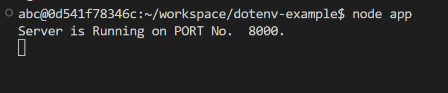
Start your application using the following command:
node app.jsOutput