|
VOOZH | about |
|
VOOZH | about |
Pagination in Ruby on Rails is the process of dividing a large amount of material into smaller, easier-to-manage pages or chunks. This is frequently used in web applications to provide data in a more readable style, which enhances the user experience.
Ruby on Rails provides built-in techniques and gems for implementing pagination. 'will_paginate' is one of the most widely used gems for pagination, although there are other options as well, such as 'pagy' and 'kaminari'.
Table of Content
You can implement pagination in Ruby on Rails manually without using methods like 'will_paginate'. Active Record is an ORM(Object-Relational Mapping) library that provides a set of methods and techniques to interact with databases using classes. We can use the 'limit' and 'offset' methods provided by Active Record.
Step 1: Create a demo project using the command below. It will create a project named 'railsapp' in the current directory. Then use the second command to get into your project directory.
rails new railsapp
cd railsapp
Step 2: Now, we will create a controller and view using the following command. This command creates a controller file named 'posts_controller.rb' in ‘app/controllers’ and its view file 'index.html.erb' in ‘app/views/home’. This command also creates a route file 'config/routes.rb'.
rails generate controller Posts index
Step 3: Next, we will create a 'Post' model which will have attributes as 'title' and 'content'.
rails generate model Post title:string content:text
Step 4: We will run the migration to create the table in our database. Run the following command in terminal. This will execute the migration file and create a posts table in our database with columns for title and content.
rails db:migrate
Step 5: Open 'db/seeds.rb' and fill example data. This code will create 5 posts with title and content.
Then run this command in terminal.
rails db:seed
Step 6: Now, we will implement pagination, for that open 'app/controllers/posts_controller.rb' and write the below code.
Explanation:
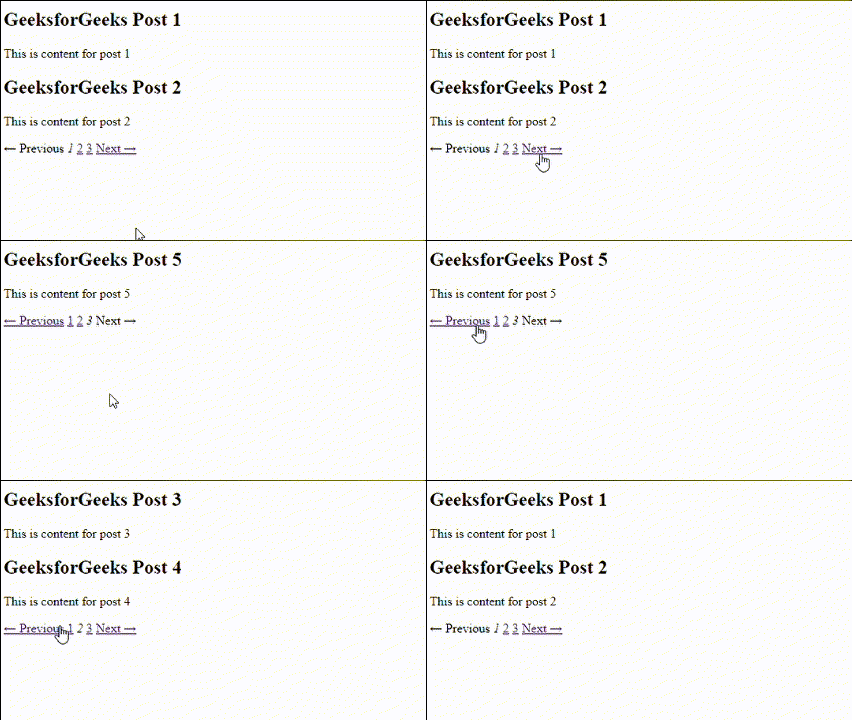
Step 7: Open 'app/views/posts/index.html.erb' and write the below code. It will display the content from database and creates Previous and Next buttons using 'link_to' method.
Step 8: Now, set the index page as root by changing the 'config/routes.rb' as mentioned below in code.
Now, run the server using this command in terminal.
rails server
Output:
Gems are packages of code in Ruby, similar to libraries or plugins in other programming languages. A Gemfile is a configuration file used in Ruby on Rails applications, to specify the gems and their versions that the project depends on. The file is typically named as 'Gemfile'. We can implement pagination with 'will_paginate' gem, which is quite easier then doing manually.
Follow till Step 5 mentioned in previous method for creating Rails project and example database.
Step 1: Add the 'will_paginate' gem to your gemfile using this line. It specifies the gem name and its version.
Run the below command to install the gems.
bundle install
Step 2: Now, edit the 'app/controllers/posts_controller.rb' to add the pagination code using the 'paginate()' method provided by 'will_paginate' gem.
Step 3: Open 'app/views/posts/index.html.erb' and add the below code to display the posts in database on webpage. The button for navigating will be created automatically since we are using 'will_paginate' gem.
Step 4: Edit the 'config/routes.rb' to make the index as root page and run the server using 'rails server' command.
Output:

.png)
.png)
.png)
.png)

.png)
.png)