VOOZH about

URL: https://www.geeksforgeeks.org/system-design/composite-method-software-design-pattern/

⇱ Composite Design Pattern - GeeksforGeeks


  • Courses
  • Tutorials
  • Interview Prep

Composite Design Pattern

Last Updated : 12 May, 2026

The Composite Pattern is a structural design pattern that organizes objects into tree structures, enabling clients to treat individual and composite objects uniformly through a common interface.

  • Treats individual objects and groups uniformly using a common interface.
  • Simplifies code and supports easy extension without modifying client logic.

Example: In a file system, files (leaf nodes) and folders (composite nodes) share a common interface, allowing operations like display or delete to be performed uniformly on both individual items and groups.

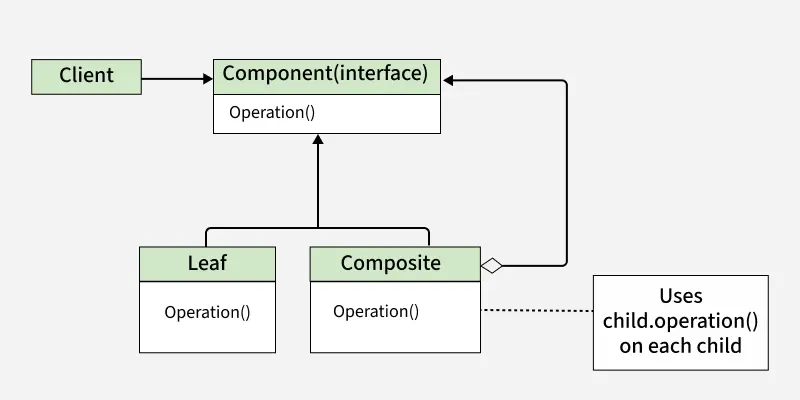
👁 composite_pattern
Composite Pattern

In the Diagram

  • The Client interacts with the Component interface, allowing it to work with both Leaf and Composite objects uniformly.
  • Leaf represents individual objects, while Composite represents a group of objects and can contain multiple children.
  • The Composite recursively calls operations on its child components, forming a tree-like structure.

Part-Whole or Whole-Part Object hierarchies

Part-Whole (Whole-Part) hierarchies represent complex objects (wholes) composed of simpler objects (parts). This structure allows both individual objects and groups of objects to be treated uniformly, often modeled using the Composite Pattern.

Example: In a graphic design application, you might have shapes as individual elements (like circles and rectangles), and you can combine these shapes to create more complex shapes (like a smiley face with eyes and a mouth). The Composite Pattern lets you work with both simple shapes and complex shapes using the same set of operations, making it easier to manage and manipulate them.

In this context:

  • The parts are individual shapes (like circles, rectangles).
  • The wholes are the complex shapes (like a smiley face composed of circles and rectangles).

Real Life Example

The Composite Pattern is useful in various scenarios, such as:

  1. Graphics and GUI Libraries: Building complex graphical structures like shapes and groups.
  2. File Systems: Representing files, directories, and their hierarchical relationships.
  3. Organization Structures: Modeling hierarchical organizational structures like departments, teams and employees.

Component

The Composite Pattern consists of key elements that allow treating individual objects and groups uniformly.

  1. Component: The Component is the common interface for all objects in the composition. It defines the methods that are common to both leaf and composite objects.
  2. Leaf: The Leaf is the individual object that does not have any children. It implements the component interface and provides the specific functionality for individual objects.
  3. Composite: The Composite is the container object that can hold Leaf objects as well as the other Composite objects. It implements the Component interface and provides methods for adding, removing and accessing children.
  4. Client: The Client is responsible for using the Component interface to work with objects in the composition. It treats both Leaf and Composite objects uniformly.

Working

The Composite Pattern works by defining a common interface that is shared by both individual objects and groups of objects.

  • The client interacts with objects through a common Component interface.
  • Leaf objects perform the actual work, while Composite objects store and manage child components.
  • When an operation is called on a composite, it forwards the request to its children recursively.

Uses

The Composite Pattern is used when dealing with hierarchical structures.

  • To represent part–whole hierarchies such as trees or nested structures.
  • To allow clients to treat individual objects and collections uniformly.
  • To simplify client code by avoiding checks for leaf or composite objects.

Implementation Example

You are tasked with developing a software component to manage a hierarchical file system structure. The goal is to implement the Composite Pattern to seamlessly work with individual files and directories as part of a unified hierarchy.

The practical application of the design pattern using code.

1. Component

In the file system hierarchy example, the Component is represented by the FileSystemComponent interface. This interface defines the common interface for both leaf and composite objects. It declares a method, display(), which all classes in the hierarchy must implement.

The Component serves as the foundation for all objects within the hierarchy. Whether it's file or a directory, they all must adhere to this common interface.

2. Leaf

In the context of our file system hierarchy example, Leaf objects are the individual files. These are the objects that do not have any children. Here is an implementation of a leaf object, a file:

Here, File is a leaf object. It implements the FileSystemComponent interface by providing a display method. It contains data specific to files, such as their name and size.

3. Composite

In the file system hierarchy example, Composite objects are directories. These are objects that contain other components, including both leaf objects (files) and other composite objects (subdirectories). Here's an implementation of a composite object, a directory:

  • Directory acts as a composite object that implements the FileSystemComponent interface and provides its own display method.
  • It maintains a collection (vector) of FileSystemComponent objects to store files and subdirectories.
  • The addComponent method allows adding child components, enabling a hierarchical file system structure.

4. Client

The Client code interacts with the components through the Component interface, and it doesn't need to be aware of whether it's working with a leaf or a composite object.

In this client code, you can see how the client interacts with both leaf (file) and composite (directory) objects uniformly, without needing to know the specific type of each object.

Complete code of the above Problem


Output
Directory: My Documents
File: document.txt (1024 bytes)
File: image.jpg (2048 bytes)

Advantages

The Composite Pattern offers several benefits when working with hierarchical object structures.

  • Hierarchical Structure: Represents objects in tree-like hierarchies, treating individuals and composites uniformly.
  • Simplified Client Code: Clients interact with objects without distinguishing between single or composite ones.
  • Flexibility: Easily add or remove objects without affecting client code.
  • Code Reusability: Same operations apply to both parts and wholes, reducing duplication.

Disadvantages

Despite its benefits, the Composite Pattern also has some drawbacks.

  • Complex Implementation: Requires a common interface for all objects, making code more intricate.
  • Performance Overhead: Traversing deep hierarchies can slow operations.
  • Limited Type Safety: Common interface may allow invalid operations, risking runtime errors.
  • Extra Memory Usage: Storing child references increases memory consumption.
Comment

Explore