Designing Netflix is a quite common question of system design rounds in interviews. In the world of streaming services, Netflix stands as a monopoly, captivating millions of viewers worldwide with its vast library of content delivered seamlessly to screens of all sizes. Behind this seemingly effortless experience lies a nicely crafted system design. In this article, we will study Netflix's system design.
This section outlines the key features and system expectations needed to build a scalable video streaming platform.
1. Functional Requirements
These define the core features that users interact with in the system.
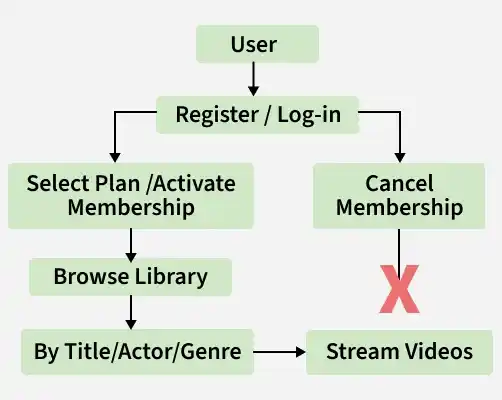
Users should be able to create accounts, log in, and log out.
Subscription management for users.
Allow users to play videos and pause, play, rewind, and fast-forward functionalities.
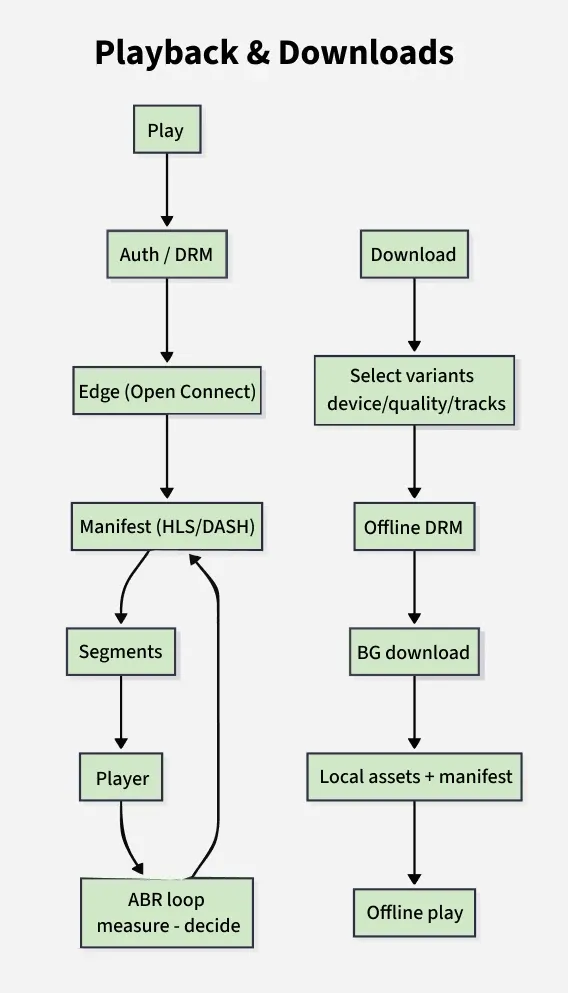
Ability to download content for offline viewing.
Personalized content recommendations based on user preferences and viewing history.
2. Non-Functional Requirements
These define the performance, scalability, and reliability expectations of the system.
Low latency and high responsiveness during content playback.
Scalability to handle a large number of concurrent users.
High availability with minimal downtime.
Secure user authentication and authorization.
Intuitive user interface for easy navigation.
2. High-Level Design
We all are familiar with Netflix services. It handles large categories of movies and television content and users pay the monthly rent to access these contents. Netflix has 180M+ subscribers in 200+ countries.
Netflix works on two clouds AWS and Open Connect. These two clouds work together as the backbone of Netflix and both are highly responsible for providing the best video to the subscribers.
The application has mainly 3 components:
Client (User Device): TV, Xbox, laptop, or mobile phone used to browse and play Netflix videos.
OC (Open Connect / Netflix CDN): Netflix’s global CDN delivers videos from the nearest server for faster streaming, reducing latency and load on central servers.
Backend (Database & Services): Manages non-streaming tasks like content onboarding, video processing, distribution to servers, and traffic management, mostly powered by AWS.
1. Microservices Architecture of Netflix
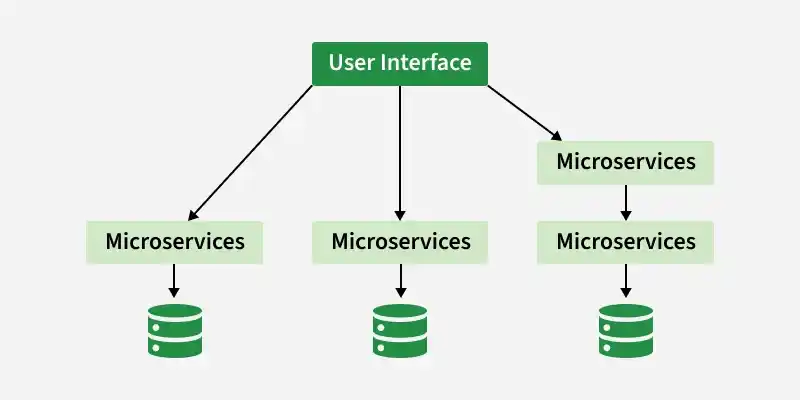
Netflix's architectural style is built as a collection of services. This is known as microservices architecture and this power all of the APIs needed for applications and Web apps. When the request arrives at the endpoint it calls the other microservices for required data and these microservices can also request the data from different microservices. After that, a complete response for the API request is sent back to the endpoint.
In a microservice architecture, services should be independent of each other. For example, The video storage service would be decoupled from the service responsible for transcoding videos.
Ways to improve reliability in microservices systems
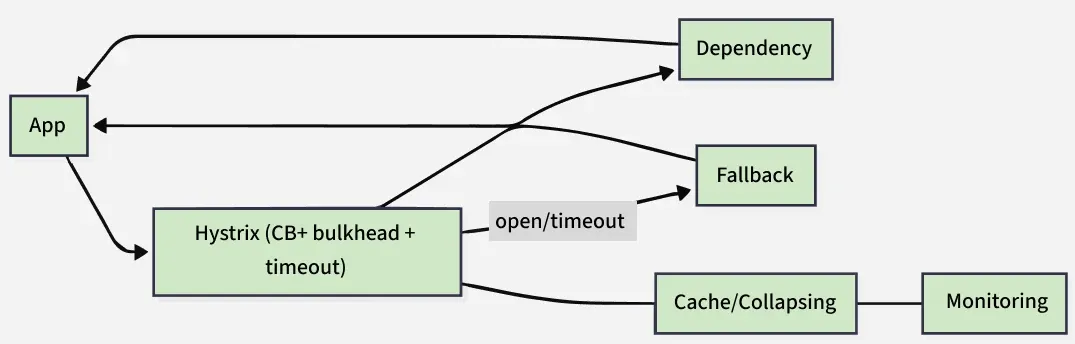
Use Hystrix: Helps isolate failures and prevent cascading issues across services.
Separate Critical Microservices: Keep essential features (search, navigation, play) independent or reliant only on reliable services, ensuring high availability even in failures.
Stateless Servers: Design servers to be replaceable—if one fails, traffic is redirected to another without dependency on any single server.
3. Capacity Estimation (Order-of-Magnitude)
This section estimates system scale in terms of users, traffic, storage, and throughput.
1. Concurrency & Sessions
This estimates how many users are active and generating requests at peak times.
Assume Daily Active Users (DAU) ≈ 250 million.
Peak concurrency ~ 5–10% ⇒ 12.5–25 million simultaneous streams (use 15–20 million for quick math).
Sessions per user per day ≈ 2 ⇒ 500 million play starts/day → ~5.8k QPS average (allow bursts 4–5×).
2. Bitrate & Egress (Adaptive Bitrate, ABR)
This calculates bandwidth usage required to stream video content.
Streams use ABR ladder (240p–4K); assume ~3–4 Mbps average.
1 million concurrent at 3 Mbps ≈ 3 Tbps ≈ 375 GB/s.
At 20 million concurrent and ~3.65 Mbps ⇒ ~73 Tbps (~9.1 TB/s) edge egress.
3. Edge vs Origin (Open Connect impact)
This explains how CDN reduces load on origin servers and improves performance.
Netflix uses its CDN called Open Connect.
With ~98% cache hit rate, origin traffic is ~2% of edge traffic.
This estimates backend API traffic generated by user interactions.
~50 million active users during busy hour.
~15 API calls per user in ~10 minutes.
~750 million calls/10 min ⇒ ~1.25 million RPS burst.
Use caching (Redis/EVCache) with >95–99% hit rate to protect databases.
5. Event/Telemetry Ingest
This measures how much analytics and tracking data the system processes.
~150 events per session.
500 million sessions/day ⇒ ~75 billion events/day.
At ~500 bytes/event ⇒ ~37.5 TB/day (before compression).
Use tools like Apache Kafka and store in Amazon S3 (Parquet format).
6. Storage Footprint (Control Plane, not video masters)
This estimates storage needs for metadata and supporting data.
Catalog metadata: hundreds of GB (replicated).
Artwork/media variants: multi-TB in object storage + CDN.
Personalization cache: 100–200 KB per profile (short-lived).
7. Peaks, Regionality, and Safety Buffers
This ensures the system can handle traffic spikes and regional variations.
Plan for regional traffic spikes and failover scenarios.
Maintain buffers to handle sudden surges in concurrency and requests.
8. One Worked Mini-Example (Talk Track)
This provides a quick summary calculation useful for explaining in interviews.
15M concurrent @ 3 Mbps ⇒ 45 Tbps (~5.6 TB/s).
98% cache hit ⇒ ~0.9 Tbps origin.
500M play starts/day ⇒ ~5.8k QPS avg, ~20–30k burst.
75B events/day ⇒ ~37 TB/day ingest.
Control plane ~1M+ RPS with caching.
9. Why Edges (Open Connect), succinctly
This explains why edge caching is critical for streaming systems.
Performance: faster Time To First Frame (TTFF), smoother playback.
Cost: reduces backbone/cloud bandwidth usage.
Resilience: supports regional isolation and failover.
4. Use-Case Design (Product Surfaces)
Defines the users interaction with the platform—such as browsing content, streaming videos, managing profiles, and receiving personalized recommendations—to ensure a seamless viewing experience.
1. Home / Personalization
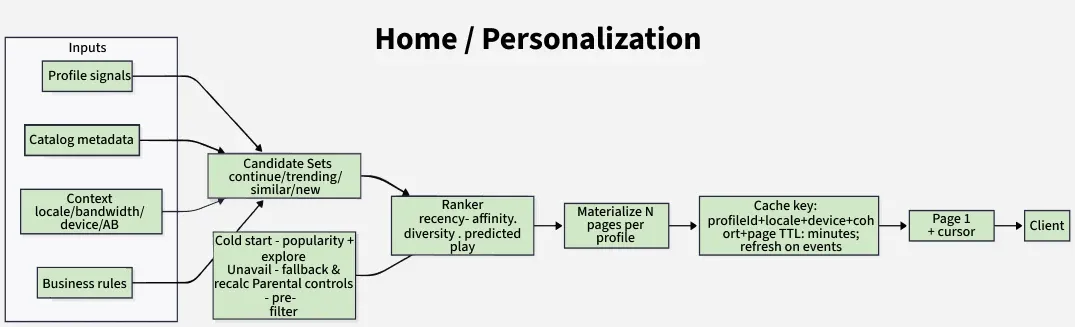
Show each profile a fast, relevant home page (“rows”) that feels fresh but loads in ~100–300 ms p99 from cache.
Repackaging/pruning when codecs/bitrates change across app updates.
Edge cases This handles special scenarios to ensure a consistent offline experience.
Region change after travel: title plays if license remains valid; renewal may be blocked until in-region.
Device clock drift: license checks use secure time sources.
Multiple profiles on one device: enforce per-profile quotas and visibility.
5. Low Level Design
This section focuses on the detailed implementation of components, including classes, data structures, APIs, and interactions between modules.
1. How Does Netflix Onboard a Movie/Video
Netflix receives very high-quality videos and content from the production houses, so before serving the videos to the users it does some preprocessing.
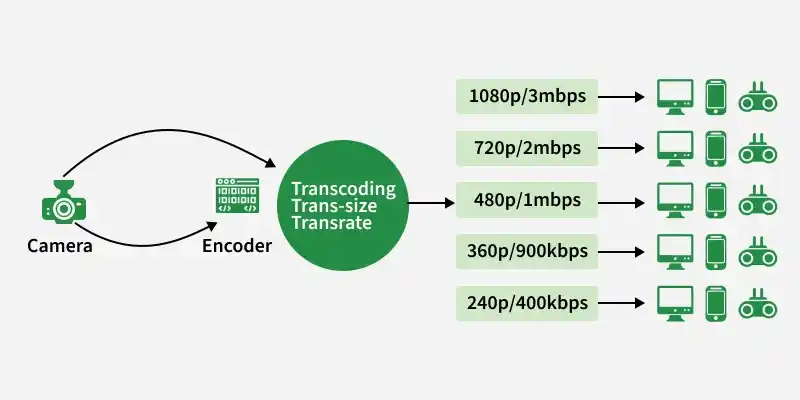
Netflix supports more than 2200 devices and each one of them requires different resolutions and formats.
To make the videos viewable on different devices, Netflix performs transcoding or encoding, which involves finding errors and converting the original video into different formats and resolutions.
Netflix also creates file optimization for different network speeds. The quality of a video is good when you're watching the video at high network speed. Netflix creates multiple replicas (approx 1100-1200) for the same movie with different resolutions.
These replicas require a lot of transcoding and preprocessing. Netflix breaks the original video into different smaller chunks and using parallel workers in AWS it converts these chunks into different formats (like mp4, 3gp, etc) across different resolutions (like 4k, 1080p, and more). After transcoding, once we have multiple copies of the files for the same movie, these files are transferred to each and every Open Connect server which is placed in different locations across the world.
Step by step process of how Netflix ensures optimal streaming quality:
When the user loads the Netflix app on his/her device firstly AWS instances come into the picture and handle some tasks such as login, recommendations, search, user history, the home page, billing, customer support, etc.
After that, when the user hits the play button on a video, Netflix analyzes the network speed or connection stability, and then it figures out the best Open Connect server near to the user.
Depending on the device and screen size, the right video format is streamed into the user's device. While watching a video, you might have noticed that the video appears pixelated and snaps back to HD after a while.
This happens because the application keeps checking the best streaming open connect server and switches between formats (for the best viewing experience) when it's needed.
User data is saved in AWS such as searches, viewing, location, device, reviews, and likes, Netflix uses it to build the movie recommendation for users using the Machine learning model or Hadoop.
2. Traffic Management and Scalability in Netflix
This explains the strategies and infrastructure used by Netflix to handle massive user traffic efficiently and ensure smooth streaming.
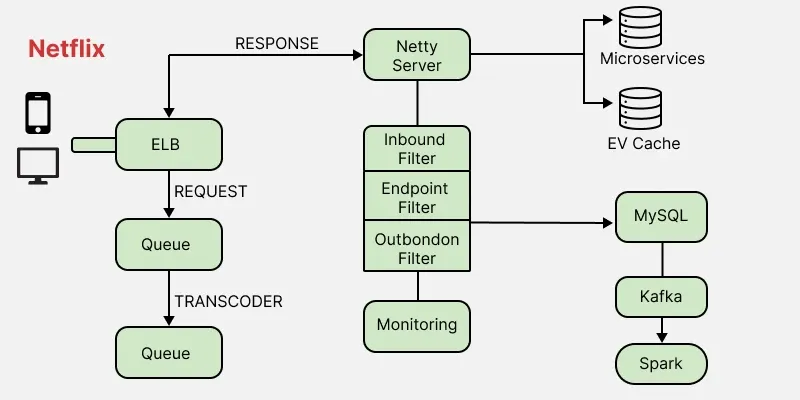
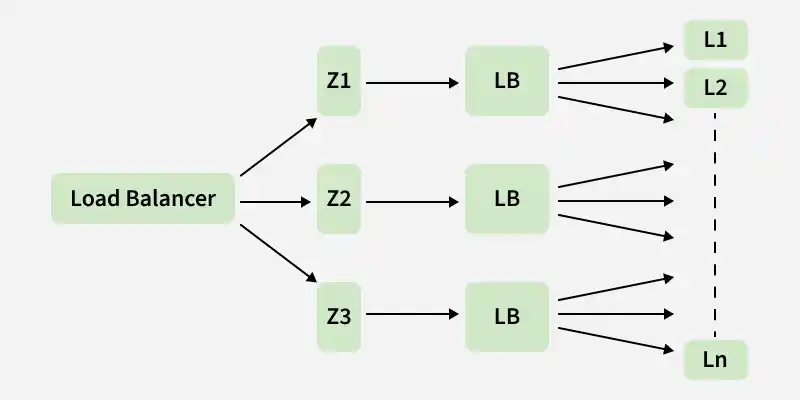
ELB in Netflix is responsible for routing the traffic to front-end services. ELB performs a two-tier load-balancing scheme where the load is balanced over zones first and then instances (servers).
The First-tier consists of basic DNS-based Round Robin Balancing. When the request lands on the first load balancing ( see the figure), it is balanced across one of the zones (using round-robin) that your ELB is configured to use.
The second tier is an array of load balancer instances, and it performs the Round Robin Balancing technique to distribute the request across the instances that are behind it in the same zone.
2. ZUUL
ZUUL is a gateway service that provides dynamic routing, monitoring, resiliency, and security. It provides easy routing based on query parameters, URL, and path. Let's understand the working of its different parts:
The Netty server takes responsibility to handle the network protocol, web server, connection management, and proxying work. When the request will hit the Netty server, it will proxy the request to the inbound filter.
The inbound filter is responsible for authentication, routing, or decorating the request. Then it forwards the request to the endpoint filter.
The endpoint filter is used to return a static response or to forward the request to the backend service (or origin as we call it).
Once it receives the response from the backend service, it sends the request to the outbound filter.
An outbound filter is used for zipping the content, calculating the metrics, or adding/removing custom headers. After that, the response is sent back to the Netty server and then it is received by the client.
Advantages of using ZUUL
You can create some rules and share the traffic by distributing the different parts of the traffic to different servers.
Developers can also do load testing on newly deployed clusters in some machines. They can route some existing traffic on these clusters and check how much load a specific server can bear.
You can also test new services. When you upgrade the service and you want to check how it behaves with the real-time API requests, in that case, you can deploy the particular service on one server and you can redirect some part of the traffic to the new service to check the service in real-time.
We can also filter the bad request by setting the custom rules at the endpoint filter or firewall.
3. Hystrix
In a complex distributed system a server may rely on the response of another server. Dependencies among these servers can create latency and the entire system may stop working if one of the servers will inevitably fail at some point. To solve this problem we can isolate the host application from these external failures.
Hystrix library is designed to do this job. It helps you to control the interactions between these distributed services by adding latency tolerance and fault tolerance logic. Hystrix does this by isolating points of access between the services, remote system, and 3rd party libraries. The library helps to:
Stop cascading failures in a complex distributed system.
control over latency and failure from dependencies accessed (typically over the network) via third-party client libraries.
Fail fast and rapidly recover.
Fallback and gracefully degrade when possible.
Enable near real-time monitoring, alerting, and operational control.
Concurrency-aware request caching. Automated batching through request collapsing
3. EV Cache
In most applications, some amount of data is frequently used. For faster response, these data can be cached in so many endpoints and it can be fetched from the cache instead of the original server. This reduces the load from the original server but the problem is if the node goes down all the cache goes down and this can hit the performance of the application.
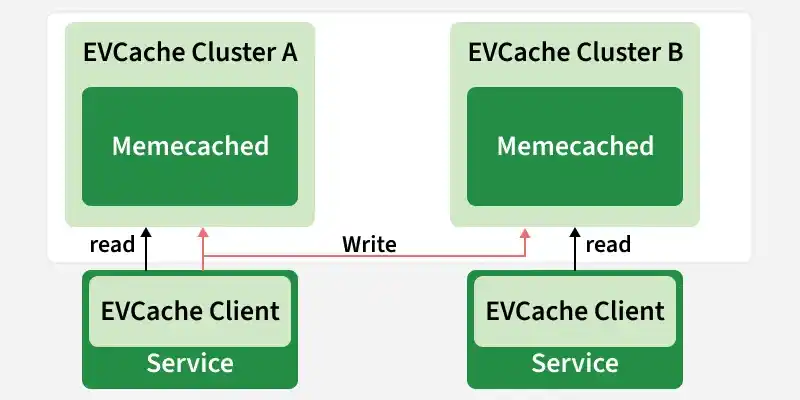
To solve this problem Netflix has built its own custom caching layer called EV cache. EV cache is based on Memcached and it is actually a wrapper around Memcached.
Netflix has deployed a lot of clusters in a number of AWS EC2 instances and these clusters have so many nodes of Memcached and they also have cache clients.
The data is shared across the cluster within the same zone and multiple copies of the cache are stored in sharded nodes.
Every time when write happens to the client all the nodes in all the clusters are updated but when the read happens to the cache, it is only sent to the nearest cluster (not all the cluster and nodes) and its nodes.
In case, a node is not available then read from a different available node. This approach increases performance, availability, and reliability.
4. Data Processing in Netflix Using Kafka And Apache Chukwa
When you click on a video Netflix starts processing data in various terms and it takes less than a nanosecond. Let's discuss how the evolution pipeline works on Netflix.
Netflix uses Kafka and Apache Chukwe to ingest the data which is produced in a different part of the system. Netflix provides almost 500B data events that consume 1.3 PB/day and 8 million events that consume 24 GB/Second during peak time. These events include information like:
Error logs
UI activities
Performance events
Video viewing activities
Troubleshooting and diagnostic events
Apache Chukwe is an open-source data collection system for collecting logs or events from a distributed system. It is built on top of HDFS and Map-reduce framework. It comes with Hadoop’s scalability and robustness features.
It includes a lot of powerful and flexible toolkits to display, monitor, and analyze the result.
Chukwe collects the events from different parts of the system and from Chukwe you can do monitoring and analysis or you can use the dashboard to view the events.
Chukwe writes the event in the Hadoop file sequence format (S3). After that Big Data team processes these S3 Hadoop files and writes Hive in Parquet data format.
This process is called batch processing which basically scans the whole data at the hourly or daily frequency.
To upload online events to EMR/S3, Chukwa also provide traffic to Kafka (the main gate in real-time data processing).
Kafka is responsible for moving data from fronting Kafka to various sinks: S3, Elasticsearch, and secondary Kafka.
Routing of these messages is done using the Apache Samja framework.
Traffic sent by the Chukwe can be full or filtered streams so sometimes you may have to apply further filtering on the Kafka streams.
That is the reason we consider the router to take from one Kafka topic to a different Kafka topic.
5. Elastic Search
In recent years we have seen massive growth in using Elasticsearch within Netflix. Netflix is running approximately 150 clusters of elastic search and 3, 500 hosts with instances. Netflix is using elastic search for data visualization, customer support, and for some error detection in the system.
Example
If a customer is unable to play the video then the customer care executive will resolve this issue using elastic search. The playback team goes to the elastic search and searches for the user to know why the video is not playing on the user's device.
They get to know all the information and events happening for that particular user. They get to know what caused the error in the video stream. Elastic search is also used by the admin to keep track of some information. It is also used to keep track of resource usage and to detect signup or login problems.
6. Apache Spark For Movie Recommendation
Netflix uses Apache Spark and Machine learning for Movie recommendations. Let's understand how it works with an example.
When you load the front page you see multiple rows of different kinds of movies. Netflix personalizes this data and decides what kind of rows or what kind of movies should be displayed to a specific user. This data is based on the user's historical data and preferences.
Also, for that specific user, Netflix performs sorting of the movies and calculates the relevance ranking (for the recommendation) of these movies available on their platform. In Netflix, Apache Spark is used for content recommendations and personalization.
A majority of the machine learning pipelines are run on these large spark clusters. These pipelines are then used to do row selection, sorting, title relevance ranking, and artwork personalization among others.
Video Recommendation System
If a user wants to discover some content or video on Netflix, the recommendation system of Netflix helps users to find their favorite movies or videos. To build this recommendation system Netflix has to predict the user interest and it gathers different kinds of data from the users such as:
User interaction with the service (viewing history and how the user rated other titles)
Other members with similar tastes and preferences.
Metadata information from the previously watched videos for a user such as titles, genre, categories, actors, release year, etc.
The device of the user, at what time a user is more active, and for how long a user is active.
Netflix uses two different algorithms to build a recommendation system...
Collaborative Filtering: Recommends content based on similar user behavior—if two users rate items alike, they’ll likely enjoy similar content in the future.
Content-Based Filtering: Recommends videos similar to those a user liked before, using item attributes (title, genre, actors, etc.) and the user’s profile preferences.
6. Database Design
Netflix uses two different databases i.e. MySQL(RDBMS) and Cassandra(NoSQL) for different purposes.
1. EC2 Deployed MySQL
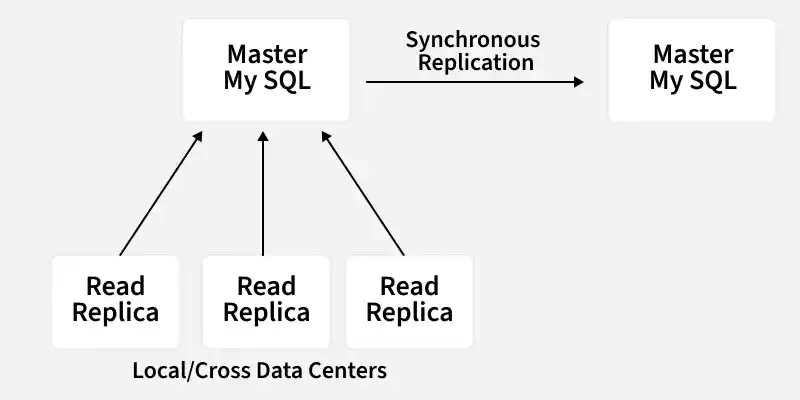
Netflix saves data like billing information, user information, and transaction information in MySQL because it needs ACID compliance. Netflix has a master-master setup for MySQL and it is deployed on Amazon's large EC2 instances using InnoDB.
The setup follows the "Synchronous replication protocol" where if the writer happens to be the primary master node then it will be also replicated to another master node. The acknowledgment will be sent only if both the primary and remote master nodes' write have been confirmed. This ensures the high availability of data. Netflix has set up the read replica for each and every node (local, as well as cross-region). This ensures high availability and scalability.
All the read queries are redirected to the read replicas and only the write queries are redirected to the master nodes.
In the case of a primary master MySQL failure, the secondary master node will take over the primary role, and the route53 (DNS configuration) entry for the database will be changed to this new primary node.
This will also redirect the write queries to this new primary master node.
2. Cassandra
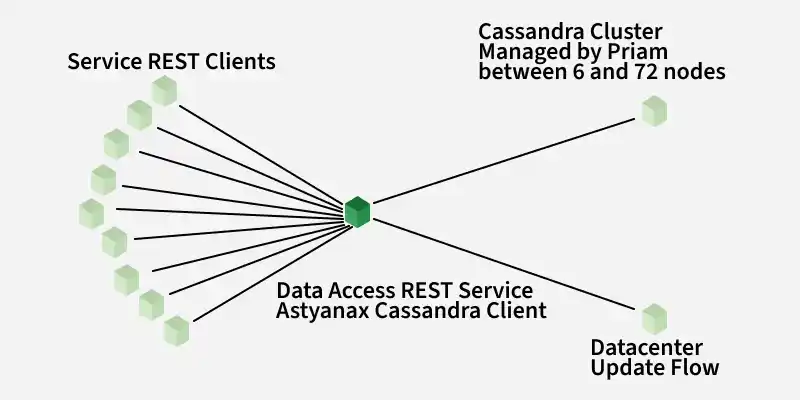
Cassandra is a NoSQL database that can handle large amounts of data and it can also handle heavy writing and reading. When Netflix started acquiring more users, the viewing history data for each member also started increasing. This increases the total number of viewing history data and it becomes challenging for Netflix to handle this massive amount of data.
Netflix scaled the storage of viewing history data-keeping two main goals in their mind:
Smaller Storage Footprint.
Consistent Read/Write Performance as viewing per member grows (viewing history data write-to-read ratio is about 9:1 in Cassandra).
Initially, the viewing history was stored in Cassandra in a single row. When the number of users started increasing on Netflix the row sizes as well as the overall data size increased. This resulted in high storage, more operational cost, and slow performance of the application. The solution to this problem was to compress the old rows.
Netflix divided the data into two parts:
Live Viewing History (LiveVH): Stores recent viewing data with frequent updates, kept uncompressed for fast ETL processing.
Compressed Viewing History (CompressedVH): Stores older viewing records with rare updates, compressed to save storage space.
7. Personalization & Search
Help each profile find something to watch fast (reduce time-to-first-play, increase completion). Balance relevance (you’ll like it), diversity (not all sequels), and freshness (new/returning titles)
1. Signals
This defines the various signals used to understand user behavior and preferences.
Behavioral: plays, pauses, stops, rewinds, completion %, dwell time on title pages, add-to-list, browse depth.
Contextual: device type, time of day, network quality, household profile (Kids, language).
Social-like affinity (implicit): “people who watched X also watched Y.”
Quality signals: prior user satisfaction (finishes), early abandons, rewatch ratio.
2. Features & Storage
This describes how features are generated, stored, and accessed for recommendations.
Offline feature store: heavy aggregates (e.g., long-term genre affinity, recency decay counts) computed in Spark and written to a feature store (batch cadence: hours).
Online/near-real-time features: short windows (last session, last 15 min); maintained via stream processors fed from event bus.
Join strategy: at request time, the ranker joins candidate titles with the latest profile features + item features (cached in EVCache).
3. Candidate Generation (recall → a few thousand)
This step generates a large set of relevant content candidates for ranking.
Collaborative filtering recall: “viewers like you also watched…” (matrix-factorization or ANN over embeddings).
Content-based recall: same genre/theme/cast embeddings; language/region filters.
Business rules: new & expiring, licensed for region/profile, parental controls.
Contextual recall: device-aware (shorter runtime picks on mobile nights), session-aware (continue watching, episodic next-up).
4. Ranking (reduce to a few dozen rows)
This stage ranks and filters candidates to show the most relevant content.
Two-stage ranker:
Lightweight scorer (GBDT/logistic) trims 2–5k candidates to ~200–400.
Heavier model (pointwise/pairwise LTR, neural ranker) orders the final page(s).
Objective blend: predicted play start (pPlay) × expected watch time (EWT) × completion likelihood × diversity boost × freshness.
Diversity & saturation controls: limit near-duplicates (same franchise), spread genres, ensure at least N “exploration” picks.
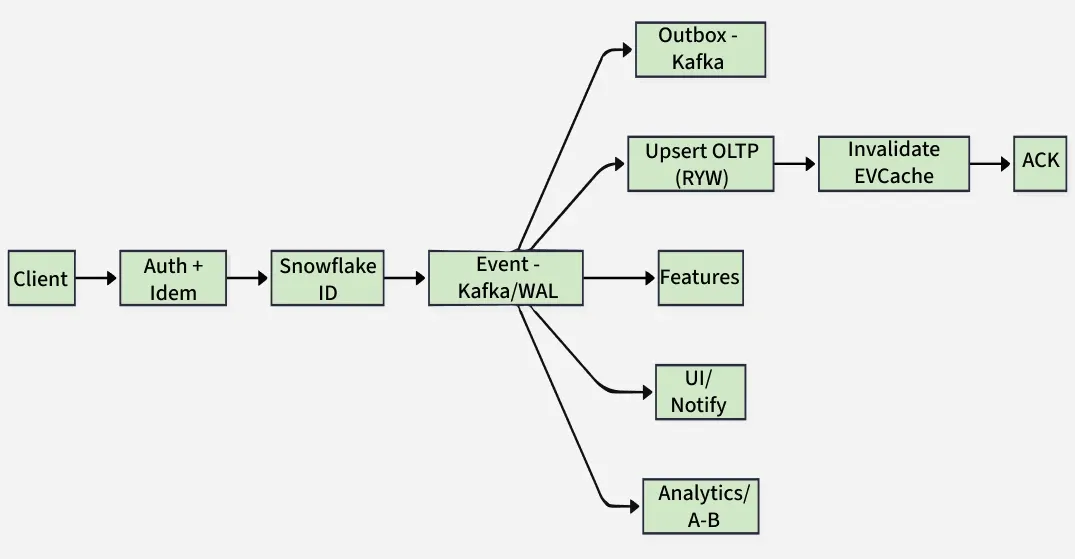
This flow handles user actions like adding content to a list or rating, ensuring durability and consistency.
Validate & authorize: check profile, entitlement, parental controls; idempotency key to avoid duplicates on retries.
ID allocation & logging: allocate Snowflake ID; write append-only event (e.g., ListItemAdded, RatingSet) to Apache Kafka / WAL first (source of truth).
Transactional outbox: if using OLTP, use outbox → Kafka to avoid dual-write races.
State update: upsert OLTP row (profile list / rating table) with read-your-writes guarantee for the caller (session stickiness or client merge).
Cache maintenance: targeted EVCache invalidation (per-profile list keys, per-title aggregates).
Async fans: Features update user/title features for ranking (e.g., affinity boosts); Notifications/UI refresh “My List”, badges, and row ordering; Analytics handle counters and A/B beacons (latency-insensitive).
2. Home Rows (Read)
This flow retrieves personalized content rows efficiently for the user’s home screen.
Hot path: read materialized per-profile pages from EVCache (TTL minutes; staggered jitter to avoid thundering herds).
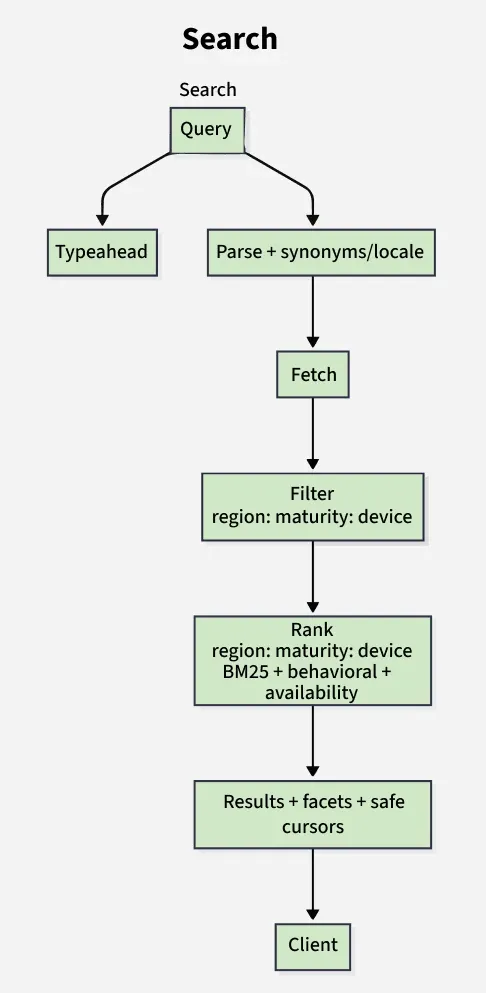
Miss path: fetch candidates (recent/popular/continue-watching) from feature store + catalog, apply eligibility filters (region/DRM availability, maturity rating, device capabilities), and rank using recency, similarity, affinity, and diversity.
Assemble page: join artwork, language tracks, watch-state; store in cache; return results.
Pagination: use opaque cursor (last score + tie-breakers) for stable paging; tolerate eventual consistency.
Freshness: background refresh on new plays/ratings; soft real-time SLAs (seconds).
Degradation: fallback to heuristic rows (e.g., “Top 10”, “Recently Added”) if ranking/indexing lags.
9. Storage Model (Pragmatic)
This section describes how different types of data are stored and organized across databases and storage systems for scalability and efficiency.