The Decorator Design Pattern is a structural pattern that lets you dynamically add behavior to individual objects without changing other objects of the same class. It uses decorator classes to wrap concrete components, making functionality more flexible and reusable.
Wraps existing objects using decorator classes to add new behavior at runtime.
Extends functionality without modifying original code, following the open/closed principle.
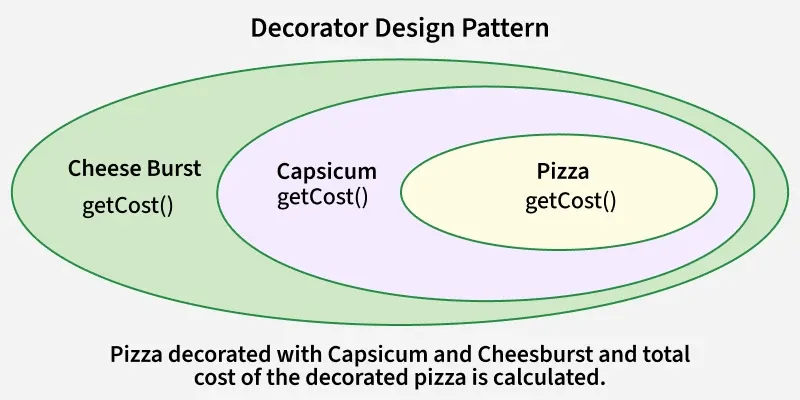
Capsicum acts as the first decorator, wrapping the pizza and adding its own cost using getCost().
Cheese Burst is another decorator that wraps the previous layer and adds additional cost.
The final price is calculated as Pizza + Capsicum + Cheese Burst, demonstrating how the Decorator Pattern adds behavior dynamically.
Real-World Examples
The Decorator Pattern is widely used in software systems to dynamically add new features or behaviors to objects without modifying their original structure.
1. Coffee Shop Application: A basic coffee object is enhanced with add-ons like milk, sugar, or whipped cream. Each add-on acts as a decorator that dynamically adds cost and behavior.
2. Video Streaming Platforms: Videos can be wrapped with decorators for subtitles, audio enhancements, or language options. Multiple features can be added without modifying the original video object.
3. Text Processing Applications: Plain text can be decorated with bold, italic, or underline formatting. Multiple text styles can be combined dynamically using decorators.
4. Video Streaming Platforms: A video object can be enhanced with features like subtitles, language options, or audio enhancements. These features act as decorators, adding functionality without modifying the original video.
5. Java I/O Streams: In Java, a FileInputStream can be wrapped with BufferedInputStream or DataInputStream. Each wrapper adds new functionality without altering the core stream.
Components
The Decorator Pattern consists of key elements that work together to dynamically extend object behavior.
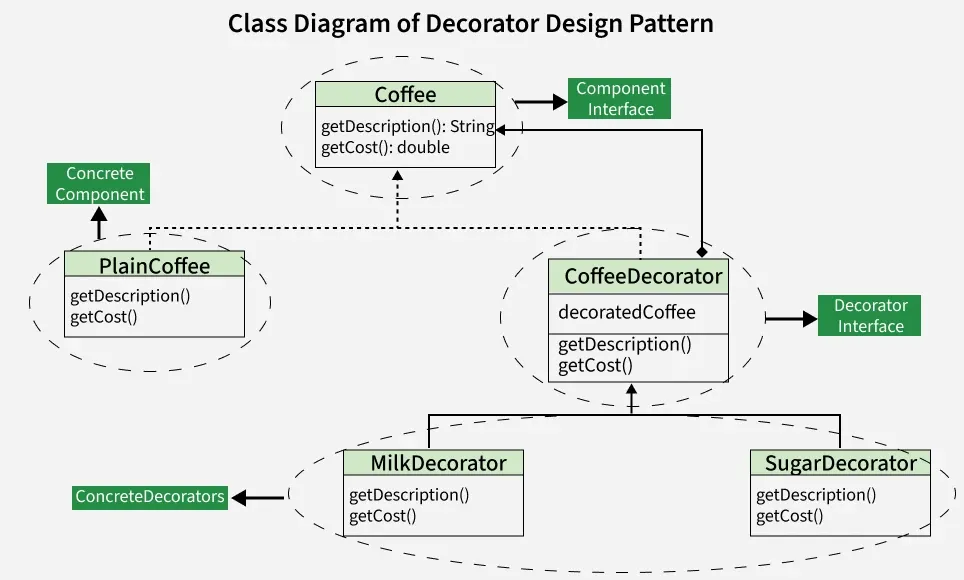
Component Interface: Defines common operations for components and decorators.
Concrete Component: Core object with basic functionality.
Decorator: Abstract wrapper that holds a Component reference and adds behavior.
Concrete Decorator: Specific decorators that extend functionality of the component.
Working
The Decorator Pattern works by wrapping objects to add new behavior without modifying their original structure.
Define a component interface that both the core object and decorators implement.
Create a concrete component that implements the interface.
Create decorator classes that also implement the interface and have a reference to a component object.
Decorator classes add or override behavior by delegating to the wrapped object.
Uses
The Decorator Pattern is used when:
We want to add responsibilities to objects without subclassing, avoiding the need to create multiple derived classes.
We need to combine behaviors flexibly at runtime, allowing features to be added or removed dynamically as needed.
We want to extend functionality of a class in a transparent way, without modifying its original code or structure.
Implementation Example
Problem statement
Suppose we are building a coffee shop application where customers can order different types of coffee. Each coffee can have various optional add-ons such as milk, sugar, whipped cream, etc. We want to implement a system where we can dynamically add these add-ons to a coffee order without modifying the coffee classes themselves.
Using the Decorator Pattern allows us to add optional features (add-ons) to coffee orders dynamically without altering the core coffee classes. This promotes code flexibility, scalability and maintainability as new add-ons can be easily introduced and combined with different types of coffee orders.
This example shows the practical application of the design pattern using code.
1. Component Interface(Coffee)
This is the interface Coffee representing the component.
It declares two methods getDescription() and getCost() which must be implemented by concrete components and decorators.
2. ConcreteComponent(PlainCoffee)
PlainCoffee is a concrete class implementing the Coffee interface.
It provides the description and cost of plain coffee by implementing the getDescription() and getCost() methods.
3. Decorator(CoffeeDecorator)
CoffeeDecorator is an abstract class implementing the Coffee interface.
It maintains a reference to the decorated Coffee object.
The getDescription() and getCost() methods are implemented to delegate to the decorated coffee object.