Creating a web crawler system requires careful planning to make sure it collects and uses web content effectively while being able to handle large amounts of data. We'll explore the main parts and design choices of such a system in this article.
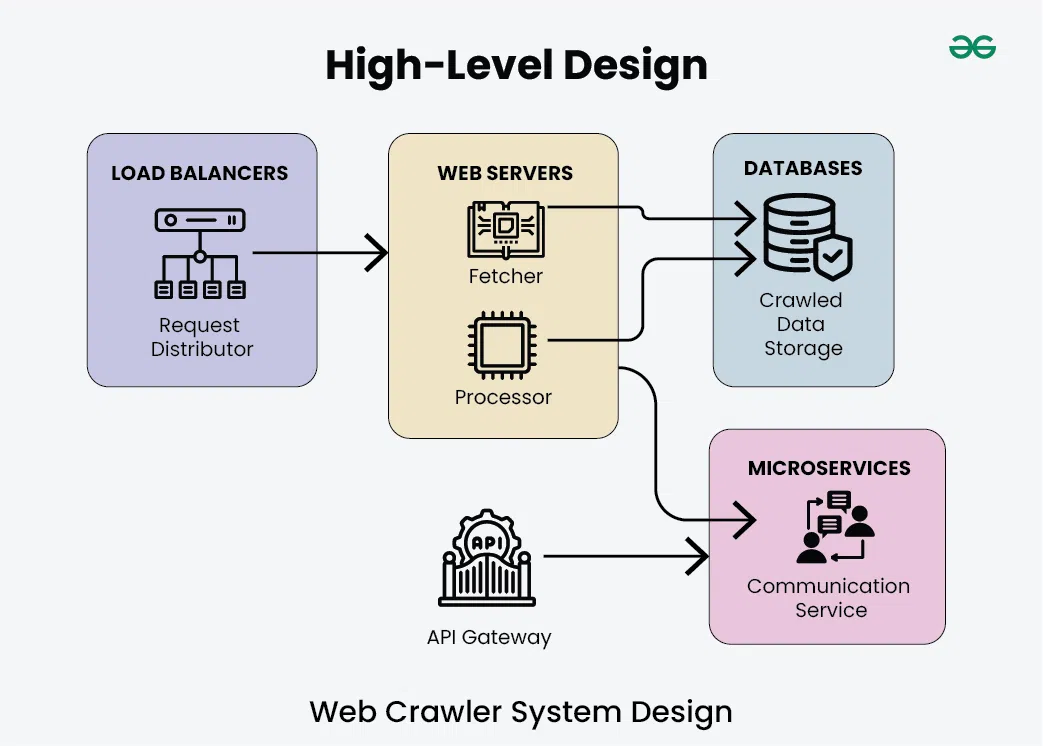
The load balancer serves as the entry point for incoming requests to the web crawler system.
The "Request Distributor" component within the load balancer distributes incoming requests among multiple web servers for load balancing and fault tolerance.
2. Web Servers
The web servers are responsible for fetching and processing web pages. Within the web servers section, there are two main components:
Fetcher: This component fetches web pages from the internet based on the URLs provided.
Processor: This component processes the fetched web pages, extracting relevant information and performing any required data processing or analysis.
3. Databases (Crawled Data Storage)
The databases store the crawled data obtained from the processed web pages.
This section represents the storage layer where crawled data is persisted for future retrieval and analysis.
The microservices architecture includes a communication service responsible for facilitating communication between various components of the system.
This section represents the interaction layer where microservices handle communication tasks such as message passing, event notification, and coordination between different parts of the system.
The API gateway acts as the main entry point for external users to use the web crawler system. It combines all the different functions offered by the small software programs into a single, easy-to-use interface.
This ensures that all requests are handled securely, that users are confirmed as who they say they are, and that the number of requests is controlled to prevent overloading.
The URLs table stores information about the URLs encountered during crawling. It typically includes the following columns:
URL: The URL of the web page.
Status: The status of the URL (e.g., crawled, pending, error).
Last Crawled: Timestamp indicating when the URL was last crawled.
Depth: The depth of the URL in the crawl hierarchy (e.g., root, first-level link, second-level link)
2. Content Table
The content table stores the content extracted from crawled web pages. It may include columns such as:
URL: The URL of the web page.
Title: The title of the web page.
Text Content: The main text content of the web page.
Metadata: Any metadata associated with the web page (e.g., author, publish date).
HTML Source: The raw HTML source code of the web page.
3. Links Table
The links table stores information about the links extracted from crawled web pages. It typically includes columns like:
Source URL: The URL of the web page where the link was found.
Target URL: The URL linked to from the source page.
Anchor Text: The anchor text associated with the link.
Link Type: The type of link (e.g., internal, external).
4. Index Table
The index table stores indexed information for efficient search and retrieval. It may include columns like:
Keyword: The indexed keyword extracted from the content.
URLs: The URLs associated with the indexed keyword.
Frequency: The frequency of the keyword occurrence in the content.
5. Metadata Table
The metadata table stores additional metadata about crawled web pages. It can include columns like:
URL: The URL of the web page.
Content-Type: The MIME type of the web page (e.g., text/html, image/jpeg).
Content-Length: The size of the web page content in bytes.
HTTP Status Code: The HTTP status code returned when fetching the web page.
Microservices and API Used for Web Crawler System Design
1. Microservices used for Web Crawler System Design
Crawler Service:
Responsible for core crawling functionality.
Exposes endpoints for managing crawling tasks.
Database Service:
Manages database operations.
Provides endpoints for interacting with the database service.
Queue Service:
Manages the queue of URLs to be crawled.
Offers endpoints for queue management.
Analysis Service:
Performs additional analysis on crawled data.
Exposes endpoints for triggering analysis tasks.
Notification Service:
Sends notifications based on crawling events.
Provides endpoints for notification management.
2. APIs Used for Web Crawler System Design
1. Crawler API:
Endpoints:
/add-url
/retrieve-data
/start-crawl
Example Requests:
1. Adding URL to crawl:
{
"url": "https://example.com/"
}
2. Retrieving crawled data:
{
"url": "https://example.com/",
"data": "Crawled data content..."
}
3. Starting crawl:
{
"message": "Crawl started successfully"
}
2. Database API:
Endpoints:
/store-data
/query-data
Example Requests:
1. Storing crawled data:
{
"url": "https://example.com/",
"data": "Crawled data content..."
}
2. Querying indexed information:
{
"query": "SELECT * FROM crawled_data WHERE keyword='example'"
}
3. Queue API:
Endpoints:
/enqueue-url
/dequeue-url
/monitor-queue
Example Requests:
1. Enqueueing URL for crawling:
{
"url": "https://example.com/"
}
2. Dequeueing URL from queue:
{
"url": "https://example.com/"
}
3. Monitoring queue status:
{
"status": "Queue is running smoothly"
}
4. Analysis API:
Endpoints:
/trigger-analysis
/submit-data
/retrieve-results
Example Requests:
1. Triggering analysis on crawled data:
{
"task": "Sentiment analysis",
"data": "Crawled data content..."
}
2. Submitting data for analysis:
{
"task": "Keyword extraction",
"data": "Crawled data content..."
}
3. Retrieving analysis results:
{
"task": "Sentiment analysis",
"result": "Positive"
}
5. Notification API:
Endpoints:
/subscribe
/configure-preferences
/receive-updates
Example Requests:
1. Subscribing to notifications:
{
"email": "user@example.com"
}
2. Configuring notification preferences:
{
"preferences": {
"email": true,
"sms": false
}
}
3. Receiving real-time updates:
{
"event": "Crawl completed",
"message": "Crawl of https://example.com/ completed successfully"
}
Scalability for Web Crawler System Design
Auto-scaling: Configure the system to automatically adjust server capacity based on workload demands, ensuring optimal performance during peak traffic periods and minimizing costs during low activity.
Horizontal Scaling: Design the system to scale horizontally by adding more instances of components such as crawlers, queues, and databases, allowing it to handle increased traffic and processing requirements.
Load Balancing: Implement load balancing techniques to evenly distribute incoming requests across multiple servers or instances, optimizing resource utilization and improving fault tolerance.
Database Sharding: Distribute data across multiple database servers through sharding techniques, improving database performance, scalability, and fault tolerance by reducing data volume and query load on individual servers.
Content Delivery Network (CDN): Utilize a CDN to cache and serve static assets from servers located closer to end-users, reducing latency, improving content delivery speed, and offloading traffic from origin servers.



.webp)