|
VOOZH | about |
|
VOOZH | about |
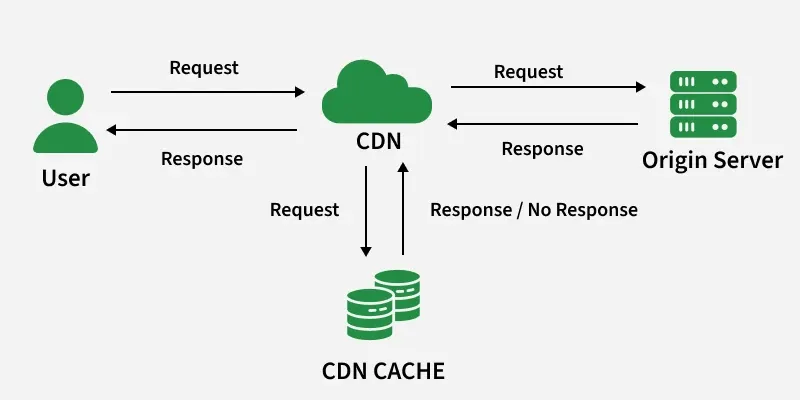
A CDN (Content Delivery Network) is a network of globally distributed servers that stores and delivers website/app content like images, videos, CSS, JS, and files from the nearest edge server, so users get faster load time, lower latency, and better availability, while the main origin server load also reduces.
Example: When a user in India opens a website hosted in the US, the CDN delivers images and files from a nearby server (e.g., Mumbai), making the website load much faster.
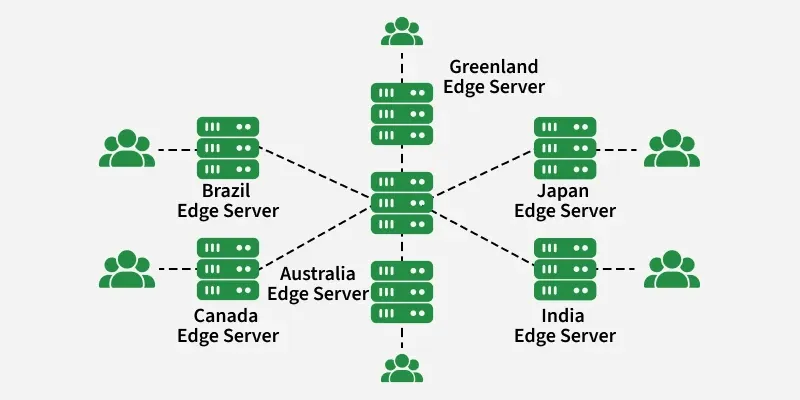
In a Content Delivery Network, the origin server contains the original version and the edge servers are distributed across various location around the world.
Step by step process of how CDN's work:
Example: suppose when there is someone in Canada request on our website which might be hosted in USA, they will be served from the closest edge location such as the London edge location. This much quicker than having the visitor make a complete request to the origin server which will increase the latency.
A CDN must support both functional and non-functional needs.
This section describes the core features required for a CDN system.
This section defines system qualities like performance, scalability, and reliability.
You can estimate the system capacity by analyzing certain data like traffic, number of user coming on site, storage requirements, etc. By analyzing whole data we can further calculate the required storage capacity for whole year. Here is the simplified calculation given:
Traffic is 50,000 vistors per month
Traffic per second = 50000/30*24*60*60
= 0.019Assumption: 40% of requests served by CDN
20% of static contentCDN static TPS = 0.019×40%×20% = 0.019×0.40×0.20
= 0.00152 requests/secStorage required (approx 200kb/file size) = 0.00152*200 = 0.304 KB/S
Storage required per year = 0.304×60×60×24×365 = 9.14 GB/year
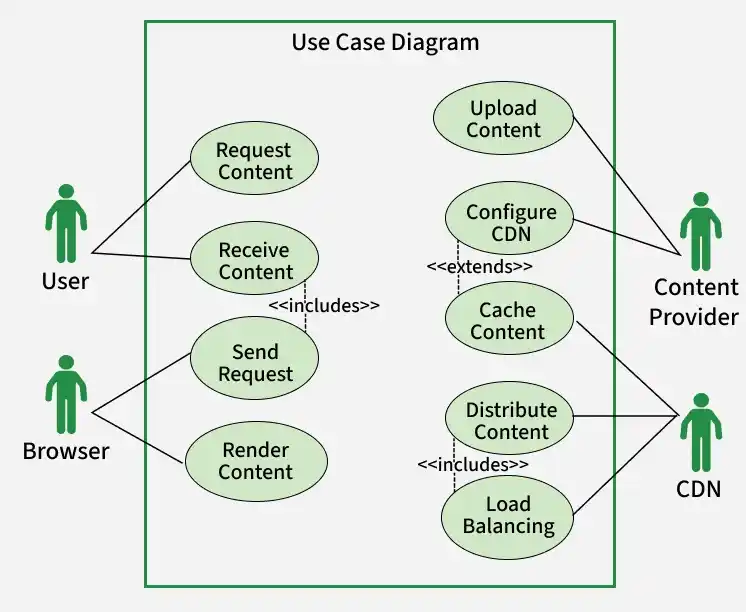
It shows how users request content, the CDN caches and delivers it via edge servers, while the content provider uploads and manages content.
This diagram illustrates how different actors interact with the CDN system to deliver content efficiently.
User (End User): The user initiates the process by requesting content (such as images, videos, or web pages) through their browser. The CDN processes this request and delivers the content back to the user with low latency and high performance.
Content Provider: The content provider uploads content (e.g., media files, website assets) to the CDN and configures settings like caching rules and distribution policies. This ensures content is properly stored and optimized for delivery.
CDN System: The CDN acts as the core system that handles all operations related to content delivery. When a request is received, the CDN first checks if the content is available in cache. If available, it serves the content directly; otherwise, it fetches it from the origin server, caches it, and then delivers it to the user.
Cache Content: This is a mandatory step where the CDN stores frequently accessed content in edge servers to reduce latency and improve performance.
Distribute Content: The CDN distributes content to users based on their geographic location, ensuring faster delivery.
Load Balancing: Requests are distributed across multiple servers to avoid overload and ensure efficient resource utilization.
Upload Content & Configure CDN: These are optional actions performed by content providers to manage and customize how content is delivered through the CDN.
Overall, the diagram shows how the CDN ensures fast, scalable, and reliable content delivery by combining caching, load balancing, and intelligent traffic management.
Low-level design involves unique specifications for each thing of the CDN. It interprets high level design right into a greater granular blueprint, providing a guide for developers to put into effect individual modules.
Low-level design focuses on internal modules.
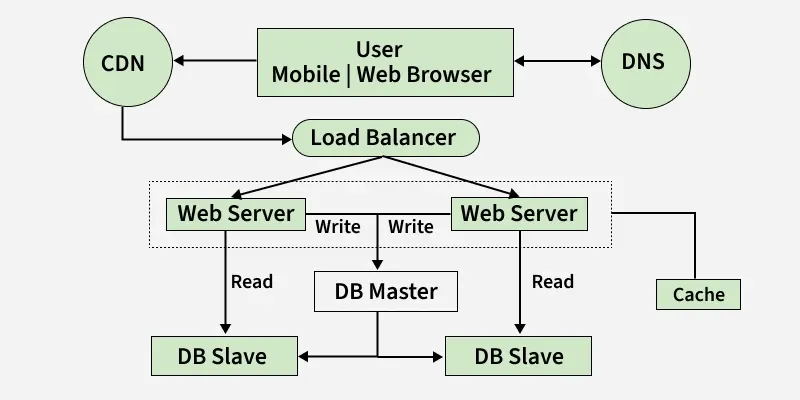
High-level design presents an architectural evaluation of the CDN. It makes a speciality of the interplay among important additives and the general flow of data.
In the High-Level Design (HLD), the structure of the Content Delivery Network (CDN) is printed with a focus at the distribution of edge servers globally.
Role:
This defines how edge servers improve performance and handle user requests.
The HLD presents perception into how part servers interact with the starting place server. It outlines the procedure of content material retrieval from the origin server and how updates are propagated at some point of the CDN.
Role:
This defines how content is fetched, updated, and kept available.
Introducing a central controller, the HLD elaborates on the control and coordination of edge servers.
Role:
This defines how the CDN controller manages and optimizes the network.
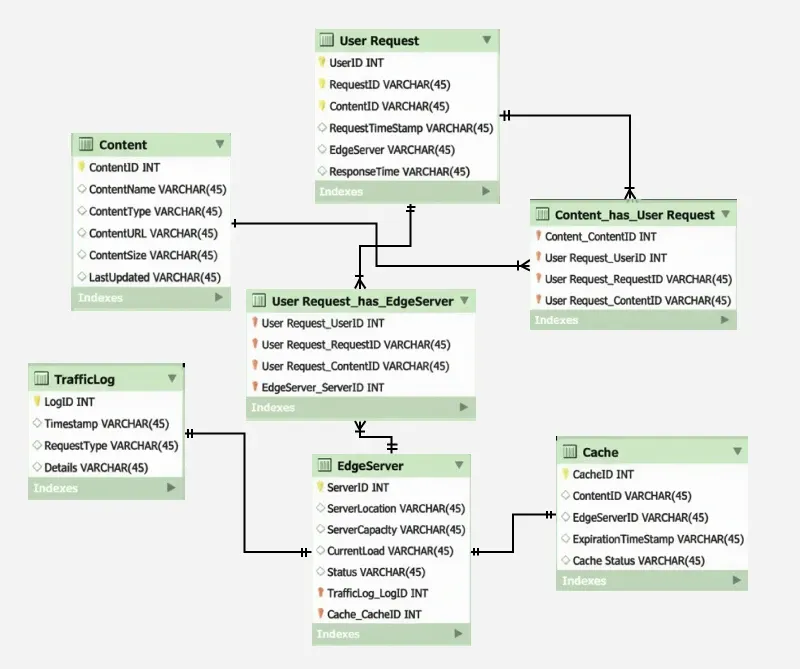
A CDN database stores content metadata, edge server info, cache status, and request logs to manage fast delivery and monitoring.
Content Table: This table stores information about the content served by the CDN, including its type, location, and size.
Content_id: Unique identifier for each piece of content.
Content_name: Descriptive name or title of the content.
Content_type: Indicates the type of content (e.g., image, video, script).
Content_url: URL or path to the content on the CDN.
Content_size: Size of the content file.
Last_updated: Timestamp indicating when the content was last updated.
Edge Server Table: This table represents the edge servers in the CDN, including their location, capacity, current load, and operational status.
Server_id: Unique identifier for each edge server.
Server_location: Geographical location of the edge server.
Server_capacity: Capacity or resources of the server (CPU, RAM, storage).
Current_load: Current load or usage on the server.
Status: Operational status of the server (active, standby, offline).
User Request Table: This table logs user requests, recording details such as user ID, requested content, the edge server used, and response time.
Request_id: Unique identifier for each user request.
User_id: ID of the user making the request.
Content_id: ID of the requested content.
Request_timestamp: Timestamp indicating when the request was made.
Edge_server_used: ID of the edge server that fulfilled the request.
Response_time: Time taken to fulfill the request.
Traffic Log Table: This table stores logs related to CDN activities, providing insights into different types of requests and events.
Log_id: Unique identifier for each log entry.
Timestamp: Timestamp indicating when the log entry was created.
Request_type: Type of request (content retrieval, cache purge, etc.).
Details: Additional details about the request or event.
Cache Table: This table manages the caching information, including content ID, edge server ID, expiration details, and cache status.
Cache_id: Unique identifier for each cache entry.
Content_id: ID of the content being cached.
Edge_server_id: ID of the edge server where the content is cached.
Expiration_timestamp: Timestamp indicating when the cached content expires.
Cache_status: Status of the cache (valid, expired, purged).
APIs are used to add, fetch, update, and purge content so edge servers can cache and deliver data faster.
It defines backend endpoints to manage CDN content operations like add, fetch, update, and purge cache.
Add New Content API (POST) Request:
/api/content
Retrieve Content Details API (GET) Request:
/api/content/c12345
Update Content API (PUT) Request:
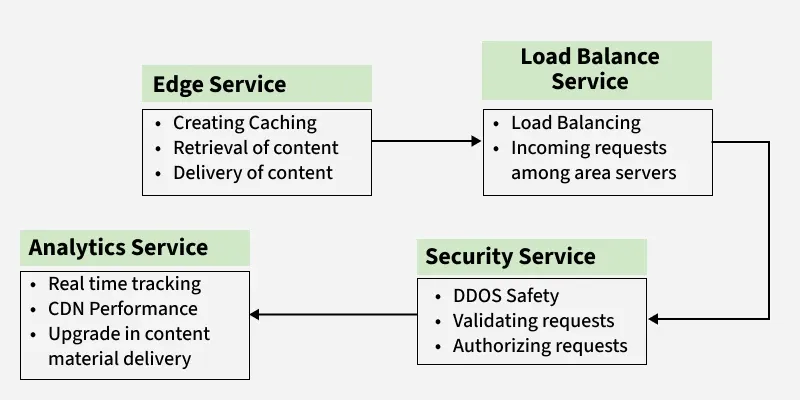
/api/content/c12345Edge Service, Load Balancer Service, Security Service, and Analytics Service work together to cache, route, protect, and monitor content delivery.
The Edge Service in the Microservices and APIs Used section of the design specializes in dealing with content caching, retrieval, and delivery.
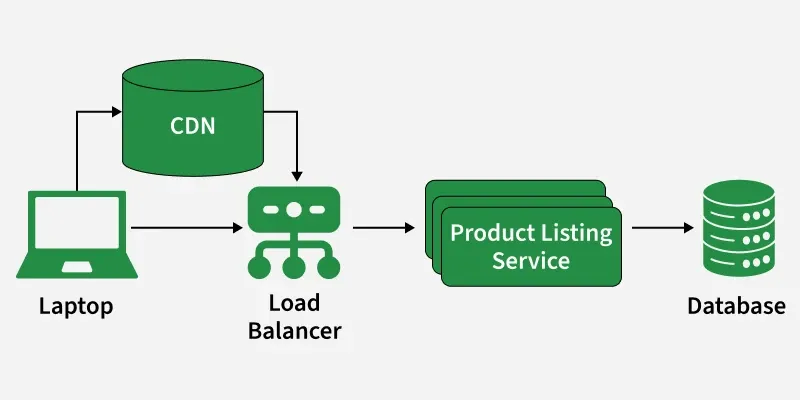
This microservice is devoted to load balancing and distributing incoming requests among area servers.
The Security Service microservice is responsible for imposing security features together with DDoS safety and access controls.
The Analytics Service microservice is designed to collect and procedure overall performance metrics.
Scalability ensures CDN works under heavy load.
This section explains how the system scales by adding more servers to handle increased traffic.
This section explains scaling by upgrading existing server resources.
This section describes how stateless architecture improves scalability.