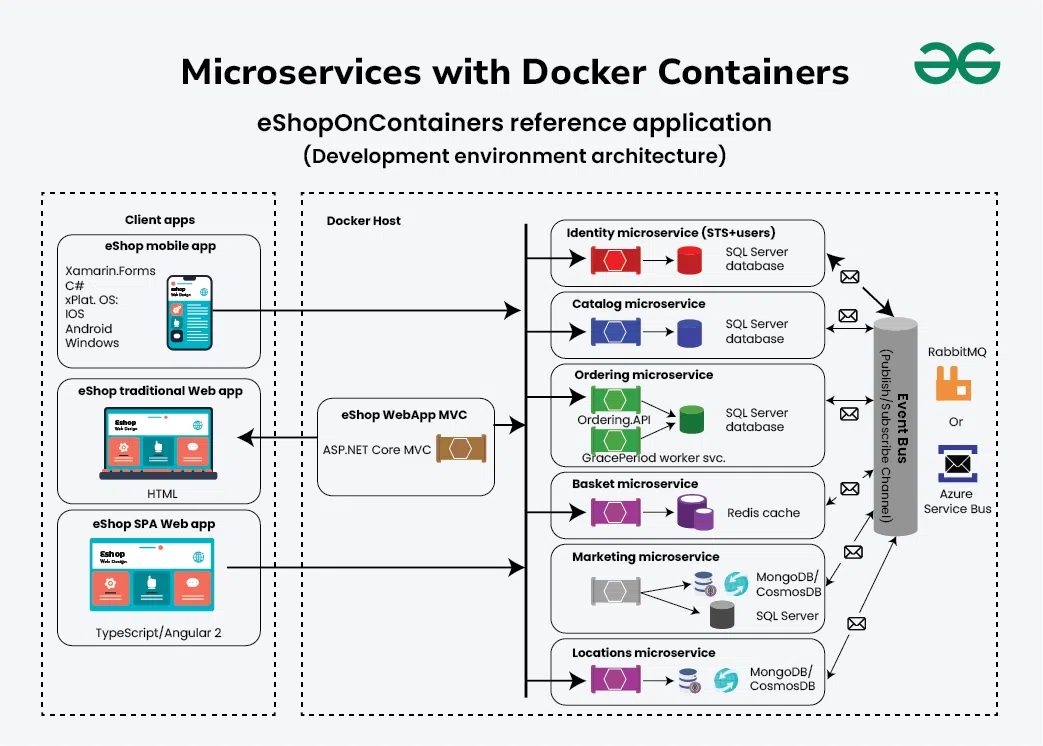
Designing a Microservices Architecture with Docker containers
Last Updated : 1 Jun, 2026
Microservices architecture with Docker uses lightweight containers to package and run independent services. It simplifies deployment, improves scalability, and ensures consistent application behavior across different environments.
Independent Service Deployment: Each microservice runs inside its own Docker container, allowing services to be developed, deployed, and updated independently.
Improved Scalability and Reliability: Docker enables easy scaling of individual services and provides a consistent runtime environment, improving system resilience and efficiency.
Importance of Containerization
Consistency: Containers package the application along with all required dependencies, ensuring the same environment across development, testing, and production. This eliminates the common "it works on my machine" problem.
Portability: Containerized applications can be easily moved across different environments and infrastructures. This simplifies deployment and supports faster scaling.
Resource Efficiency: Containers share the host operating system kernel, making them more lightweight than virtual machines. This reduces infrastructure costs while improving performance.
Isolation and Security: Containers isolate applications running on the same host, preventing conflicts between services. Packaging applications and dependencies together also reduces the attack surface and simplifies management.
Scalability and Orchestration: Tools such as Kubernetes automate the deployment, scaling, and management of containers. This improves availability, simplifies operations, and enables dynamic scaling based on workload demands.
Steps to set up the environment for Docker
Follow these steps to install Docker and prepare an environment for building and running containerized applications.
Step 1: Install Docker: Install Docker Engine on your operating system (Windows, macOS, or Linux) using the official installation package and setup instructions.
Step 2: Verify Installation: Run docker --version in the terminal to confirm that Docker is installed and accessible on your system.
Step 3: Create a Dockerfile: Create a Dockerfile that defines the application environment, dependencies, configurations, and runtime instructions.
Step 4: Build Docker Images: Use the docker build command to create a Docker image containing the application and all required dependencies.
Step 5: Run Docker Containers: Launch containers using the docker run command and configure ports, volumes, and environment variables as needed.
Step 6: Use Docker Compose (Optional): For multi-container applications, use Docker Compose to define and manage services, networks, and volumes through a single docker-compose.yml file.
Step 7: Explore Docker Hub: Use Docker Hub to download ready-made images, find base images, or share your own container images with others.
Step 8: Monitor and Manage Containers: Use commands like docker ps and docker logs to monitor containers. For large-scale deployments, tools such as Docker Swarm or Kubernetes can be used for orchestration and scaling.
Using Docker in creation of microservices involves splitting your application into smaller deployable components. All of the microservices are confined in individual Docker containers, and are contained along with all the dependencies necessary for the containers to run.
One should employ Dockerfiles that describe the specifications for creating a microservice and its appropriate surroundings for web development, testing, and deployment.
BMC or orchestration tools such as Kubernetes are used in order to manage multiple microservice containers, make them deployable at once, scaling of services and discovery of new services.
This approach helps achieve better elasticity, modularity, and sustainability because it supports the CI/CD processes, optimizes the usage of resources, and isolates services to increase their reliability.
Real-World Examples
Many leading technology companies use deployment strategies to ensure reliable releases, minimal downtime, and a better user experience.
Netflix
Netflix uses a combination of Blue-Green Deployment and Canary Releases to safely introduce new features and updates.
New features are first released to a limited group of users, while system health metrics such as error rates and user activity are closely monitored.
This approach reduces risk, protects the user experience, and allows Netflix to validate changes before a full rollout.
Amazon
Amazon heavily relies on Rolling Deployment to release updates across its large-scale infrastructure.
Updates are gradually deployed to microservices across servers instead of updating everything at once.
This ensures high availability, minimal downtime, and smooth service for millions of customers.
Spotify
Spotify uses Feature Toggles (Feature Flags) to support continuous deployment and A/B testing.
New features are deployed into production but remain hidden until enabled through feature flags.
This allows Spotify to test features with specific users, collect feedback, and make data-driven decisions before a wider release.
Etsy
Etsy follows a Continuous Deployment approach supported by extensive automation and testing.
Code changes are automatically tested and deployed multiple times a day when they pass all validation checks.
This enables rapid delivery of improvements while maintaining application quality and reliability.
Uber
Uber combines Canary Releases with Rollback Strategies to manage updates across its global platform.
New microservice versions are first released to a small group of users, while monitoring tools track performance and detect issues.
If problems are identified, Uber quickly rolls back to the previous stable version, ensuring service stability and uninterrupted operations.
Choosing the Right Communication Protocols
Selecting the right communication protocol is important for ensuring efficient, scalable, and reliable communication between services.
RESTful APIs: Best for simple, stateless communication using standard HTTP methods (GET, POST, PUT, DELETE). They are easy to understand, widely supported, and suitable for many applications.
Message Queues (AMQP, MQTT): Ideal for asynchronous communication and event-driven systems. They improve reliability and scalability by ensuring message delivery between services.
gRPC: Suitable for high-performance applications requiring low latency and efficient communication. It uses HTTP/2 and Protocol Buffers, making it ideal for internal microservice communication.
GraphQL: Allows clients to request only the data they need, reducing over-fetching and under-fetching. This improves flexibility and efficiency in client-server interactions.
Event-Driven Architectures: Technologies like Kafka and RabbitMQ support publish-subscribe communication. They enable scalable, real-time event processing while keeping services loosely coupled.
Custom Protocols: Used for specialized requirements where standard protocols are insufficient. They provide flexibility but increase development and maintenance effort.
Data Management Techniques
Choosing the right data management approach is essential for maintaining scalability, consistency, and reliability in a microservices architecture.
Database per Service: Each microservice has its own dedicated database, ensuring data isolation and reducing dependencies between services. This also supports polyglot persistence, allowing each service to use the most suitable database technology.
Shared Database: Multiple microservices access a common database when shared data is required across services. Proper schema design and access controls are important to maintain data integrity and avoid tight coupling.
Event Sourcing and CQRS: Event Sourcing stores all state changes as events, enabling auditing and state reconstruction. CQRS separates command and query operations, improving system performance, scalability, and reliability.
Load Balancing Techniques
Load balancing helps distribute traffic efficiently across service instances, improving performance, availability, and scalability in microservices architectures.
Client-Side Load Balancing: Clients distribute requests among service instances using methods such as round-robin or weighted balancing. This reduces the load-balancing responsibility on the server.
Server-Side Load Balancing: Dedicated load balancers route incoming traffic across backend service instances. Common algorithms include round-robin, least connections, and adaptive load balancing.
Service Mesh: Tools like Istio and Linkerd use sidecar proxies to manage traffic, service discovery, and load balancing. This improves observability and control over service communication.
Dynamic Scaling: Auto-scaling mechanisms adjust the number of service instances based on metrics such as CPU usage or request volume. This helps efficiently handle changing workloads.
Global Load Balancing: Traffic is distributed across geographically distributed service instances to reduce latency and improve availability. CDNs and global load balancers are commonly used for this purpose.
Orchestration Techniques
Orchestration techniques automate the deployment, scaling, and management of microservices, ensuring reliability and efficient resource utilization.
Container Orchestration Tools: Tools such as Kubernetes, Docker Swarm, and Nomad automate deployment, scaling, service discovery, load balancing, health checks, and rolling updates.
Service Deployment: Orchestration platforms support declarative deployments using YAML or JSON manifests. This ensures consistent configurations across environments and simplifies application deployment.
Scaling and Autoscaling: Service instances are automatically increased or decreased based on metrics such as CPU usage, memory consumption, or request rates, helping maintain optimal performance.
High Availability: Orchestration tools distribute service replicas across multiple nodes or regions. They provide fault tolerance through self-healing and automatic traffic redirection to healthy instances.
Management Techniques
Management techniques help monitor, secure, deploy, and optimize microservices in production environments.
Monitoring and Logging: Tools such as Prometheus, Grafana, and the ELK Stack collect metrics and logs to monitor service health, performance, and troubleshooting.
Security and Access Control: Identity and access management solutions, along with encryption and policy enforcement, help secure microservices and protect sensitive data during communication.
CI/CD Integration: Continuous Integration and Continuous Deployment pipelines automate building, testing, container image creation, deployment, and rolling updates across environments.
Service Discovery: Service registries enable microservices to automatically locate and communicate with each other, improving flexibility and resilience.
Cost Management: Management tools provide insights into resource usage, quotas, and infrastructure costs, helping organizations optimize resource allocation and reduce expenses.
Deployment Strategies
Deployment strategies define how new application versions are released while ensuring reliability and minimal disruption.
Blue-Green Deployment
Uses two identical environments to enable safe and seamless application updates.
Maintains separate Blue (current) and Green (updated) environments, allowing updates without affecting live users.
Traffic is switched to the Green environment after testing, with quick rollback possible if issues occur.
Canary Deployment
Releases updates gradually to a small group of users before a full rollout.
Deploys the new version to a limited audience to test performance and stability.
Reduces deployment risk by detecting issues before reaching all users.
Rolling Deployment
Updates application instances gradually rather than all at once.
Replaces old instances with new ones in phases while keeping the service available.
Minimizes downtime and reduces the impact of deployment failures.
Feature Toggles (Feature Flags)
Allow features to be enabled or disabled without redeploying the application.
Separate feature release from code deployment, providing greater flexibility.
Useful for A/B testing, gradual rollouts, and quickly disabling problematic features.
Rollback Strategy
Provides a way to restore a previous stable version when deployment issues occur.
Uses versioned releases to quickly revert changes if problems are detected.
Helps maintain system stability and reduces service disruption.