|
VOOZH | about |
|
VOOZH | about |
The MVC (Model–View–Controller) design pattern divides an application into three separate components: Model, View, and Controller. This separation of concerns improves code organization, maintainability, and scalability. Each component handles a specific responsibility, making the application easier to modify and extend.
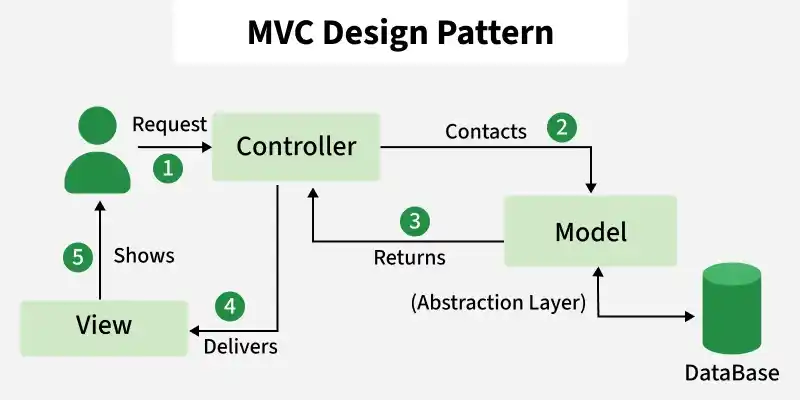
The MVC architecture consists of three main components that work together to separate application logic, data handling, and user interaction.
The Model component in the MVC (Model-View-Controller) design pattern demonstrates the data and business logic of an application. It is responsible for managing the application's data, processing business rules, and responding to requests for information from other components, such as the View and the Controller.
Displays the data from the Model to the user and sends user inputs to the Controller. It is passive and does not directly interact with the Model. Instead, it receives data from the Model and sends user inputs to the Controller for processing.
Controller acts as an intermediary between the Model and the View. It handles user input and updates the Model accordingly and updates the View to reflect changes in the Model. It contains application logic, such as input validation and data transformation.
An e-commerce website follows the MVC pattern to separate data handling, user interface, and request processing.
MVC is used to organize an application by separating responsibilities, making development and maintenance easier.
This below communication flow ensures that each component is responsible for a specific aspect of the application's functionality, leading to a more maintainable and scalable architecture
Problem Statement
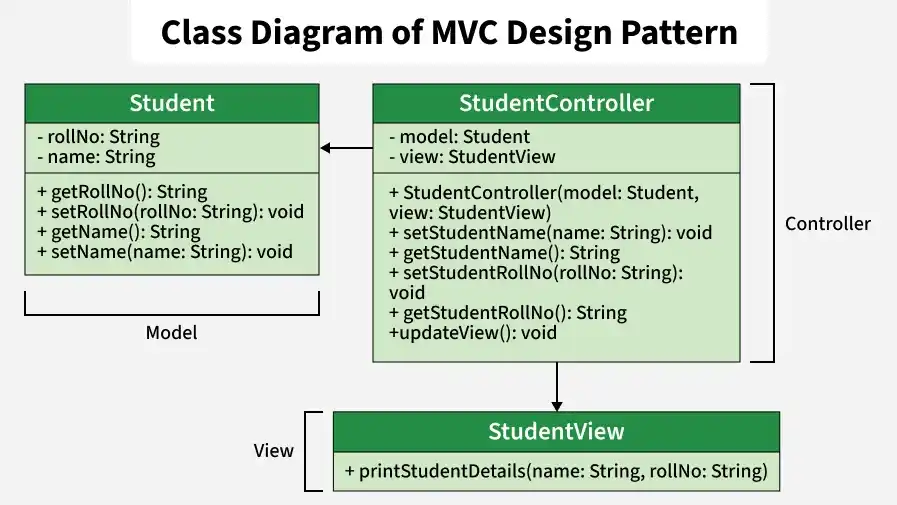
Design and implement a student management application using the MVC (Model–View–Controller) design pattern. The Model manages student data such as name and roll number, the View displays the information, and the Controller handles updates and coordinates communication between the Model and View.
Let’s break down into the component wise code.
Represents the data (student's name and roll number) and provides methods to access and modify this data.
Represents how the data (student details) should be displayed to the user. Contains a method (printStudentDetails) to print the student's name and roll number.
Acts as an intermediary between the Model and the View. Contains references to the Model and View objects. Provides methods to update the Model (e.g., setStudentName, setStudentRollNo) and to update the View (updateView).
The complete code for the above example is.
Student:
Name: Lokesh Sharma
Roll No: 15UCS157
Student:
Name: Vikram Sharma
Roll No: 15UCS157
MVC provides several benefits that improve application design and development.
Despite its benefits, MVC has some limitations.