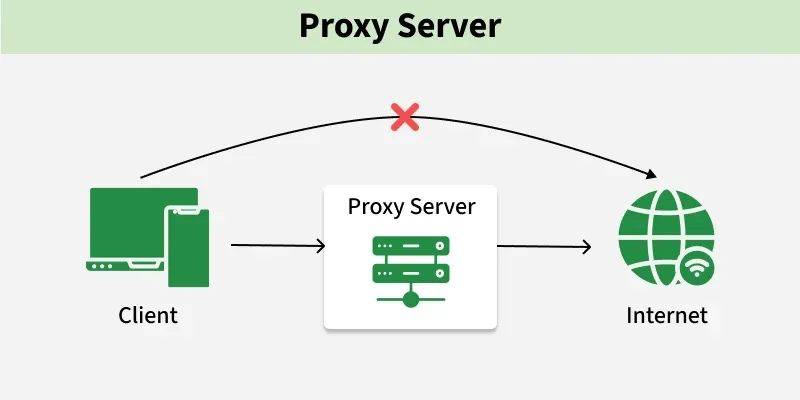
A proxy server acts as an intermediary between a client and a server, forwarding requests and responses between them. It helps manage and control traffic while improving performance, security, and privacy.
Forwards client requests to servers and returns responses while hiding client identity to enhance security.
Improves performance through caching and efficient traffic control mechanisms.
Example: When a user accesses a website through a proxy server, the request first goes to the proxy, which forwards it to the website. The website responds to the proxy, which then sends the data back to the user.
Proxy servers are used to improve security, performance, and control over network traffic.
Content Filtering: Proxies can block access to specific websites or content categories based on policies, helping enforce usage rules and prevent access to harmful content.
Privacy & Anonymity: Forward proxies hide the client’s IP address, providing anonymity and protecting user identity and location.
Security & Access Control: Proxies inspect incoming traffic, block malicious content, and enforce access control to protect sensitive resources.
Load Balancing: Reverse proxies distribute incoming requests across multiple servers, improving performance and preventing server overload.
Caching: Proxies store frequently accessed data locally, reducing server load and improving response time.
Types of Proxies
Proxy servers can be broadly categorized based on whether they act on behalf of the client or the server.
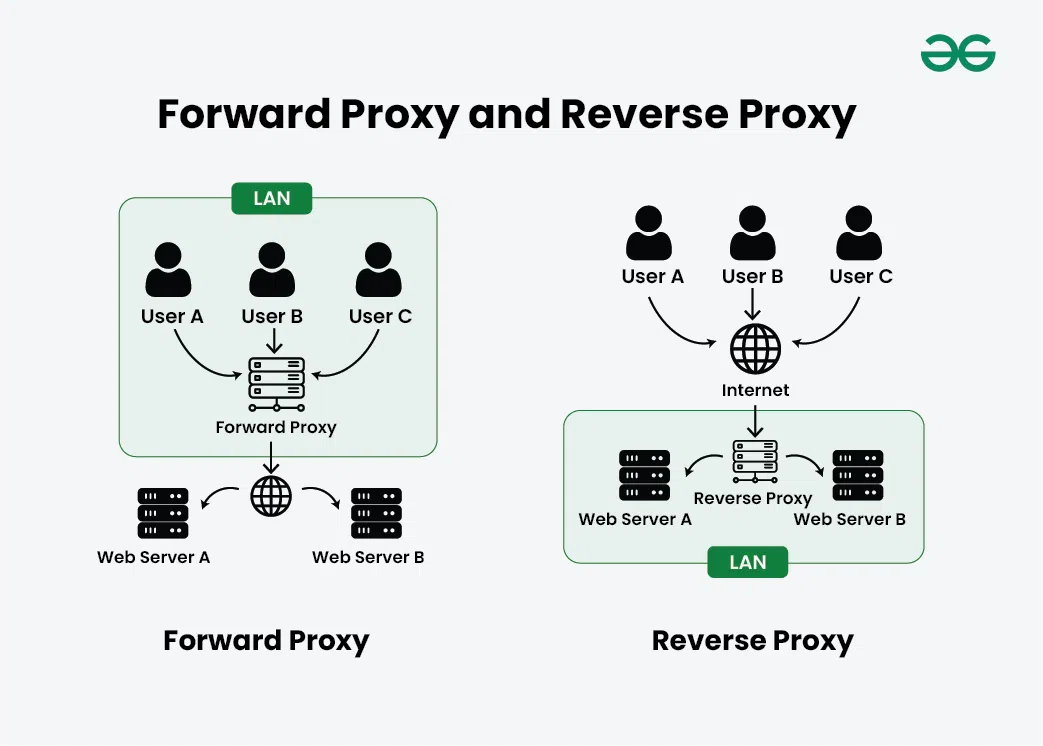
A server that serves as an intermediary between your computer or other device and the internet is known as a forward proxy. Your request passes through the forward proxy before reaching the website when you attempt to view it. On your behalf, the proxy then submits the request to the website, receives the response, and sends it back to you.
Example: Used in corporate networks to restrict employee internet access
When to use
IP Masking: To hide the client’s IP address from the server
Traffic Management: Handles requests from multiple clients through a single proxy
Content Filtering: Blocks access to specific websites or content
2. Reverse Proxy
A reverse proxy is a server that sits between clients (like web browsers) and another server, handling requests on behalf of that server. Instead of a client connecting directly to the main server, the reverse proxy intercepts requests and forwards them to the server.
Example: Used by companies like Netflix or Amazon to handle millions of user requests via load balancing
When to use
Load balancing: Distributes traffic across multiple servers.
Security: Helps reduce DDoS attacks by hiding backend servers.
Caching: Stores server responses to improve performance.
Common Proxy Tools
Various tools are used to implement proxy servers based on different use cases like caching, load balancing, and security.
Nginx: Acts as a reverse proxy and load balancer
HAProxy: High-performance load balancing proxy
Squid: Forward proxy mainly used for caching and filtering
Varnish: HTTP caching proxy used to speed up web applications
Use in System Design
Proxy servers are widely used in modern architectures to improve performance, security, and scalability.
Used in API Gateways to route and manage requests (reverse proxy behavior)
Used in CDNs to deliver content from edge servers
Used in Microservices Architecture for routing, security, and communication
Used in Enterprise Networks for monitoring, filtering, and access control
Proxy Server Implementation Strategy
Proxy server implementation involves designing and configuring proxies to improve performance, security, and scalability of a system.
Reverse Proxy vs Forward Proxy: Reverse proxies handle requests on behalf of servers (used for load balancing, security), while forward proxies act on behalf of clients (used for anonymity, access control).
Proxy Server Software: Choose suitable tools like Nginx, Apache, HAProxy, Squid, or Varnish based on performance, scalability, and compatibility with your system.
Deployment Architecture: Decide between centralized (single proxy) or distributed (multiple proxies) architecture for better performance and fault tolerance.
Load Balancing: Distribute incoming traffic across multiple servers to avoid overload and ensure high availability.
Authentication & Authorization: Implement access control using methods like Basic Auth, LDAP, or token-based authentication to restrict usage.
Security Measures: Use SSL/TLS encryption, firewalls, and ACLs to protect against unauthorized access and attacks.
Caching & Content Filtering: Cache frequently accessed data to reduce latency and filter unwanted or harmful content based on policies.
Logging & Monitoring: Track requests, errors, and performance metrics to ensure system health and troubleshoot issues.
Scalability & High Availability: Use clustering, replication, and failover techniques to handle increased traffic and avoid downtime.
Advantages
The advantages of proxy servers are as follow:
Enhanced Security: Proxies act as a barrier between client and the internet, filtering out malicious content and imparting an extra layer of defense towards cyber threats.
Improved Performance: Caching mechanisms in proxies boost up content delivery by means of storing regularly accessed data locally, reducing the need to fetch resources from the origin server.
Load Balancing: Reverse proxies distribute incoming visitors across a couple of servers, optimizing resource usage, and ensure high availability.
Disadvantages
The disadvantages of proxy servers are as follow:
Latency: Introducing a proxy can add latency to the communication between user and servers, impacting the reaction time, in particular for real-time application.
Configuration Complexity: Setting up and handling proxy servers may be complicated, requiring knowledge of networking and security to make certain proper configuration and to increase overall performance.
Forward Proxy Vs Reverse Proxy
These two types of proxies differ based on whether they act on behalf of the client or the server and how they handle request flow.
Forward Proxy
Reverse Proxy
Acts on behalf of the client
Acts on behalf of the server
Client is aware and configures it
Client is usually unaware
Used for anonymity, access control, and filtering
Used for load balancing, security, and performance
Caches internet data to improve client access speed