Observer Design Pattern is a behavioral pattern that creates a one-to-many relationship between a subject and its observers. When the subject's state changes, all dependent observers are notified and updated automatically, ensuring synchronized communication.
Enables automatic updates to multiple objects when one object changes, useful for event-driven or publish-subscribe systems.
Promotes loose coupling between the subject and its observers, improving flexibility and maintainability.
Example: A YouTube channel (Subject) notifies all its subscribers (Observers) whenever a new video is uploaded.
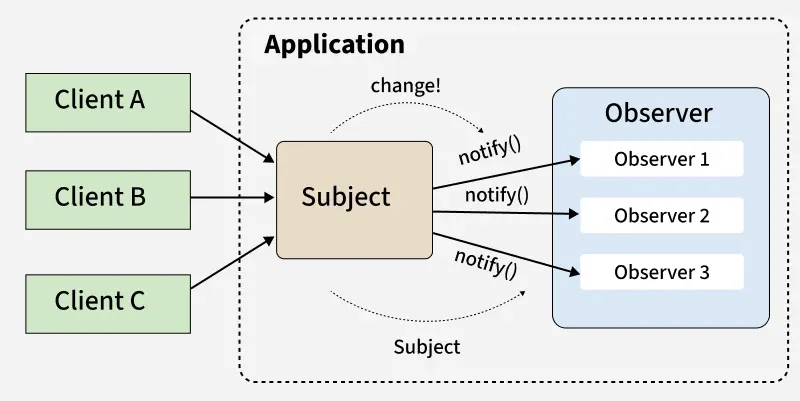
Clients (A, B, C) interact with the Subject, and when its state changes, it triggers a notification.
The Subject sends notify() updates to all registered Observers (Observer 1, 2, 3).
Observers automatically receive updates and react, without the Subject knowing their specific details (loose coupling).
Note: Subjects are the objects that maintain and notify observers about changes in their state, while Observers are the entities that react to those changes.
Real-Life Applications
The Observer pattern is widely used in applications where changes in one object need to be automatically reflected in multiple others:
Social Media Notifications: Users (observers) receive updates when someone they follow (subject) posts new content.
Stock Market Apps: Investors get real-time updates when stock prices (subjects) change.
Event Listeners in GUIs: UI components respond to user actions like clicks or keyboard input.
Weather Monitoring Systems: Multiple displays update automatically when central weather data changes.
Components
The main components of Observer Design Pattern are:
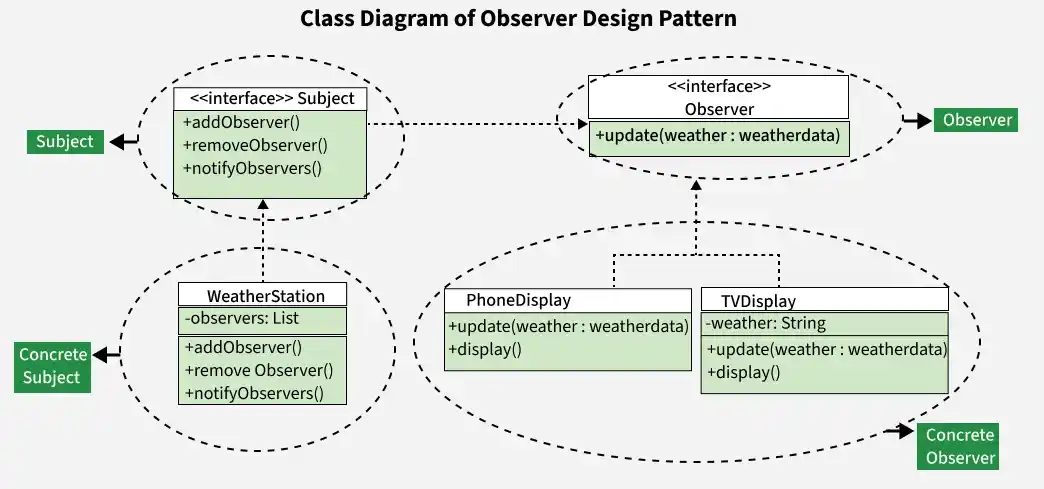
Subject: Maintains a list of observers, provides methods to add/remove them, and notifies them of state changes.
Observer: Defines an interface with an update() method to ensure all observers receive updates consistently.
ConcreteSubject: A specific subject that holds actual data. On state change, it notifies registered observers (e.g., a weather station).
ConcreteObserver: Implements the observer interface and reacts to subject updates (e.g., a weather app showing weather updates).
Working
The Observer Pattern works by establishing a subscription mechanism between a subject and its observers so that changes in one object are automatically reflected in others.
Observers subscribe to the subject to receive updates.
The subject maintains a list of registered observers.
When the subject’s state changes, it notifies all observers.
Observers react to the update according to their own behavior.
Uses
The Observer Pattern is used when multiple objects need to be notified automatically about changes in another object’s state.
To implement event handling systems such as GUI listeners.
To maintain consistency between related objects without tight coupling.
To support publish–subscribe mechanisms.
Implementation Example
Problem statement
Imagine a weather monitoring system where multiple display devices like phone and TV need to show updated weather information. Whenever the weather changes, all devices should receive updates automatically without being tightly connected to the weather system.
The Observer pattern solves this by allowing devices (observers) to register with a WeatherStation (subject). When the weather changes using setWeather(), it notifies all observers, and they update their display accordingly.
1. Subject
The "Subject" interface outlines the operations a subject (like "WeatherStation") should support.
"addObserver" and "removeObserver" are for managing the list of observers.
"notifyObservers" is for informing observers about changes.
2. Observer
The "Observer" interface defines a contract for objects that want to be notified about changes in the subject ("WeatherStation" in this case).
It includes a method "update"that concrete observers must implement to receive and handle updates.
3. ConcreteSubject(WeatherStation)
"WeatherStation" is the concrete subject implementing the "Subject" interface.
It maintains a list of observers ("observers") and provides methods to manage this list.
"notifyObservers" iterates through the observers and calls their "update" method, passing the current weather.
"setWeather" method updates the weather and notifies observers of the change.
4. ConcreteObserver(PhoneDisplay)
"PhoneDisplay" is a concrete observer implementing the "Observer" interface.
It has a private field weather to store the latest weather.
The "update" method sets the new weather and calls the "display" method.
"display" prints the updated weather to the console.
5. ConcreteObserver(TVDisplay)
"TVDisplay" is another concrete observer similar to "PhoneDisplay".
It also implements the "Observer" interface, with a similar structure to "PhoneDisplay".
6. Usage
In "WeatherApp", a "WeatherStation" is created.
Two observers ("PhoneDisplay" and "TVDisplay") are registered with the weather station using "addObserver".
The "setWeather" method simulates a weather change to "Sunny," triggering the "update" method in both observers.
The output shows how both concrete observers display the updated weather information.