Protocol Buffers (protobuf) streamline data serialization with a compact, efficient binary format. In this article, we will explore its role in optimizing system design, enhancing performance, and enabling seamless data exchange across diverse platforms and languages.
Protocol Buffers (protobuf) is a method for serializing structured data, developed by Google. They provide a language-neutral, platform-neutral, and extensible mechanism for efficiently serializing structured data. Here are the key aspects of Protocol Buffers:
Schema Definition:
Data structures in Protocol Buffers are defined in a schema file (.proto file) using a simple language-independent interface definition language (IDL).
This schema defines the structure and data types of the information being serialized.
Serialization Format:
Protocol Buffers serialize data into a binary format.
This binary format is compact, efficient for transmission over networks, and faster to serialize and deserialize compared to text-based formats like XML or JSON.
Language Support:
Protocol Buffers are supported across multiple programming languages, including C++, Java, Python, Go, and many others.
Google provides compiler tools (protobuf compiler) that generate data access classes and serialization/deserialization code in these languages based on the .proto schema file.
Backward and Forward Compatibility:
Protocol Buffers support backward and forward compatibility. New fields can be added to the schema without breaking existing clients or servers that may still be using older versions of the schema.
This makes it easier to evolve data formats over time in large-scale systems.
Usage Scenarios:
Protocol Buffers are commonly used in scenarios where efficient serialization, transmission, and storage of structured data are critical.
This includes network communication protocols (such as gRPC, which uses protobuf by default), storing data in databases, and designing APIs that need to handle large amounts of data efficiently.
Key Features of Protocol Buffers
Below are the key features of protocol buffers:
Efficiency : Protocol messages are serialized into a binary format, making them compact and faster to parse compared to text-based formats.
Cross - Platform: Protobuf messages are sent across network protocols such as REST and RPCs and supports multiple programming languages like C++, Python, Go , Java and, more.
Schema - Driven : Protocol Buffer requires a schema definition (a .proto file) that describes the structure of the data.
How Protocol Buffers Work?
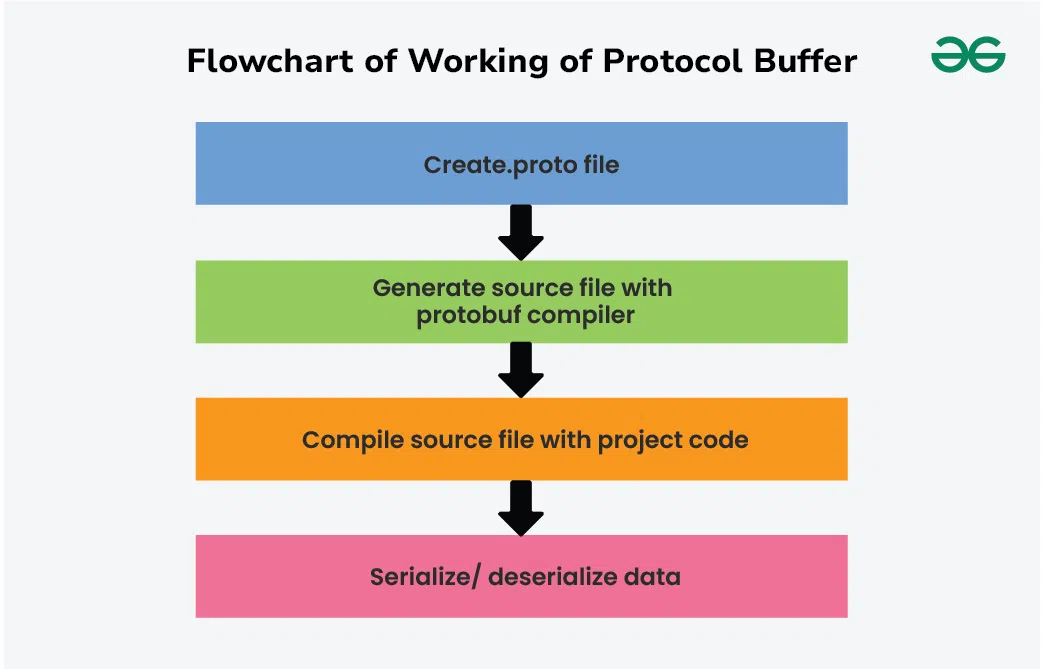
Protocol Buffers (protobuf) work by defining a schema for your data using a .proto file, which specifies the structure and types of the data you want to serialize. Here's a step-by-step overview of how Protocol Buffers work:
1. Define a .proto File
Schema Definition: Create a .proto file that defines your data structures using Protocol Buffers' Interface Definition Language (IDL).
Message Types: Define message types (similar to classes or structs in programming languages) that represent your data objects. Each message type can contain fields of various types (e.g., integer, string, nested messages, enums).
Options and Imports: Specify options and imports if needed, such as specifying package names, importing other .proto files, or setting options for code generation.
2. Compile the .proto File
Use Protobuf Compiler: Use the protobuf compiler (protoc) to generate code in your desired programming language (e.g., C++, Java, Python).
Generated Code: The compiler generates classes or structs in the target language that correspond to your message types defined in the .proto file. These generated classes handle serialization and deserialization of your data.
3. Serialize Data
Create Instances: In your application code, create instances of the generated classes (messages).
Set Data: Populate the fields of these instances with your data.
Serialize: Use the generated methods to serialize the data into a binary format. This involves encoding the data according to the schema defined in the .proto file.
4. Deserialize Data
Receive Serialized Data: When receiving data (e.g., over a network or from storage), you get the serialized bytes.
Parse: Use the generated methods to parse the serialized data back into an instance of the generated class.
Access Data: Access the fields of the deserialized instance to work with the data in your application.
Using Protocol Buffers (protobuf) in system architecture involves integrating them into various layers and components of your distributed system. Here’s a structured approach on how to effectively use protobuf in system architecture:
1. Define Protobuf Messages
Start by defining your data structures using Protocol Buffers' IDL (Interface Definition Language) in a .proto file. This file specifies the schema for your data, including message types, fields, and optionally enums and services.
2. Compile .proto Files
Use the protoc compiler to generate code in your desired programming languages (e.g., Python, Java, C++) from the .proto file(s). This step creates language-specific classes or structs that handle serialization and deserialization of your data.
3. Integration into System Components
Integrate Protocol Buffers into different parts of your system architecture:
a. Communication Protocols (e.g., gRPC)
Define Services: Use Protocol Buffers to define RPC (Remote Procedure Call) service interfaces.Example .proto File with Service:
Implement Services: Implement these services in your server-side code using the generated protobuf classes.
Client Integration: Use the generated client stubs in your client applications to communicate with the server.
b. Data Storage
Serialization: Serialize data using Protocol Buffers before storing it in databases or caches.Example (Python):
Deserialization: Deserialize data when retrieving it from storage.
Example (Python):
c. Inter-Service Communication
Message Passing: Use protobuf messages for inter-service communication in a microservices architecture.
Example (Python using gRPC):
Benefits of Protocol Buffer in System Architecture
Below are some benefits of protocol buffer in system architecture:
Efficiency: Protocol Buffers offer efficient serialization and deserialization, which is crucial for reducing network bandwidth usage and improving performance.
Compatibility: Supports backward and forward compatibility, allowing systems to evolve without breaking existing clients or services.
Language Neutrality: Allows interoperability between services written in different programming languages.
Structured Data: Facilitates clear and structured data definitions, reducing ambiguity and improving maintainability.
Performance: Provides faster serialization and deserialization compared to text-based formats like JSON or XML.
Performance Optimization in Protocol Buffers
Performance optimization in Protocol Buffers (protobuf) primarily focuses on improving serialization and deserialization efficiency. Here are key strategies for optimizing performance:
Use proto3 Syntax
Efficient Encoding: proto3 syntax in Protocol Buffers is optimized for simplicity, performance, and backward compatibility. It uses a more efficient encoding scheme compared to proto2, reducing message size and improving serialization/deserialization speed.
Field Ordering and Tagging
Tagging Efficiency: Protocol Buffers assign unique tags to each field in a message. Optimize performance by grouping frequently accessed fields together and assigning lower tags to these fields. This reduces overhead during serialization and deserialization.
Avoid Nested Structures
Flatten Messages: Minimize nested structures within messages, as each level of nesting adds overhead to serialization and deserialization. Instead, flatten messages where possible to reduce processing time and message size.
Reuse Objects and Pools
Object Pools: Reuse instances of Protocol Buffer objects to avoid frequent memory allocation and deallocation overhead. Object pooling strategies can improve performance, especially in high-throughput scenarios.
Batch Operations
Batch Serialization: When feasible, batch multiple Protocol Buffer messages together for serialization. This reduces the overhead of repeated serialization/deserialization operations and improves overall throughput.
Advanced Features of Protocol Buffers
Below are some advanced features of protocol buffers:
Nested Messages: Messages can contain other messages.
Repeated Fields: Fields can be repeated to create lists.
Enums: Enumerations can be defined within messages.
Default Values: Fields can have default values.
Language Support: Generates code for multiple languages like C++, Java, Python, Go, etc.
Use Cases of Protocol Buffers
Network Communications: Efficient data interchange in distributed systems and microservices.
Data Storage: Compact storage of structured data.
Configuration Files: Structured configuration with schema validation.
By providing a robust, efficient and extensible framework for data serialization, Protocol buffers are widely used in modern development.