The prototype pattern is a creational design pattern which is required when object creation is a time-consuming, and costly operation, so we create objects with the existing object itself to by copying the existing ones.
The cloned object can modify only the required properties, avoiding unnecessary changes to the original object.
This approach saves time and system resources, especially when object creation is expensive or complex.
The clone() method is a simple way to implement this pattern, but the cloning logic depends on the specific business requirements.
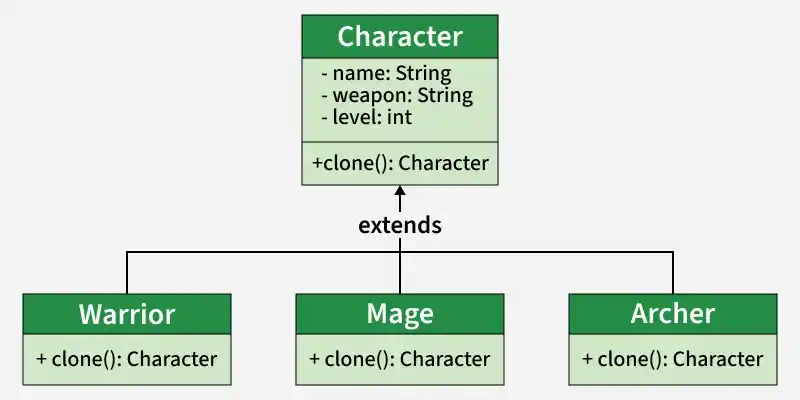
Example: Consider a Game Character System where creating a character involves loading graphics, skills, and configurations.
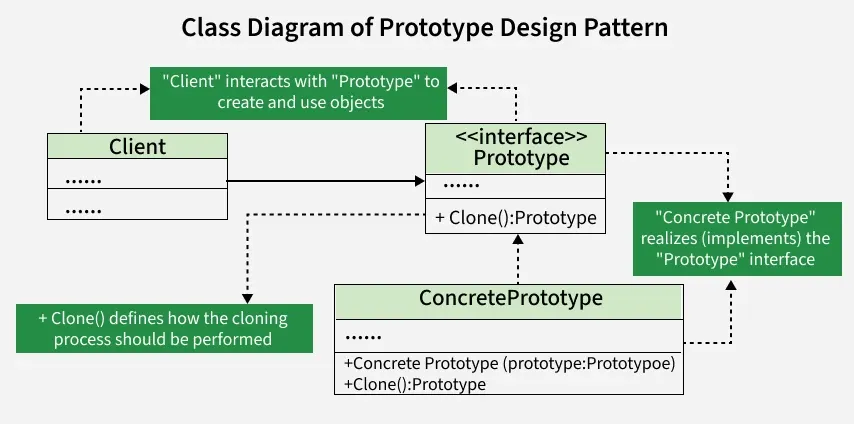
Prototype Interface / Abstract Class: Defines the clone() method and sets a standard for all objects that can be cloned.
Concrete Prototype: Implements the prototype interface or extends the abstract class to provide actual cloning behavior.
Client: Uses the prototype to create new objects by calling the clone() method.
Clone Method: Specifies how an object is copied and is implemented by concrete prototypes.
Features
The Prototype pattern enables efficient object creation through duplication.
Reduces the need for expensive object initialization
Uses a clone() method to duplicate objects
Allows modification of selected properties after cloning
Uses
The Prototype pattern is useful when object creation is costly or complex.
When object creation is time-consuming or resource-intensive
When many similar objects are required with slight variations
When object initialization involves database calls or heavy computations
Implementation Example
Understand how prototype design pattern work with the help of an example:
Imagine you're working on a drawing application, and you need to create and manipulate various shapes. Each shape might have different attributes like color or size. Creating a new shape class for every variation becomes tedious. Also, dynamically adding or removing shapes during runtime can be challenging.
Solving this problem with the help of Prototype Design Pattern:
The Prototype Design Pattern helps in managing variations of shapes efficiently, promoting flexibility in shape creation, and simplifying the process of adding or removing shapes at runtime.
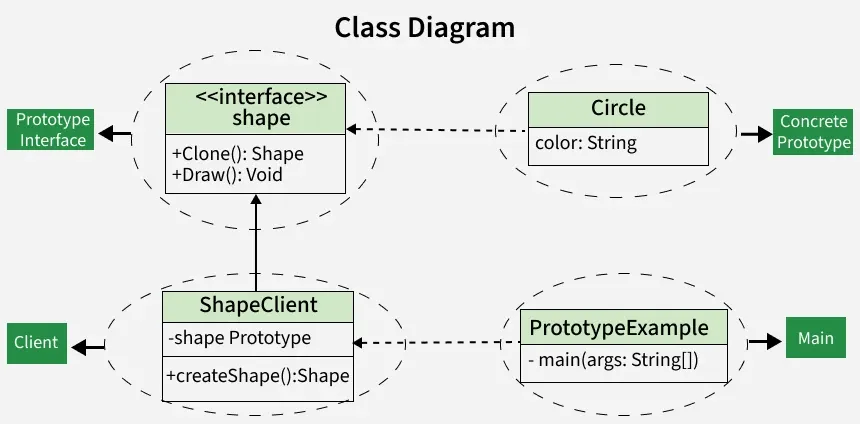
The Prototype Design Pattern addresses this by introducing a prototype interface (Shape) that declares common methods for cloning and drawing shapes.
Concrete prototypes like Circle implement this interface, providing their unique cloning logic.
The ShapeClient acts as a user, utilizing the prototype to create new shapes.