System Analysis and Design Interview Topics for Freshers
Last Updated : 23 Jul, 2025
System Analysis is the "what" before the "how" in system design. It provides the essential roadmap for crafting a system that is both effective and efficient in solving the intended problem. "Imagine you're building a dream house. You wouldn't start hammering nails without a detailed blueprint, right?"The same goes for software development."
System analysis is the blueprint, while system design translates it into the actual system.
Important Topics for System Analysis and Design Guide
Information systems are integral to system design, shaping the architecture, data management, user interaction, and development process.
By carefully considering the role of IS, system designers can create systems that are robust, user-friendly, and meet the needs of their intended users.
System Analysis - This involves studying the requirements of either the existing system or a new system in order to design an effective system.
System Design - Involves the process of creating a well-structured system with careful consideration of objectives and requirements.
Approaches to Development
Attempts to make system development less of an art and more of a science usually referred to as engineering techniques, are applied to system development. Techniques are:
Prototyping - Designing and building a scaled-down but fundamental version of a desired system is known as prototyping.
Joint Application Design(JAD) - Users, managers, and system developers are brought together for a series of intensive structured meetings run by a JAD session leader.
Participatory Design(PD) - Each user has an equal share in determining system requirements and in approving system design
6. System Analyst
A System Analyst is an individual responsible for analyzing requirements and designing information systems.
Role of a System Analyst
Change Agent - Introduce changes to the user organization.
Investigator and Monitor - Investigate the existing system to find the reasons for its failure and also monitor programs about time, cost and quality.
Architect - Creates a detailed physical design of candidate systems.
Psychologist - Interprets user thoughts, and assesses their behaviour to find facts about the system.
Motivator - Effective user training and proper motivation to use the system.
Intermediary - Diplomacy in dealing with people for acceptance of the system.
Duties of a System Analyst
Defining Requirements -Understand the user's requirements.
Prioritising Requirements by Consensus - Meeting with all other users and arriving at a consensus.
Analysis - Analyses the working of the current system
Solving Problems - Identify alternative solutions and select the best solution for a particular problem.
Drawing up Functional Specifications - Precise and detailed specifications so it can be used by system implementers.
Designing Systems - After specifications are accepted, the analyst designs the system
Evaluating System - Evaluate a system after it has been in use for a reasonable time.
Qualifications of a System Analyst
Analytical Skills - Includes system study, organizational knowledge, problem identification, problem analysis and problem solving.
Technical Skills - Includes knowledge of Programming languages, OS, DBMS, different type of computer
it is a set of complete and precisely stated properties along with the constraints of the system that the software must satisfy.
Characacteristics of a SRS
Unambiguous - Every requirement stated has only one interpretation.
Complete - It should include all functions and constraints intended by the system user.
Realistic& Achievable - The requirements should be realistic and achievable with current technology.
Verifiable&Consistent - No requirement should conflict with any other requirement.
Modifiable - Any necessary changes to requirements can be made easily.
Traceable - The origin of each requirement must be clear.
Useful - The SRS must address the needs of the operation and maintenance phase.
Structure or Outine of a SRS Document:
Introduction - Includes its purpose, scope, and objectives.
Informative description about the system - Includes Information flow representation, Description of sub-systems and System Interface, and the problems it aims to solve.
Functional Description of the system -Includes Restrictions, limitations, Performance, Design constraints, and software diagram.
Test and validation criteria - Includes Performance limitations, and expected software response.
Glossary - Definition of all technical or software-specific terms used in the document.
Bibliography - Reference of all documents related to the software.
System Design Specification or Software Design Specification
it gives a complete understanding of the details of each component of the system, and its associated algorithms, etc.
10. Fact Finding Techniques or Information Gathering Techniques
Techniques used for collecting data related to the existing system to learn the function of the existing system. Various fact-finding techniques are:
Interview - This important fact-finding technique, where the system analysts gather information from individuals through face-to-face interaction.
Group Discussions - A group of staff members are invited by system analysts from different wings for discussion.
Site Visits - The system analysts visit sites to get information on the working of the system.
Presentations - The customer makes a presentation of the existing system or about the organisation.
Questionnaires - Special purpose documents that allow the analyst to collect information and opinions.
Interviews
The steps involved in the interview are Introduction, Asking Questions, Recording the interview, and Doing a final check. There are two types of interviews:
Structured - There is a specific set of questions to be asked to an interviewee.
Unstructured - No specific set of questions only a general goal or subject in mind.
Advantages of Interviews
Get individual's views
Better clarity of the problem
The interviewee responds freely and openly
Disadvantages of Interviews
Very time consuming
Depends on the system analyst's interpersonal skills
May be impractical due to the location
Feasibility Study
Consists of activities which determine the existence of the scope of developing an information system for the organisation. There are different feasibility study like
Technical Feasibility - Concerned with hardware, software and expertise required for the development of the system.
Operational Feasibility - All about problems that may arise during operations like useful information, response time, Accuracy, Security, and Efficiency.
Economical Feasibility - Judging whether the possible benefits of solving the problem is worthwhile or not.
Legal Feasibility - Consideration of copyright law, labour law, antitrust legislation, regulation, etc.
Cost Benefit Analysis
It involves analysing the costs associated with implementing and operating a system against the expected benefits it will bring. Different costs are
Cost of human resources - Salaries of system analysts, software engineers, programmers, data entry operators, and clerical staff.
Cost of Infrastructure - Includes computers, cables, software, etc.
Cost of training - The developing and operating staff need to be trained for new technologies and systems.
11. Modular and Structured Design
Design - it bridges the gap between specifications and coding. Some of the properties of design are Verifiability, Traceability, Completeness, Consistency, Efficiency, and Simplicity.
Design Principles
These principles are meant to effectively handle the complexity of design.
These principles are:
Problem Partitioning - The system is divided into modules that are self-dependent.
Abstraction - Designing the outer view of the component without worrying about the details of implementation.
Top Down Design - Decomposing major components into their subordinate level components and interacting until the desired level of detail is achieved.
Bottom-Up Design - Process of combining modules to provide larger ones, to compile these to provide event larger ones and so till we arrive at one big module. This approach is more suitable as it starts from some existing modules.
Structure Chart - it depicts the division of a system into programs along with their internal structure.
Modularity - it means decomposing a system into smaller components (modules) that can be coded separately.
Guidelines for good design are:
Factoring - A system should be divided into as many relatively independent modules as possible.
A superordinate module should control not more than seven subordinates.
Coupling - The dependency levels between modules should be minimal.
Cohesion - A module should not perform more than one function.
Coupling
The communication between modules should be through parameters. Boolean variables or flags can be used for communication. There are five types of coupling:
Data Coupling: Data is passed through parameters for communication.
Stamp Coupling: Data structure is passed through parameters for communication.
Control Coupling: Control information is passed through parameters for communication.
Common Coupling: Global data areas used by the multiple modules.
Content Coupling: One module can access the data inside another module and alter it. The same goes for the code of the moduls.
Cohesion
A module conforms itself to the performance of a single task.
There are seven types of cohesion. They are:
Functional Cohesion: If every instruction in the module is related to a single task.
Sequential Cohesio: All instructions in the module are related to each other the data that is passed to the module and sequence of the instruction matters.
Communicational Cohesion: All instructions in the module are related to each other the data that is passed to the module and the sequence of the instruction doesn’t matter.
Procedural Cohesion: Instructions are related to each other by the control flow.
Temporal Cohesion: All instructions are related to each other by only the flow of control and are unrelated to their sequence.
Logical Cohesion: The relation between instructions in the module is zero or bare minimum.
Coincidental Cohesion: There is no relationship between instructions in the module.
12. Form Design
Forms are used for collecting data from users. Form design refers to the process of creating intuitive and user-friendly forms.
The common GUI controls used in forms for inputs include:
Text Box:Allows for single or multiple lines of characters.
Radio Button: Helps quickly identify and select a particular value.
Check Box: Provides an option for the Yes/On value.
List Box: Requires the selection of a data item’s value from a list of possible choices.
Dropdown List: Suggests the existence of a hidden list of possible values.
Combination Box: Combines the capabilities of a text box and a list box.
Spin Box: Allows the user to make an input selection using navigation buttons.
Criteria for form design
To create a well-conceived and attractive design form, we have to satisfy the following criteria:
Organisation: Logical arrangement of form elements, Clear and intuitive information structure.
Consistency: Uniformity in design elements, Standardized layout, fonts, and colours.
Completeness: Inclusion of all necessary fields, Avoidance of unnecessary or redundant questions.
Flexible Entry: Accommodation of various input formats, Clear instructions and validation for user guidance.
Economy: Concise form with essential elements, Balanced information collection for user convenience.
13. Report Design
Reports are used for presenting and summarizing data in a structured format. Report design refers to the process of creating clear, organized, and user-friendly layouts for displaying information.
Types of Output for Report Design
Internal Outputs - Intended for the owners of the system and the user within the organization. Examples: Detailed Reports, Summary Reports, etc.
External Outputs - Intended for customers, suppliers, partners and regulatory agencies. Examples: Invoices, Account statements, paycheques, telephone bills, etc.
Criteria for report design
For producing a good report following criteria should be considered:
Relevance: Focuses on information essential to the report's goals.
Accuracy: Ensures that data and facts are reliable and error-free.
Clarity: Uses clear language, concise formatting, and visual aids for effective communication.
Timeliness: Ensures that the information remains current and applicable.
Cost: Balances the quality of the report with the associated costs.
User Interface Design
it involves creating interfaces that facilitate effective communication between users and computer systems. It focuses on making interactions intuitive, efficient, and user-friendly.
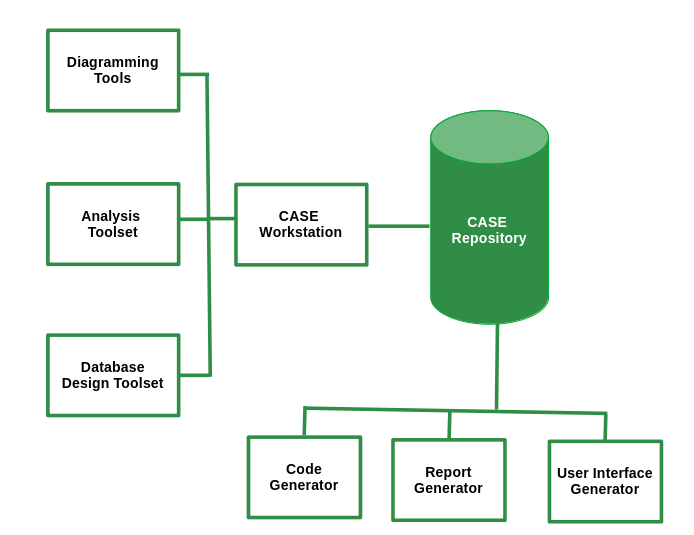
Rational Rose: One of the most widely used CASE tools in the software community.
UML modeling: The Unified Modeling Language is primarily a graphical modeling language used to express designs.
Emerging CASE tools: Integrated CASE (I-CASE).
Object-Oriented CASE tools: Paradigm Plus from Protosoft, Rational Rose from Rational, and WithClass
16. Implementation of Systems
It involves coding, testing, creating necessary hardware, and providing training to end-users.
System Testing
A holistic approach to testing the application. Types include Recovery Testing, Security Testing, Stress Testing, Performance Testing, Response Testing, Usability and Documentation Testing.
Alpha Testing: Carried out by the customer at the developer site in a controlled environment.
Beta Testing: Carried out at one or more customer sites by end-users.
Converting Old System to the New System:
Can be performed in several ways depending on system criticality and related issues:
Direct Conversion: Old system is shut down, and the new system starts.
Pilot Conversion: New system is installed at a single pre-decided location.
Parallel Conversion: Old system runs alongside the new system until management and users are satisfied.
Phased Conversion: Different sub-systems of the new system are used in conjunction until the whole new system is converted.
17. Maintenance of Systems
Monitoring, evaluating, and modifying the information system to make necessary desirable changes. Maintenance activity has four key stages:
Help Desk: Initial stage for users to report issues or seek assistance.
Analysis: In-depth examination of reported issues and system performance.
Implementation: Incorporation of enhancements based on analysis findings.
Release: Deployment of the modified information system to users.
Different Maintenance Activities
Corrective Maintenance: Rectifying design, coding, and implementation problems detected after system implementation.
Adaptive Maintenance: Changes in the operation system, hardware, or DBMS.
Perfective Maintenance: Adding new functionalities and features to the software.
Preventive Maintenance: Changes made to software to make it easily maintainable and prevent system failure in the future.
Legacy System: A very old and large system modified heavily since its inception. Solutions include replacing software with a package, re-implementing from scratch, discarding software, freezing maintenance and phasing in a new system, or reverse engineering the legacy system.
18. Audit of Computer Systems
An assessment of an information system to provide recommendations and advice to improve system performance and security. It is done by an IS auditor. Objectives of the audit are:
To improve the quality of the information system.
Prevent failure.
Speed up the process.
Improve cost performance.
Increase efficiency.
Reduce risk and enhance system security.
Standardization.
Responsibility and Authority of the System Auditor:
Should firmly maintain professional ethics.
Should be aware of the ethical demands on themselves.
Should meet internal and external trust by performing an accurate and sincere system audit.
Must maintain confidentiality of the information provided to them.
May demand data and material from the division being audited.
May also demand a report on the implementation of improvements to an audit division as suggested by them.
Factors Audited by IS Auditor:
Audit of response time: Actual response time compared with the desired response time.
Audit of broken links: Findings of broken or unavailable links on the website.
Database Audit: Checking the database integrity and availability.
Network Audit: Checking the vulnerability and configuration of the network.
Transaction Audit: Process to find who made changes, what changes were made, and whether the changes were authorized.
Audit of Computer Security: Reviewing physical and logical security measures.
Audit of Application: Assessment of manual and programmed internal controls of the information system.
Some Important Terms
Visual Audit Pro - A software that audits activities like logging on/off, and collects information about software and hardware.
E-Z Audit -A software that gives information on RAM capacity, network card name, network connect speed, MAC address and TCP/IP information.
IDEA(Interactive Data Extraction and Analysis) - Used to import information from the database to be audited for further analysis by the auditor.
Audit Trail - A log of changes made in data, settings and related changes.
Risk Assessment - Evaluating threats and vulnerabilities of IS. two methods are there for analysing the risks:
Quantitative Risk Analysis - Gives an idea about the amount of risks involved with an event.
Qualitative Risk Analysis - Gives the degree of risk associated with the institution’s system, networks and information assets.
Disaster Recovery Plan
Disaster - Earthquakes, floods, fires and terrorist attacks can severely damage an organisation's computing infrastructure.
Disaster Recovery Plan - A document containing procedures for emergency response, extended backup operations and recovery.
Techniques applied for contingency situations are:
In-house backup - The process of storing data backups within the organization
Alternate Storage Area - Store one copy of all AIS files and databases at an alternative site.
The Disaster Recovery Toolkit - A highly valuable collection of items and documents for ensuring business continuity in disaster.
Contigency Events
Necessary Recovery Action
Loss of Data
Identify the appropriate recovery plan, The location of required recovery files.
Loss of Software
Identify the type of software and location where backup copies are maintained.
Loss of Communication
Identify alternate communication facility, Estimate recovery time.
Loss of hardware
Identify any alternate substitute for the equipment. Estimate replacement cost of hardware.
Loss of Personnel
Identify substitutes for each personnel, if alternates are not available then obtain them from an outside source.
Loss of Facility
Identify all necessary hardware, software, data, and personnel required for normal functioning at the alternative location
Contingency Planning Steps:
Develop the plan.
Test the plan.
Maintain the plan.
19. Viruses
One of the biggest security threats to computer systems can cause irreparable damage to certain systems. Anti-virus measures for protecting against viruses include:
Make a backup of all data.
Use anti-virus software.
Open email attachments with caution.
Regularly update software.
Stay updated about the latest security news.
20. Concurrent Audit
Data is audited while the transaction is in progress. It helps in finding missing audit trails and is also used in monitoring largely integrated and automated systems.
Concurrent Audit Techniques
Integrated Test Facility (ITF) Technique : Auditing software is embedded into the client software.
The Snapshot Technique: Embedded auditing software takes a snapshot before and after the process of critical processing.
System Control Audit Review File (SCARF): Embedded auditing software monitors the system transaction uninterruptedly and stores the collected information in a SCARF master file.
Continuous and Intermittent Simulation techniques (CIS): Used DBMS to trap exceptions.
21. Different Kinds of Information Systems
Management Information System (MIS)
It helps the organization produce information that can aid in improving decision-making, problem-solving, controlling operations, and creating new products or services.Generates semi-structured, ad-hoc reports tailored for strategic management. Examples: Marketing information systems.
Transaction Processing System (TPS)
TPS processes data from business operations, providing essential support for day-to-day operations. Handles routine transactions, employs fixed periodic reporting, and serves operational management needs. Examples: Sales processing systems, and online reservation systems.
Decision Support System (DSS)
DSS utilizes analytical models, specialized databases, and internal data to provide interactive decision support. Offers reports like sensitivity and what-if analyses, catering to individual manager's decision-making needs. Example: Geographic Information System (e.g., IBM's Geo-Manager).
Expert System
Expert Systems apply knowledge from a specific field, delivering expert advice within a defined domain. Provides human-like expert advice; sought by managers seeking specialized knowledge. Example: Medical diagnostic expert systems (e.g., MYCIN).
If you are a beginner and want to learn about system design then you can refer to System Design Tutorial.