System Design of Youtube - A Complete Architecture
Last Updated : 7 Nov, 2025
Youtube is one of the most popular and extensible video streaming services and the architecture contains various components that enhance user experience. When it comes down to Youtube services, it is been that commonly used in the daily world with tremendous users so the system design corresponding is likely a bit complex.
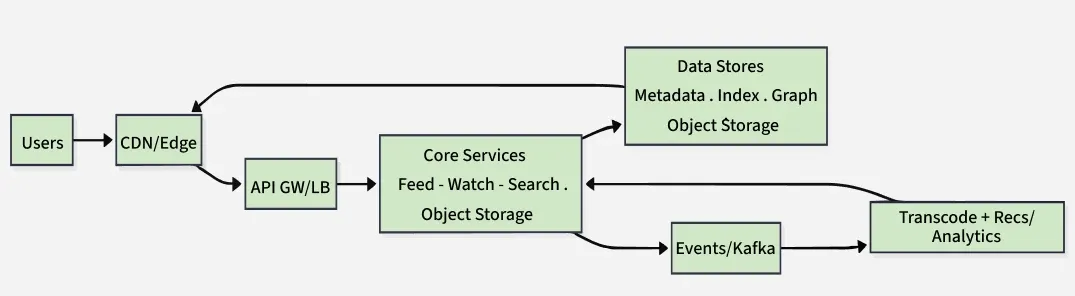
Here’s how data flows end-to-end, from user action to backend and back:
You open YouTube: your app hits a nearby CDN/Edge server (fast, cached stuff like thumbnails/video chunks).
Anything dynamic (feed, search, watch page) goes through the API Gateway/Load Balancer, which routes the request to the right service.
Core services (Feed, Watch, Search, Upload, Auth) fetch/store info in databases and indexes (video metadata, search index, social graph) and store actual video files in object storage.
When you watch or upload, events are pushed to Kafka so background systems can transcode videos (create all resolutions) and run recommendations/analytics.
Processed videos are served from object storage via the CDN for speed, while pages keep using services and data stores for fresh info.
Functional Requirements of YouTube System Design:
User Registration and Authentication
Video Uploading, Processing, and Sharing
Video Streaming
Comments and Interaction
Search Functionality
Home Page and Recommendations
Channel Management
Subscriptions and Notifications
Playlists and Watch Later
Likes, Dislikes, and Engagement Metrics
Live Streaming (optional advanced feature)
Analytics for Creators
Content Moderation and Reporting
Non-functional Requirements of YouTube System Design:
NoSQL (Cassandra, DynamoDB, MongoDB): Comments, notifications, video events.
Analytics Infrastructure:
Use Kafka for event streaming.
Spark/Beam/BigQuery for batch and stream processing.
Store historical data in data lakes like S3 or HDFS.
13. APIs & Third-Party Integrations
YouTube-style API:
Support for RESTful endpoints to query videos, search, channels, analytics.
Authenticated via OAuth 2.0.
Webhooks:
For video uploads, new comments, or subscriber updates.
External Integrations:
Embed videos via iFrames.
Share links on social media platforms, blogs, or email.
These are only a few of the significant components and variables that affect YouTube design. For the actual implementation details, a more thorough investigation and architectural decisions based on the scale and requirements of the platform would be necessary.
Low-level Design (LLD) of YouTube:
There are many low-level design factors that must be taken into account when creating the architecture for a system like YouTube. Low-Level Design (LLD) focuses on the detailed implementation aspects of the system. The goal is to define how the individual components interact, the data structures used, class structures, and API designs. Below are the key elements:
User Class: Represents a user in the system with attributes like user_id, username, email, password_hash, subscriptions, history, and preferences. Methods include upload_video(), like_video(), subscribe_to_channel(), create_playlist().
Video Class: Represents a video with attributes like video_id, user_id, title, description, tags, views_count, upload_timestamp, and metadata. Methods include get_video_info(), increase_views(), add_comment(), transcode_video().
Comment Class: Represents comments on videos. Includes comment_id, user_id, video_id, content, timestamp, and methods like edit_comment() and delete_comment().
Channel Class: Represents a user's channel. Includes attributes like channel_id, user_id, channel_name, subscribers_count, and methods like add_video(), remove_video(), get_channel_info().
Playlist Class: Manages video playlists, with attributes like playlist_id, user_id, video_list, and methods like add_video_to_playlist() and remove_video_from_playlist().
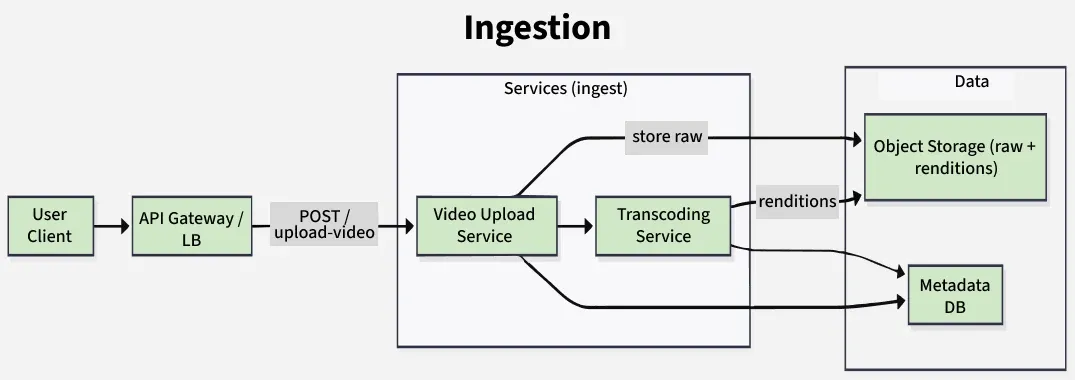
Components: The upload service interacts with the Video Storage Service and the Transcoding Service. After a video is uploaded, it is stored as raw content in object storage (e.g., AWS S3). The transcoding service then processes the video to different formats and resolutions.
API: The API for the video upload service might include POST /upload-video to accept video files and metadata.
Video Streaming Service
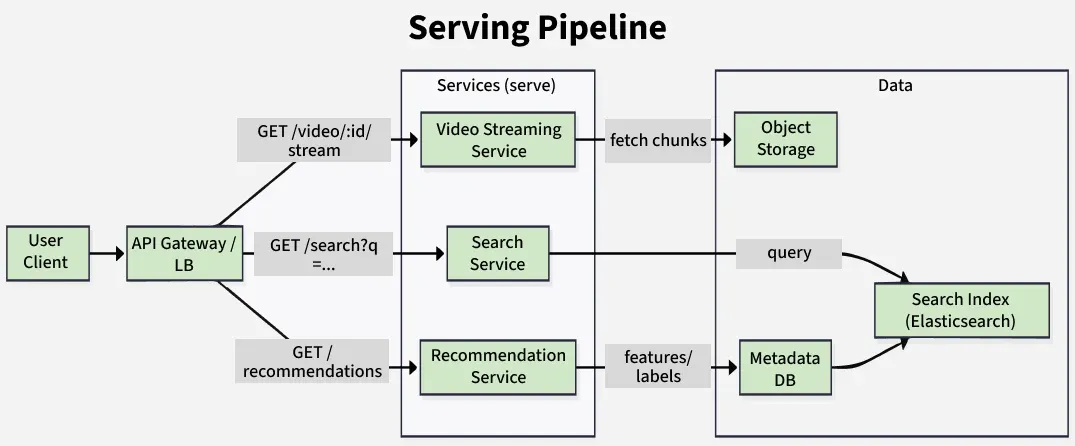
Components: After the video is transcoded, the video streaming service is responsible for serving the video to users. It fetches the video from the distributed storage system and streams it based on user device capabilities.
API: GET /video/{video_id}/stream to fetch video chunks for streaming.
Recommendation Service
Components: The recommendation engine uses Machine Learning algorithms that analyze user behavior, video history, and metadata to suggest relevant videos.
API: GET /recommendations to fetch personalized video recommendations for a user based on their interaction history.
Search Service
Components: This service allows users to search for videos, channels, and playlists using keywords. It indexes video metadata and uses full-text search engines (like Elasticsearch) to deliver fast search results.
API: GET /search?q={query} to search for videos.
3. Data Models
Video Metadata: Includes the video's title, description, upload time, tags, and thumbnail. Stored in a database with relationships to other entities like users, comments, and playlists.
User Data: Includes a user's preferences, history, and interactions. Stored in a relational or NoSQL database to manage user behavior over time.
Comment Data: Stores the comment's text, user information, timestamp, and video association.
Subscription Data: Represents a relationship between users and channels. A user can subscribe to multiple channels, and a channel can have many subscribers.
Playlist Data: Stores playlist information and video associations, ensuring that videos are organized and accessible in user-created playlists.
4. API Design
User API:
POST /register: For new user registration.
POST /login: To authenticate users.
GET /user/{user_id}: Retrieve user details and preferences.
Video API:
POST /upload-video: For video upload.
GET /video/{video_id}: Fetch metadata about a video.
POST /video/{video_id}/like: Like a video.
POST /video/{video_id}/comment: Add a comment to a video.
Search API:
GET /search: Search for videos based on keywords or metadata.
Recommendation API:
GET /recommendations: Retrieve video recommendations based on user history.
5. Database Schema and Design
To support a large-scale, high-availability video platform like YouTube, use a hybrid database architecture combining Relational Databases for structured, transactional data and NoSQL Databases for high-volume, semi-structured or unstructured data.
Relational Database Schema (SQL)
Used for strong consistency, relationships, and transactional operations.
Service Decomposition: Microservices architecture allows scaling of individual services like video upload, search, and streaming independently.
Distributed Caching: Use of caching layers (e.g., Redis) to store frequently accessed data like video metadata, trending videos, and user preferences for fast access.
Database Sharding: Large databases are split into smaller parts (shards), distributed across multiple machines to handle high volumes of data.
7. Security and Authentication
Authentication: OAuth2 or JWT tokens for secure user authentication.
Authorization: Role-based access control (RBAC) for managing user privileges.
Data Encryption: End-to-end encryption for video data and sensitive user information.
These are only a handful of the essential design components that should be considered while creating the architecture of a video-sharing website like YouTube. The specific implementation methodologies and technologies employed would depend on the system's scale, requirements, and constraints.