|
VOOZH | about |
|
VOOZH | about |
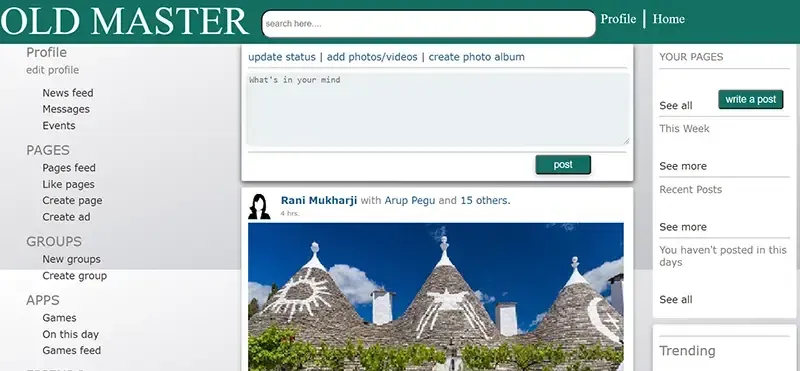
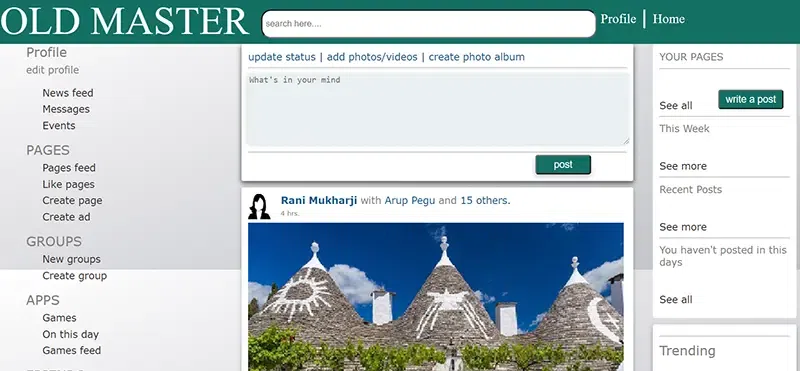
Creating a Facebook Home page is an Innovative way to learn and apply modern web design principles. In this article, we’ll walk you through the process of creating a Facebook-like homepage using only HTML and CSS. This project is perfect for beginners who want hands-on experience in structuring a professional-looking webpage while improving their frontend development skills.
You’ll learn how to set up a basic project, build the foundational HTML layout, and apply CSS styles to bring the interface to life. From fixed navigation bars to side panels and post sections, we’ll create the familiar features of Facebook’s UI, giving you a solid grasp of real-world web design. Whether you're looking to sharpen your coding skills or build an impressive portfolio project, this guide will help you every step of the way.
To start a project, create a folder and add files to it.
In this part, we will recreate the layout of a Facebook homepage using HTML Structure — from the fixed header and interactive sidebar to the post creation area and feed. Each section is thoughtfully structured using <div>containers and semantic tags, making the layout not only visually accurate but also easy to manage and style with CSS.
Below is a Easy example of how you can create structure of the HTML webpage:
file: index.html
Code Overview:
div tags..header1) contains the website name, search box, and profile area..bodyn) presents categorized navigation links like dashboard sections and settings..post00, .post10, .post1) for creating and displaying posts..sidebox, .sideboxxx, .sideboxxx2) provide additional information or widgets, like trending topics or suggestions.p1 to p7) are used throughout to style text content consistently.Now that you’ve set up the HTML structure, it’s time to make your page more attractive. Here’s how you can style it:
file: new.css
Code Overview:
.header1 class creates a fixed top navigation bar with a specific background color and text styling..bodyn and #side1 to #side24) is styled with specific padding, font settings, and hover effects to enhance interactivity.#searcharea, #searchbox, #profilearea, etc.) are positioned precisely within the header..post, .post00, .post10, .post1) are styled using shadows, padding, and rounded corners for better UI presentation..sidebox, .sideboxxx, .sideboxxx2) are added with box shadows and text styling to display supplementary information.#buttonpost, #buttonpost1) and input areas (#postbox, #commentbox) are styled for usability and aesthetic appeal.p1 to p7) are used for various text color and font styling to maintain visual hierarchy across the layout.Output: