|
VOOZH | about |
|
VOOZH | about |
HTML5 semantic elements provide meaningful tags that clearly describe their purpose, improving readability, accessibility, and SEO for both humans and browsers.
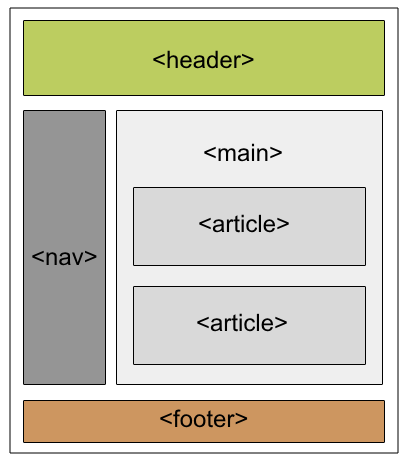
Here are some of the fundamental HTML5 semantic elements that you should use to structure your web content:
The <article> tag is used for content that stands alone and can be independently distributed or reused, such as a blog post or news article.
The <aside> is used to place content in a sidebar i.e. aside from the existing content. It is related to surrounding content.
The "details" defines additional details that the user can hide or view. "summary" defines a visible heading for a "details" element.
The <figure> and <figcaption> tags are used together in HTML to display an image (or illustration) with a descriptive caption.
Output:
👁 figcaptionAs the name suggests, it is for the header of a section introductory of a page. There can be multiple headers on a page.
Footer located at the bottom of any article or document, they can contain contact details, copyright information etc. There can be multiple footers on a page.
It defines the main content of the document. The content inside the main tag should be unique.
A page can be split into sections like Introduction, Contact Information, Details, etc and each of these sections can be in a different section tag.
The nav tag is used to define a set of navigation links in the form of a navigation bar or nav menu.
Mark tag is used to highlight the text.