|
VOOZH | about |
|
VOOZH | about |
HTML text formatting refers to the use of specific HTML tags to modify the appearance and structure of text on a webpage. It allows you to style text in different ways, such as making it bold, italic, underlined, highlighted, or struck-through.
Table of Content
HTML text formatting can be divided into two main categories: Logical Tags and Physical Tags.
Logical tags convey the meaning or importance of the text without necessarily altering its visual appearance. These tags help browsers, search engines, and assistive technologies understand the purpose of the text.
Physical tags directly affect how text looks on the webpage by changing the font, size, or style.
Here’s a list of commonly used HTML text formatting tags and their description:
| Tags | Description |
|---|---|
| <i> | Showcases italicized text. |
| <small> | Renders text in a smaller font size. |
| <ins> | Highlights added or inserted text. |
| <sub> | Creates subscript text. |
| <strong> | Emphasizes text with importance, often in bold. |
| <b> | Displays text in a bold format. |
| <mark> | Accentuates text with a background highlight. |
| <del> | Strikes through text to signify deletion. |
| <em> | Adds emphasis to text, commonly styled as italic. |
| <sup> | Formats text as superscript. |
Use the <i> tag to display text in italics without implying emphasis.
<i>This is italic text.</i>The <small> tag renders text in a smaller font than the surrounding text.
<small>This text is smaller than the rest.</small>The <ins> tag marks text as newly added or inserted, often displayed with an underline.
<ins>This is inserted text.</ins>Use the <sub> tag for subscripted text, often used in chemical formulas or footnotes.
H<sub>2</sub>OThe <strong> tag is semantically meaningful and indicates that the text is of high importance.
<strong>This text is bold and important.</strong>The <b> tag visually makes the text bold but does not imply any special significance.
<b>This is bold text.</b>The <mark> tag highlights text with a background color, similar to using a highlighter on paper.
<mark>This text is highlighted.</mark>The <del> tag is used to show that text has been deleted or is no longer relevant.
<del>This text is crossed out.</del>The <em> tag is used for emphasized text and is usually rendered in italics to highlight importance.
<em>This text is emphasized.</em>Use the <sup> tag to show superscripted text, commonly used in exponents or footnotes.
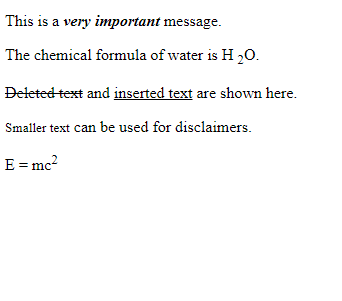
E = mc<sup>2</sup>In this example we demonstrates various text formatting tags: <strong> for important and bold text, <em> for emphasized and italic text, <b> for bold text, <i> for italic text, and <mark> for highlighted text.
Output:
This example shows how logical and physical tags can be combined for enhanced text formatting:
Output: