 |
VOOZH | about |
|
VOOZH | about |
How to Connect My Website to Google My Business- Quick Steps
- Log in to your one.com control panel and go to Website Builder settings.
- If you want, make a listing.
- Connect your listing.
- You're done!
Having your business listed on Google is super important. It helps people find you easily and makes your business look more trustworthy. When your business shows up on Google, it boosts your visibility and credibility, which means more customers can find you online.
In this guide, we’ll walk you through how to add your website to Google Business step by step. Whether you're a small business owner, an entrepreneur, or a digital marketer, this article is perfect for anyone who wants to improve their online presence. Let’s get started and make sure your business is seen by everyone searching on Google!
👁 How-To-Add-My-Website-To-Google-Business
Google Business is a free tool that helps your business show up on Google Search and Maps. It lets you add important details like your address, phone number, hours, and website. People can see your business info, read reviews, and even find directions to your store. This makes it super easy for customers to find you online. Plus, you can update your details anytime, so everything stays current and correct.
Adding your website to Google Business brings lots of benefits. First, it increases your visibility. When people search for services like yours, your business pops up in the results, which means more eyes on your business. It also boosts your local SEO, helping you show up in local searches, which is great for getting nearby customers. Another big plus is customer engagement. People can read reviews, ask questions, and even see photos of your business. This makes your business look more real and trustworthy. So, using Google Business is a smart way to get noticed and grow your business online!
Now, let's get started and see how you can add your business website. It is pretty simple, you should follow the eight steps given below sequentially.
You can go to GMB and sign in by clicking on the button in the top right corner. Your business should be verified to access your business profile.
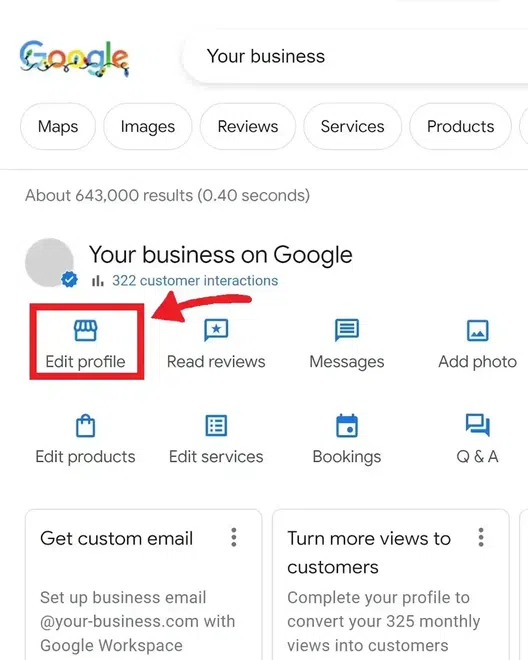
Click on manage profile, you can see the web page, now click on Edit profile.
👁 How To Add My Website To Google Business
A new pop-up that shows all your business information will be displayed on the screen. Click on the contact tab. If your business profile is not verified it will look like below.
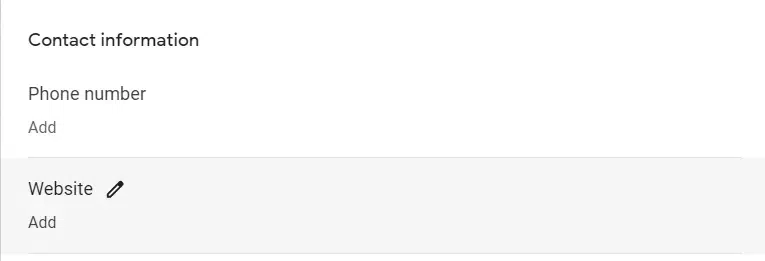
In the contact tab, you can hover over the website field. A pencil icon will appear. Now, click on that icon. When you click on that icon, you will get a text area to input your website URL.
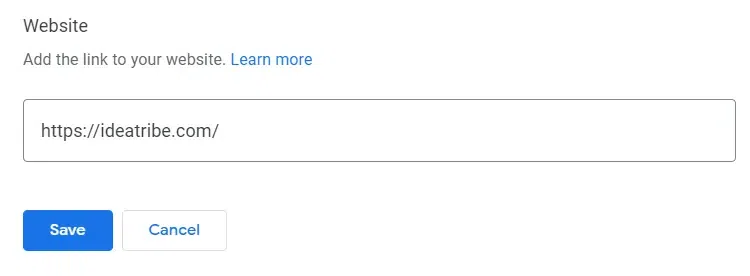
Enter the correct website address in the provided URL field. Click on the blue save button that appears below the URL field. This will successfully save your website to your Google business profile.
You can verify if your details are correct. The website button will appear on your profile and whenever a user searches your business it can also see your website. For example, you see the website button appearing on the below profile.
Getting customer reviews on Google Business can really help your business stand out. Ask happy customers to leave a review by sending them a friendly email or reminding them after a purchase. Good reviews make your business look trustworthy and help more people find you.
Google Business insights are like little reports that show how your business is doing online. You can see how many people found your business, clicked on your website, or called you. Use these insights to track your Google Business performance and see what’s working well. If you notice a drop in visits, it might be time to update your business info or add new photos.
Encouraging reviews and keeping an eye on insights are great ways to keep your business shining on Google!
To add your website to Google Business, start by signing in to your Google account. Then, go to Google Business and click “Manage Now.” Add your business name, address, and website. Verify your business by phone, email, or postcard. It’s that simple! By following these steps, you can get your Google Business listing set up and boost your visibility online.
Adding your website to Google Business is a great way to improve your online presence. Don’t worry if it feels a bit tricky at first—just take it step by step. Remember, the more info you share, the easier it is for customers to find you. So, go ahead, follow these tips, and get your business noticed. Good luck, and don’t forget to update your listing as your business grows!


.webp)
.webp)